
Conditions
Conditions are how you say when a discount applies. You build them in the same card on every discount page: pick a field, pick an operator, type or choose a value.
How it works
Section titled “How it works”A condition is three things read left to right — field · operator · value. For example Cart subtotal · is greater than or equal to · 50.
Conditions live inside a rule group. A group can hold as many conditions as you need.
- The Between conditions: control — once a group holds two or more conditions, it sits between each pair, showing the current join as a badge (AND or OR) with a Switch to OR / Switch to AND button. The choice belongs to the whole group, not to a single pair. AND is the starting value.
- Between groups — once a second group exists, a Rule Group Logic dropdown appears in the card header with Match All Rule Groups and Match Any Rule Group. The pill drawn between the groups shows which one is active.
With no rules at all, the card shows No rules configured and the line “This discount will apply to all qualifying orders.”
Where it is
Section titled “Where it is”The rule builder is the Discount Rules card on Product, Order, Shipping and Price List discounts. The same builder appears with a different heading elsewhere:
- Bundle — inside Customer Eligibility (Discount Rules), customer conditions only, and capped at one rule group.
- Buy X Get Y — twice, once under Customer buys and once under Customer gets. Each of the two needs at least one rule.
The condition rows below — field · operator · value — are shared across the app, but rule groups and Rule Group Logic belong to those six types only: Product, Order, Shipping, Price List, Bundle and Buy X Get Y. The other types arrange their conditions differently:
- Multi-offer — no rule builder. Each offer names the cart items it knows about in Qualifying items groups, each headed “Match [all] of these conditions”, and carries a separate Requirements list. The discount also has one Who can use this discount card for the customer gate.
- Custom Discount — no rule builder. Item conditions live in named groups on the Cart groups card, each offer sets its own requirements under When it applies, and the customer gate is the Who can use this discount card. It adds two fields of its own, Retail location and Company, and does not offer Product tags or Customer orders count.
- Block codes — one flat Conditions card. Conditions are listed one after another with an all/any match choice, and there are no groups.
- Spend More Save More — no builder. It offers a fixed list of six toggles instead: Customer tags, Account status, B2B customers, Past orders, Cart quantity, Cart contents.
- Gift with Purchase — no builder either. Its Conditions card is a fixed list of five toggles: Customer tags, Account status, B2B customers, Past orders, Cart attribute.
- Quantity Break — no conditions card at all.
Settings
Section titled “Settings”Add your first rule / Add rule group
Section titled “Add your first rule / Add rule group”Add your first rule creates RULE GROUP #1 with one empty condition in it. Add rule group adds another group below. Each group has an ✕ in its top-right corner to remove it. On Bundle, which allows a single group, Add rule group is not offered.
Add condition
Section titled “Add condition”Adds another condition inside the same group. The remove control on a condition appears once the group holds more than one.
Rule Group Logic
Section titled “Rule Group Logic”Shown only when two or more groups exist, so it never appears on Bundle. Match All Rule Groups (AND) or Match Any Rule Group (OR).
Between conditions:
Section titled “Between conditions:”The AND/OR badge inside a group, with a button that switches it. It appears once the group holds two or more conditions, and it applies to every condition in that group.
Cart conditions
Section titled “Cart conditions”Available on Product, Order, Shipping, Multi-offer and Block codes rules.
Cart attribute
Section titled “Cart attribute”Custom attributes set on the cart. Operators: is one of, is not one of. Value: one or two key-and-value pairs, both parts required.
How many keys a discount can read depends on its type:
- Block codes: one key and value per condition, and one cart attribute key across all active rules. A save that adds a second key is refused.
- Custom and Multi-offer: product and order offers read one cart attribute key per discount; shipping offers can read two. A condition using another key is refused when you save, with the reason on that condition.
Cart quantity
Section titled “Cart quantity”Total number of items in the cart. Operators: equals, is greater than or equal to, is less than or equal to. Value: a whole number, 1 or more.
Cart subtotal
Section titled “Cart subtotal”Subtotal value of the items in the cart, before discounts. Operators: equals, is greater than or equal to, is less than or equal to. Value: an amount of at least 0.01.
Customer conditions
Section titled “Customer conditions”Available on Product, Order, Shipping, Bundle, Multi-offer and Block codes rules. Price List offers Customer tags only. Bundle has no Customer is B2B.
Customer is B2B
Section titled “Customer is B2B”Whether the customer is a business customer. Operator: equals. Value: True or False.
Customer logged in
Section titled “Customer logged in”Whether the customer is signed in to their account. Operator: equals. Value: True or False.
Customer tags
Section titled “Customer tags”Tags on the customer record. Operators: is one of, is not one of. Value: up to 20 tags, typed one at a time.
Customer orders count
Section titled “Customer orders count”How many orders the customer has placed. Operators: equals, is greater than or equal to, is less than or equal to. Value: a whole number, 0 or more — so equals 0 is a first-order discount.
Line item conditions
Section titled “Line item conditions”Available on Product, Order, Buy X Get Y and Multi-offer. Price List offers Specific products and Specific collections only; Block codes offers Specific collections, Product tags and Has selling plan. Shipping discounts have none of these.
Line attribute
Section titled “Line attribute”Custom attributes on a line item. Operators: is one of, is not one of. Value: one or two key-and-value pairs.
Line quantity
Section titled “Line quantity”The quantity of a single line. Operators: equals, is greater than or equal to, is less than or equal to, is in range. Value: a whole number, 1 or more; is in range asks for a minimum and a maximum.
Line subtotal
Section titled “Line subtotal”The line’s own subtotal. Operators: equals, is greater than or equal to, is less than or equal to. Value: an amount of at least 0.01.
Specific collections
Section titled “Specific collections”Operators: is one of, is not one of. Value: up to 10 collections, chosen from Shopify’s collection browser.
Specific products
Section titled “Specific products”Operators: is one of, is not one of. Value: up to 20 products, chosen from Shopify’s product browser.
Product tags
Section titled “Product tags”Operators: is one of, is not one of. Value: up to 20 tags.
Specific variants
Section titled “Specific variants”Operators: is one of, is not one of. Value: up to 20 variants.
Compare-at price
Section titled “Compare-at price”The product’s Compare-at price from your Shopify admin; products without one are skipped. Offered on Multi-offer product and order offers. Operators: is higher than the current price and is not higher than the current price (neither takes a value), plus is greater than or equal to, is less than or equal to and equals, which take an amount of at least 0.01.
Has selling plan
Section titled “Has selling plan”Whether the line is a subscription. Operator: equals. Value: True or False.
Shipping conditions
Section titled “Shipping conditions”Shipping discounts only, plus Multi-offer shipping offers.
Shipping type
Section titled “Shipping type”The kind of delivery Shopify reports for the option, not the rate’s name. Operators: contains,
does not contain. Value: SHIPPING (shipping), LOCAL (local delivery), PICKUP_POINT
(pickup point), PICK_UP (local pickup) or RETAIL (retail) — for example Shipping type contains
“LOCAL”. Type it in capitals as shown: a Shipping discount ignores upper or lower case, a
Multi-offer shipping offer does not. To match rates by name, such as Express, use Shipping
method.
Shipping method
Section titled “Shipping method”The carrier or method. Operators: equals, contains, does not contain. Value: free text. A Shipping discount ignores upper or lower case; in a Multi-offer shipping offer the rate name or carrier code must match its case exactly — “Express” does not match “express”.
Country code
Section titled “Country code”Destination country, as a two-letter code (US, CA, GB). Operators: is one of, is not one of. Value: up to 20 codes.
Shipping city
Section titled “Shipping city”Destination city name. Operators: is one of, is not one of. Value: up to 20 names.
Province / State code
Section titled “Province / State code”Operators: is one of, is not one of. Value: up to 20 codes.
Postal code
Section titled “Postal code”Operators: is one of, is not one of. Value: up to 20 codes.
The mixed-fields warning
Section titled “The mixed-fields warning”If one group holds both a product selection (Specific Products, Specific Variants, Collections, Product Tags) and a product requirement (Line Quantity, Line Subtotal, Line Attribute, Subscription), the card shows a warning naming both sets:
Rule Group #1: These fields should be in separate rule groups. … Move product requirements to a different rule group for the discount to work correctly.
On Buy X Get Y the advice is deliberately reversed, because that discount matches items per group and then adds the groups together. There a requirement on its own applies to every product, so the app warns that a group “may discount too many items” and asks you to put the requirement in the same group as the selection, with the group set to AND. It also flags a group that repeats the same selection field with AND as one that “may match no products” — one item would have to be in both collections, or be both products, at once.
Neither warning blocks Save.
Examples
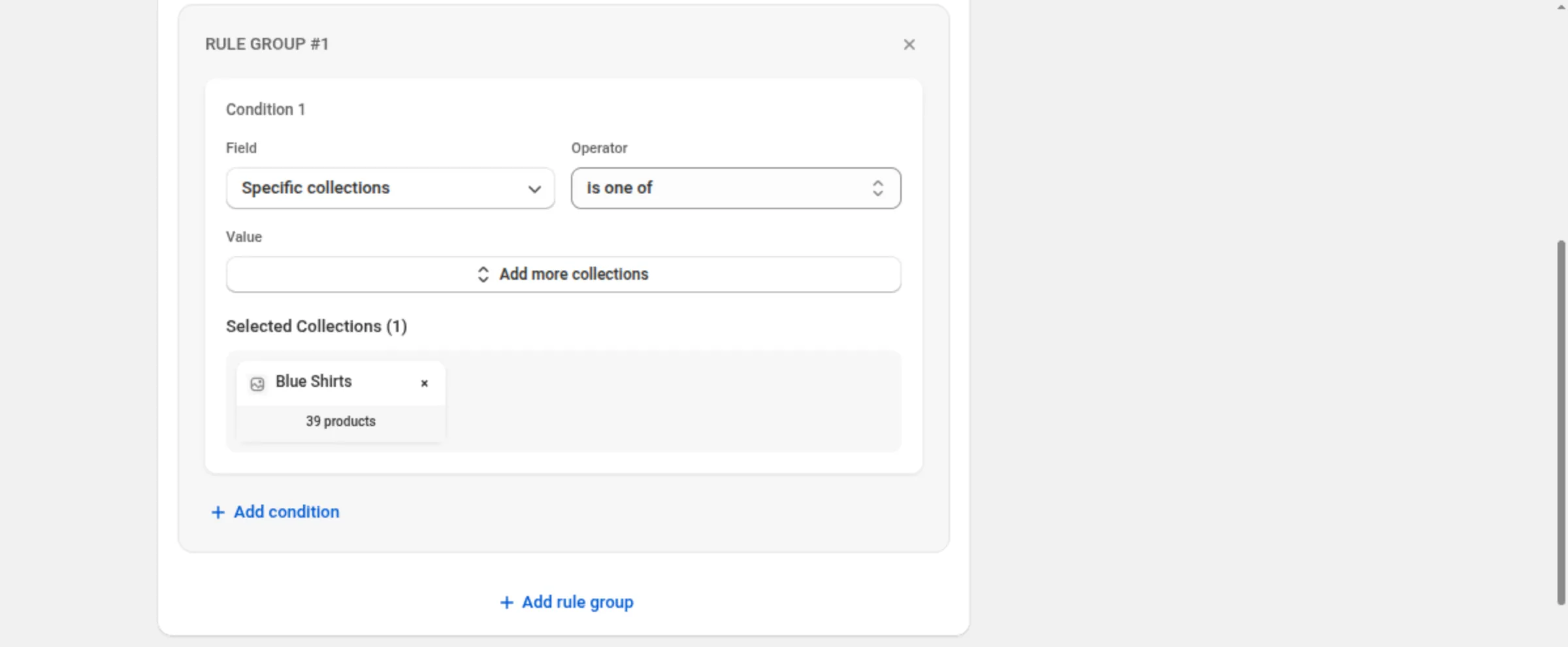
Section titled “Examples”Only Blue Shirts
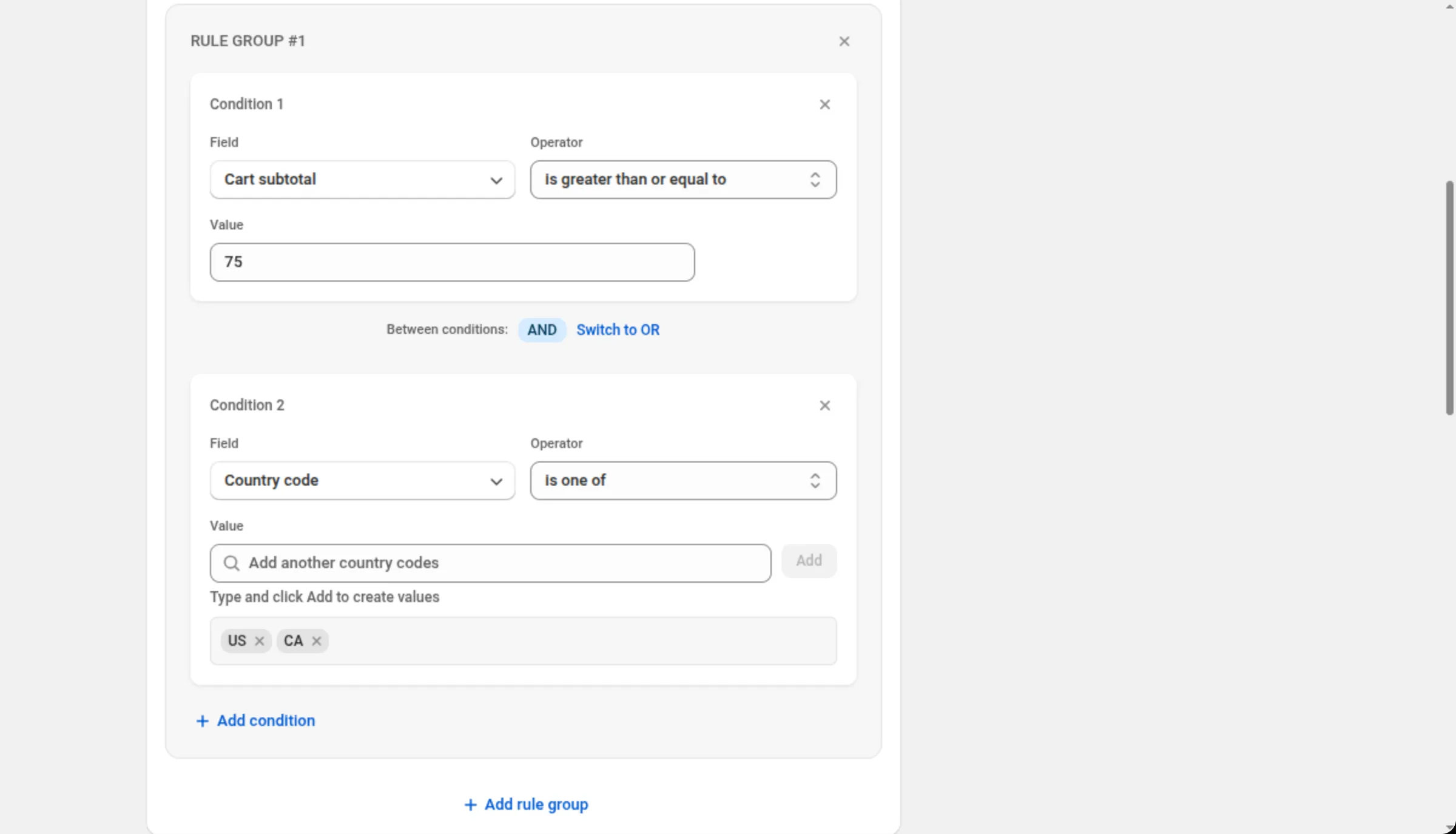
Discount Rules → RULE GROUP #1Condition 1: Specific collections · is one of · Blue ShirtsCarts over 75 going to the US or Canada (shipping discount)
Discount Rules → RULE GROUP #1Condition 1: Cart subtotal · is greater than or equal to · 75Between conditions: ANDCondition 2: Country code · is one of · US, CAFirst-time customers only
Discount Rules → RULE GROUP #1Condition 1: Customer orders count · equals · 0Either a tagged product or a big line (two groups)
RULE GROUP #1 → Product tags · is one of · clearanceRULE GROUP #2 → Line quantity · is greater than or equal to · 5Rule Group Logic: Match Any Rule GroupLimits and notes
Section titled “Limits and notes”- Products: up to 20 per condition. Variants: up to 20. Collections: up to 10.
- Tags and codes (customer tags, product tags, country, city, province, postal): up to 20 entries per condition.
- Attributes (cart or line): one or two key-and-value pairs per condition; both parts of each pair are required.
- Counts are whole numbers: cart quantity and line quantity start at 1, customer orders count starts at 0.
- Amounts must be at least 0.01 — cart subtotal, line subtotal and compare-at price.
- No rules is a valid discount on most types. It then applies to all qualifying orders. The exception is Buy X Get Y: both its builders require at least one rule, and an empty one is refused with “At least one rule is required”.
- Shopify checks the cart against these conditions. Nothing here calls the app while a shopper is shopping.
- A rule group cannot be empty: removing the last condition in a group is not offered; remove the group instead.
Related
Section titled “Related”- Customer eligibility — customer segments on top of these conditions.
- Markets and currency — where a discount runs, and what your amounts mean abroad.
- Order discount — the same builder on a full page.
- Buy X Get Y — where the grouping advice is reversed.