
App embed
The DiscountOS app embed is one switch in your theme editor. With it on, the app can paint things onto your storefront: Sale Badges, Price Drops, and the gift added to the cart automatically on a gift with purchase discount. With it off, those three show nothing — your discounts still apply, so shoppers still get the money.
-
Open Promotions in the DiscountOS app.
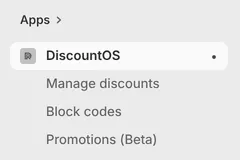
In the Shopify admin sidebar, under Apps, DiscountOS has three entries: Manage discounts, Block codes and Promotions (Beta).
-
Click Enable in theme editor.
While the embed is off, the Promotions page shows an App embed card saying “Sale Badges and Price Drops need the app embed enabled in your theme”, with an Enable in theme editor button. The button opens your theme editor straight at the app embeds panel.
On a promotion’s own page, the same status sits in the right-hand column as a permanent App embed row with an Enable or Disable button.

-
Turn the Promotions app embed on and save the theme.
In the theme editor’s App embeds panel, switch Promotions on and click Save.
Turn it on in the theme you have published. An app embed enabled only in an unpublished or draft theme does not reach shoppers, and the app does not count it.
-
Go back to the app and check the status reads Enabled.
The status badge next to App embed turns to Enabled. The app asks Shopify again each time you come back to its tab, so usually there is nothing to reload. While the app is still working out the answer it shows a spinner instead of a badge.
Settings
Section titled “Settings”The app embed has two settings of its own, in the theme editor, under the Free gift heading. They only matter if you run a gift with purchase discount.
Refresh cart pages after gift changes
Section titled “Refresh cart pages after gift changes”On by default. After the app adds or removes a gift, the cart page reloads so your theme shows the new cart. Turn it off only if your theme updates its cart without a reload — the setting’s own note says that when it is off, the page never refreshes after gift changes, so pair it with the event below or shoppers may see outdated gift lines until they next interact.
Custom cart update event
Section titled “Custom cart update event”Optional. Your theme’s cart-refresh event name. The app fires it after gift changes so the theme can update its cart in place instead of reloading.
How the app works out the status
Section titled “How the app works out the status”First, it asks Shopify. The app asks Shopify whether the Promotions embed is on in your published theme. Shopify’s answer does not depend on your storefront — a password page makes no difference — and the app asks again whenever you come back to its tab, for example after saving the theme in the theme editor.
Fallback: its own checks. Only when Shopify does not give a clear on-or-off answer does the app fall back to two checks of its own, which back each other up.
The storefront check. The app opens your storefront’s home page and looks for the marker Shopify prints in the page for every enabled app embed. That is a definite answer, on or off, and it costs you nothing — it is the same public page a shopper sees. The app re-reads it at most once a minute per store.
The report from the embed. When the embed runs, it reports in — from your published storefront, and from the theme editor preview the moment you toggle it on. That is why the status usually flips to Enabled within moments of you saving the theme.
The two are combined:
- Marker found → Enabled.
- Marker missing, but the embed reported in during the last 10 minutes → Enabled. A live report is the embed actually running, which outranks a page that did not show the marker.
- Marker missing and no recent report → Not enabled.
- The app could not read the page at all — your storefront is password protected, or the request timed out → the reports decide on their own: a report in the last 48 hours reads as Enabled, and with no report the status stays unknown.
The fallback is worked out when the page loads, so in that case reload the app to re-check. On a password-protected storefront the fallback cannot read the marker, so the report is its only signal: open your storefront once with the embed on, then reload the app.
Limits and notes
Section titled “Limits and notes”- The four widget blocks do not need the embed. Quantity Break Table, Quantity Break Picker, Spend More Save More and Cart Goal Bar are theme blocks you place in a section; each renders on its own. See Storefront widgets.
- Turning the embed off never stops a discount. Shopify still checks the cart and still applies the discount. What stops is the display: badges, crossed-out prices, and the gift being put in the cart for the shopper. On a gift with purchase discount, shoppers can still add the gift themselves and it still becomes free.
- The published theme is what counts. Shopify’s answer is about your published theme, and the fallback reads your published storefront.
- Changes take a moment to appear. Changes usually reach your store within a minute; on some pages it can take longer, rarely over half an hour.
Related
Section titled “Related”- Sale badge — a badge like “20% off” on your product images.
- Price drop — the old price crossed out with the discounted one.
- Gift with purchase — the discount whose gift the embed adds to the cart.
- App embed shows disabled — what to do when the switch is on but the app disagrees.