
Buy X Get Y
A Buy X Get Y discount gives reward items away free, or at a discount, once the customer has bought enough qualifying items. You describe the qualifying items in Customer Buys, the reward items in Customer Gets, and how much the reward is worth in Discount Configuration.
-
Open Discounts, click Create discount, and choose Buy X Get Y.
It sits in the Discounts section of the create menu, with the example “Buy 2, get 1 free”.
-
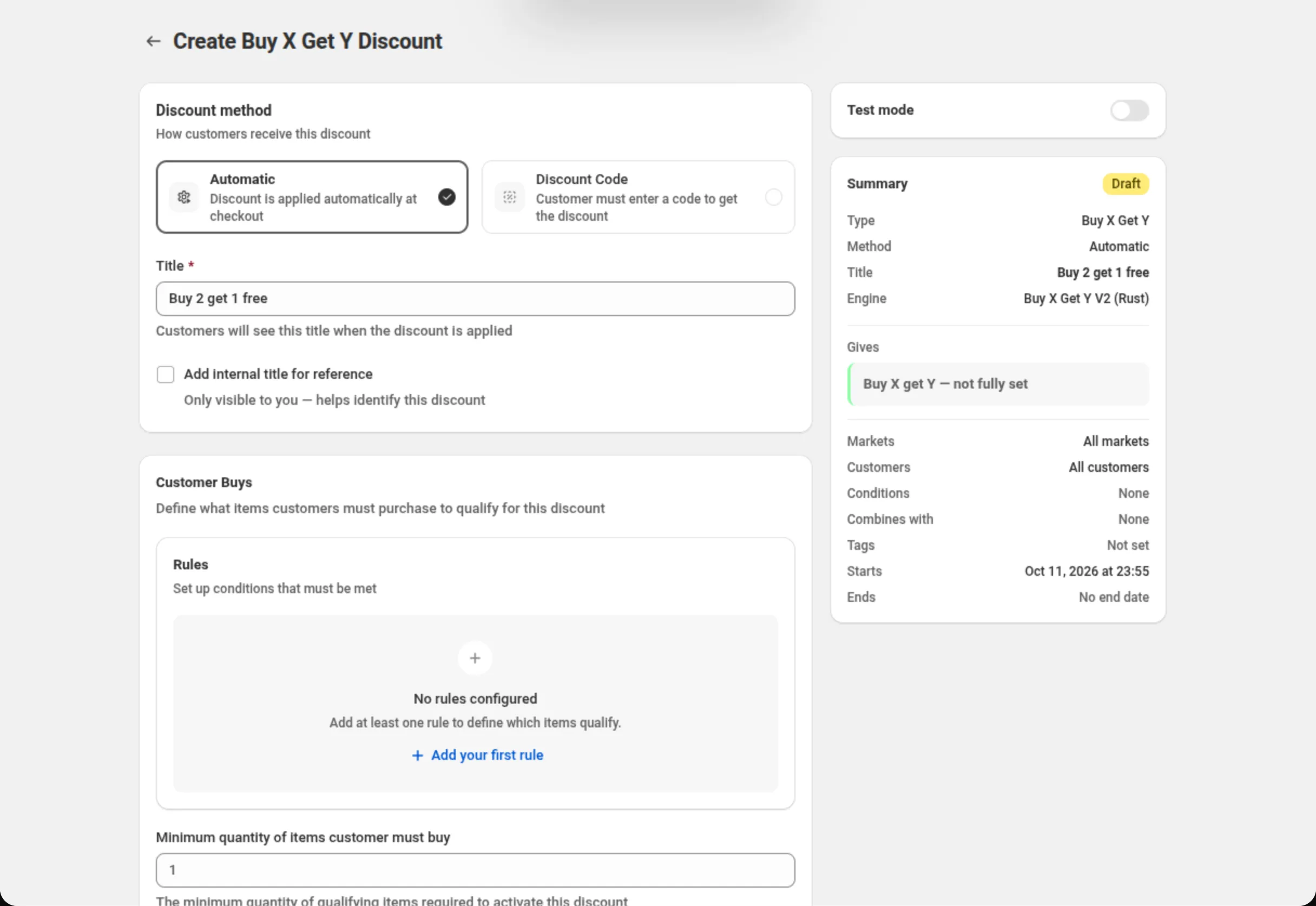
Choose the discount method and name the discount.
Pick Automatic or Discount Code, then fill in Title (automatic) or Discount Code (code). The Summary on the right keeps a running recap of what you have set.
-
Set what the customer must buy.
In Customer Buys, click Add your first rule to create RULE GROUP #1 and pick a condition, an operator and a value — for example Specific collections · is one of · T-shirts. Then set Minimum quantity of items customer must buy. At least one rule is required here.
-
Set which items are the reward.
In Customer Gets, add at least one rule the same way — for example Specific collections · is one of · Socks. These are the items the discount takes money off.
-
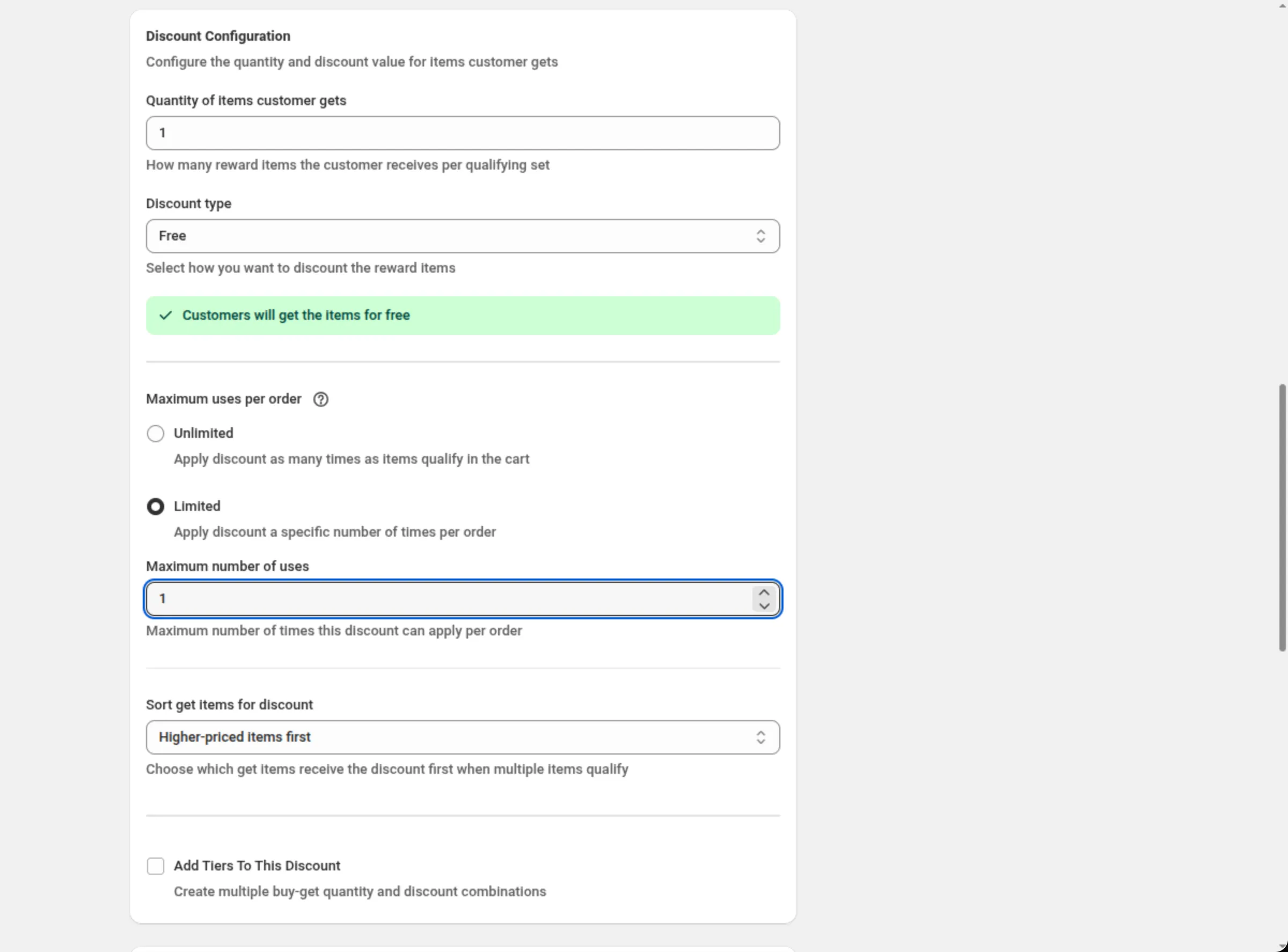
Set the reward quantity, the discount type and the value.
In Discount Configuration, enter Quantity of items customer gets, choose Discount type, and fill in the value it reveals. Then set Maximum uses per order and Sort get items for discount.
-
Set combinations, purchase type, markets and dates, then save.
Choose which other discounts this one may combine with, which purchase types it covers, which markets it runs in, and when it starts and ends. Save from the bar at the top of the page.
Settings
Section titled “Settings”Discount method
Section titled “Discount method”Automatic needs no code — Shopify applies the discount as soon as a cart matches. Discount Code means the shopper has to enter the code you set. Choose the method when you create the discount: the chooser is disabled once the discount exists.
Title / Discount Code
Section titled “Title / Discount Code”On an automatic discount, Title is the name shoppers see when the discount is applied. On a code discount the field becomes Discount Code.
Add internal title for reference
Section titled “Add internal title for reference”Adds a second name only you see, to tell similar discounts apart.
Customer Buys
Section titled “Customer Buys”The rules that decide which cart items count toward the purchase requirement. A Buy X Get Y discount can use Specific products, Specific variants, Specific collections, Product tags, Line quantity, Line subtotal, Line attribute and Has selling plan — item conditions only, no cart or customer conditions. At least one rule group is required.
Conditions inside a group join with the Between conditions AND/OR toggle; groups join with Match All Rule Groups or Match Any Rule Group — see How rule groups combine below.
Minimum quantity of items customer must buy
Section titled “Minimum quantity of items customer must buy”How many qualifying items must be in the cart before the reward is given. A whole number greater than 0. Hidden while Add Tiers To This Discount is on, because each tier carries its own buy quantity.
Customer Gets
Section titled “Customer Gets”The rules that decide which cart items are the reward. Same condition list as Customer Buys, and at least one rule group is required. Nothing is added to the cart for the shopper — the discount takes money off reward items that are already there.
How rule groups combine
Section titled “How rule groups combine”Buy X Get Y builds its qualifying items from every rule group at once — a group only ever adds items, groups never narrow each other. The AND/OR between groups decides whether the discount runs at all: with Match All Rule Groups, every group must match something in the cart; with Match Any Rule Group, one is enough. That leads to three shapes worth knowing:
- A requirement that should narrow a selection goes in the same group, with Between conditions set to AND. In collection A AND Line quantity is at least 6 covers only the lines that are both.
- A requirement alone in its own group applies to everything. [In collection A] plus [Line quantity is at least 6] as two groups pulls in every line that satisfies either one.
- “One from each category” is separate groups joined with Match All Rule Groups — a shirt group and a trouser group. Putting both collections in one AND group instead asks for a single product that is in both, which usually matches nothing.
Quantity of items customer gets
Section titled “Quantity of items customer gets”How many reward items the customer receives per qualifying set. A whole number greater than 0.
Discount type
Section titled “Discount type”How much the reward items are worth:
- Percentage off — a share off each reward item.
- Fixed amount off — one amount spread across the reward items.
- Fixed amount off per item — that amount off each reward item.
- Free — the reward items cost nothing.
Changing the type clears the value you had entered for the previous one.
Percentage / Amount off (total) / Amount off per item
Section titled “Percentage / Amount off (total) / Amount off per item”The value for the type you chose. It must be greater than 0, and a percentage may not go above 100. Free needs no value.
Maximum uses per order
Section titled “Maximum uses per order”Unlimited applies the discount as many times as the cart qualifies — a cart with six qualifying items on a “buy 2 get 1” offer gets three rewards. Limited reveals Maximum number of uses, a whole number greater than 0, and stops at that many per order. The default is Unlimited.
Sort get items for discount
Section titled “Sort get items for discount”Which reward items get discounted first when more items qualify than the reward quantity covers. Higher-priced items first (the default) gives it to the most expensive qualifying items; Lower-priced items first gives it to the least expensive.
Add Tiers To This Discount
Section titled “Add Tiers To This Discount”Turns the single buy/get pair into a ladder. Each tier has Customer buys quantity, Customer gets quantity, Discount type, its value, and an optional Message (optional). Up to 10 tiers; the heading counts them, and Add tier disappears at 10. While tiers are on, the single-offer quantity and value fields are hidden — Sort get items for discount still applies to every tier.
Discount can be combined with:
Section titled “Discount can be combined with:”Ticks for Product discounts, Order discounts and Shipping discounts. Leave them off and this discount runs alone; tick a box and Shopify may apply that kind of discount alongside it.
Tags, in the same card, label the discount — up to 20. They are saved on the discount in Shopify. On Shopify Plus, ticking Product discounts also shows Stack with product discounts tagged. See Combinations.
Maximum discount usage
Section titled “Maximum discount usage”Only shown for a discount code. Limit number of times this discount can be used in total adds a Maximum discount uses field (a whole number greater than 0), and Limit to one use per customer caps it per shopper.
Purchase type
Section titled “Purchase type”One-time purchases, Subscription products, or both — at least one is required. Ticking subscriptions adds a choice of First payment only, Limited number of payments (up to 100) or All recurring payments.
Customer eligibility
Section titled “Customer eligibility”Limit to certain customers restricts the discount to the shoppers you pick. With it on, Match by chooses Customer segments (up to 5 on an automatic discount, up to 20 on a discount code) or Specific customers (up to 100). Shopify checks the shopper before the discount applies, in the cart as well. See Customer eligibility.
Markets
Section titled “Markets”Apply to all markets covers every current and future market. Apply to specific markets lets you pick up to 20; at least one is required once you switch to it.
Active Dates
Section titled “Active Dates”Start Date and Start Time say when the discount begins, and Set End Date adds an end. All times are in your store’s timezone, which the card names on screen.
Test mode
Section titled “Test mode”A switch on its own card above the Summary. On, the discount applies only to a signed-in
customer whose account has the tag dos-test; everyone else shops as if it did not exist. On a new
discount the switch is saved with the discount. On a saved discount it takes effect at once, without
Save. See Test mode.
Examples
Section titled “Examples”Buy 2, get 1 free
Discount method: AutomaticTitle: Buy 2 get 1 freeCustomer Buys → RULE GROUP #1 → Specific collections · is one of · T-shirtsMinimum quantity of items customer must buy: 2Customer Gets → RULE GROUP #1 → Specific collections · is one of · T-shirtsQuantity of items customer gets: 1Discount type: FreeMaximum uses per order: UnlimitedSort get items for discount: Lower-priced items firstBuy 3 shirts, get a pair of socks at 50% off, once per order
Discount method: AutomaticTitle: Shirts and socks · 50% off socksCustomer Buys → RULE GROUP #1 → Specific collections · is one of · ShirtsMinimum quantity of items customer must buy: 3Customer Gets → RULE GROUP #1 → Specific collections · is one of · SocksQuantity of items customer gets: 1Discount type: Percentage offPercentage: 50Maximum uses per order: LimitedMaximum number of uses: 1A ladder: buy more, get more
Discount method: AutomaticTitle: Mix and match ladderCustomer Buys → RULE GROUP #1 → Specific collections · is one of · CandlesCustomer Gets → RULE GROUP #1 → Specific collections · is one of · CandlesAdd Tiers To This Discount: tickedTier 1 → Customer buys quantity: 2 · Customer gets quantity: 1 · Discount type: Percentage off · Percentage: 25Tier 2 → Customer buys quantity: 4 · Customer gets quantity: 2 · Discount type: FreeA code for a bundle-style reward
Discount method: Discount CodeDiscount Code: SOCKS50Customer Buys → RULE GROUP #1 → Specific collections · is one of · ShoesMinimum quantity of items customer must buy: 1Customer Gets → RULE GROUP #1 → Specific collections · is one of · SocksQuantity of items customer gets: 1Discount type: Fixed amount off per itemAmount off per item: 5Limit to one use per customer: tickedHow it shows to the shopper
Section titled “How it shows to the shopper”An automatic Buy X Get Y discount needs nothing from the shopper: once the cart holds enough qualifying items and at least one reward item, Shopify applies the discount in the cart and shows the Title you typed next to the saving. A code discount applies once the shopper enters the code you set.
The reward items are never added for the shopper — they have to be in the cart already for the discount to have anything to take money off. With Free, the reward items stay in the cart and their price drops to nothing.
Limits and notes
Section titled “Limits and notes”- Percentage: greater than 0, at most 100 — refused inline and again on the server.
- Quantities: whole numbers greater than 0, both for the buy quantity and the get quantity.
- Tiers: up to 10 per discount.
- Maximum number of uses per order: a whole number greater than 0, and only when Maximum uses per order is Limited.
- Markets: up to 20 when you pick specific markets.
- Subscriptions: up to 100 recurring payments when you choose a limited number.
- Conditions are item-level only. There are no cart-total or customer conditions in the buy and get rules — use Multi-offer if you need a cart or customer gate alongside a buy-and-get offer.
- Combinations are Shopify’s call. Ticking a box in Discount can be combined with tells Shopify this discount may run alongside that kind; Shopify decides what actually applies.
- The method is fixed after creation. Automatic and Discount Code cannot be swapped on an existing discount; duplicate it instead.
Why does my discount give away more items than I expected? Almost always because a requirement sits in its own rule group. The rule groups are added together, so a group holding only Line quantity is at least 6 matches every line in the cart. Put the requirement in the same group as the selection it narrows, with Between conditions set to AND.
I put two collections in one rule group with AND and nothing is discounted. Why? Conditions joined with AND inside one group must all be true of the same cart line, so that shape asks for one product that is in both collections. For “either collection”, use one Specific collections condition listing both, or set Between conditions to OR. For “one from each”, use a separate rule group per collection and Match All Rule Groups.
Can the same item count as both a buy item and a reward item? Yes, if it matches both selections. Point Customer Gets at a different collection or product if you do not want that.
How many tiers can one discount have? Up to 10. The heading shows the count, and Add tier disappears once you reach 10.
Related
Section titled “Related”- Gift with purchase — when the reward should be added for the shopper rather than discounted in place.
- Product discount — money off qualifying items with no purchase requirement.
- Multi-offer — several offers, and cart or customer conditions, in one discount.
- Where discounts show — automatic discounts versus discount codes.