
Examples
Ce contenu n’est pas encore disponible dans votre langue.
Every example reads only Storefront data and makes no request. They assume the namespace variable from Read the data in Liquid:
{%- assign ns = 'app--284350873601--discount_os' -%}The screenshots come from a Dawn theme on a test store. The prices in them were compared with the cart on that store.
Price drop: the price after the automatic discount
Section titled “Price drop: the price after the automatic discount”Show the price after automatic discounts, the original price struck through, and the saving. It is the price the cart charges for one item of the selected variant.
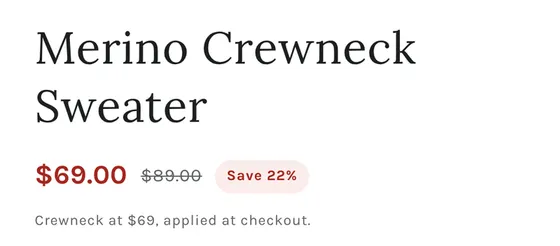
The rule: for the selected variant, take every product discount that every shopper gets
(universal is true) on one item, work out the price each one gives, and show the lowest.
Do not add them up: Shopify applies one product discount per cart line. Quantity breaks, buy X get
Y, bundles and gifts are left out because they need more than one item.
{%- liquid assign v = product.selected_or_first_available_variant assign price = v.price assign best = price assign best_title = '' assign vid = v.id | append: '' assign same_currency = false if cart.currency.iso_code == shop.currency assign same_currency = true endif assign multi = 'PRODUCT_VOLUME,ORDER_GOAL,BXGY,GWP,FREE_SHIPPING,SHIPPING,UNKNOWN_APP' | split: ',' for d in product.metafields[ns].discounts.value assign type = d.discount_type.value assign ok = false if d.universal.value and d.discount_class.value == 'product' assign ok = true endif if multi contains type or d.config.value.configuration.bundleItems assign ok = false endif if d.threshold_type.value == 'QUANTITY' and d.minimum_threshold_value.value > 1 assign ok = false endif assign only = d.config.value.targeting.variants if ok and only and only.size > 0 assign ok = false for g in only assign gid = g | split: '/' | last if gid == vid assign ok = true endif endfor endif assign value = d.maximum_reward_value.value | default: 0 assign c = price if ok and value > 0 case d.reward_type.value when 'PERCENTAGE' if value <= 100 assign c = 100 | minus: value | times: price | divided_by: 100.0 | round endif when 'FIXED_AMOUNT' if same_currency assign c = price | minus: value | at_least: 0 | round endif when 'FIXED_PRICE' if same_currency assign c = value | round endif endcase endif if c < best assign best = c assign best_title = d.discount_title.value endif endfor-%}{%- if best < price -%} <p class="price-drop"> <span class="price-drop__now">{{ best | money }}</span> <s class="price-drop__was">{{ price | money }}</s> <span class="price-drop__save">Save {{ price | minus: best | times: 100 | divided_by: price }}%</span> </p> <p class="price-drop__note">{{ best_title }}, applied at checkout.</p>{%- else -%} <p class="price-drop"><span>{{ price | money }}</span></p>{%- endif -%}- Put it where your theme prints the price, and hide the theme’s own price block so there is one price on the page.
- The saving is rounded down, so the label never says more than the shopper saves.
- A fixed amount or set price is only used when the cart is in the shop currency. Money in the data is in minor units of the shop currency, as described in Read the data in Liquid.
- Variants: render the line for each variant with
data-variant="{{ v.id }}"and show the one that matches the selected variant. See Layout notes. - Store-wide offers (
all_products) live on the shop list. Read them the same way fromshop.metafields[ns].discounts.
On product cards
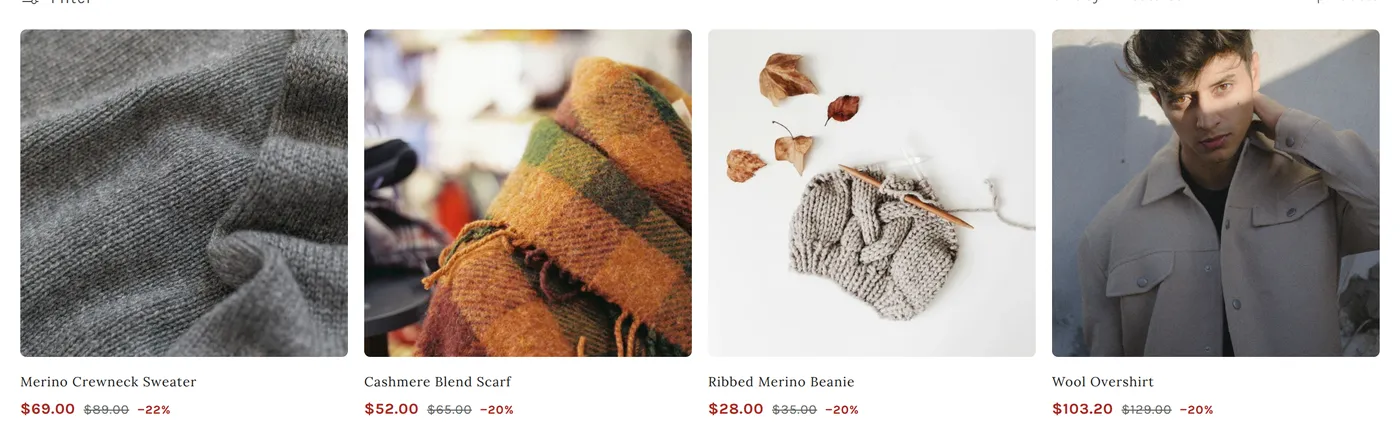
Section titled “On product cards”The same rule on each card, with card_product instead of product. The saving uses the same
number as the price, so the two can never disagree.
Offers box
Section titled “Offers box”At most four offers, one line each, under Add to cart. The rest go behind “See all”.
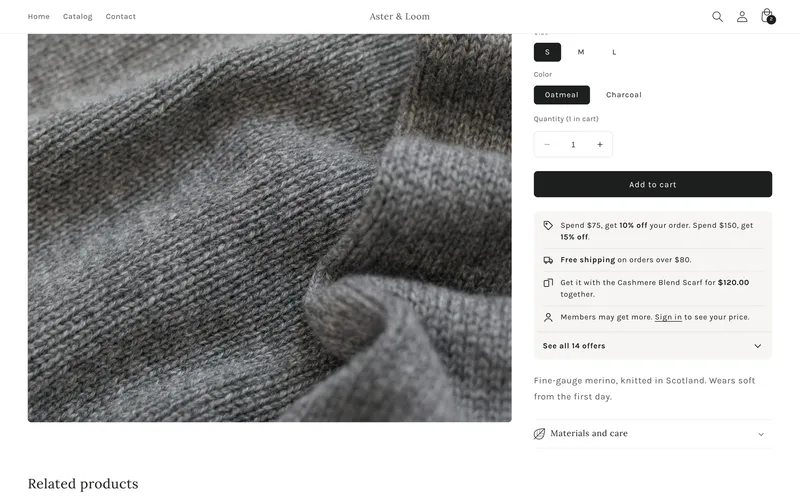
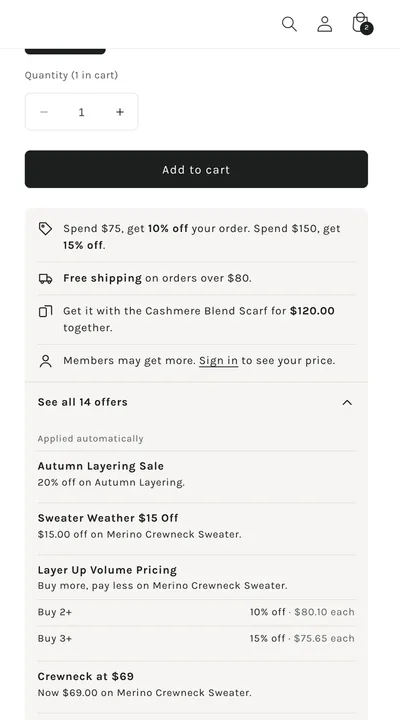
How the example picks the rows:
- Only offers that can improve the price. A quantity break or a code that gives a worse price than the price drop above is left out of the box. It stays in “See all”.
- Order and shipping offers are one line each: the spend steps from
ORDER_GOALentries and the lowest free-shipping threshold. - A bundle is one line: “Get it with the Cashmere Blend Scarf for $120.00 together.”
- Members never see a value: “Members may get more. Sign in to see your price.”
The free-shipping line, for example:
{%- assign ship_min = 0 -%}{%- for d in shop.metafields[ns].discounts.value -%} {%- if d.discount_type.value == 'FREE_SHIPPING' and d.universal.value and d.cart_attribute_key.value == blank and d.minimum_threshold_value.value -%} {%- assign amt = d.minimum_threshold_value.value | round -%} {%- if ship_min == 0 or amt < ship_min -%}{%- assign ship_min = amt -%}{%- endif -%} {%- endif -%}{%- endfor -%}{%- if ship_min > 0 -%} <li><strong>Free shipping</strong> on orders over {{ ship_min | money_without_trailing_zeros }}.</li>{%- endif -%}“See all” is a plain <details> element, so it needs no JavaScript:
Free-shipping bar
Section titled “Free-shipping bar”The lowest free-shipping threshold, in the announcement bar. Same loop as above.

Cart progress and free gift
Section titled “Cart progress and free gift”Put this inside the part of the cart your theme re-renders when the cart changes (in Dawn, inside the cart drawer and cart footer sections).
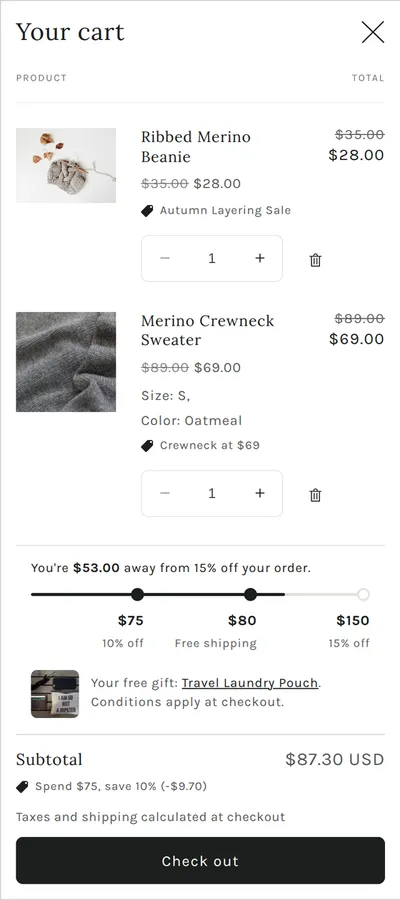
{%- assign sub = cart.items_subtotal_price -%}{%- for d in shop.metafields[ns].discounts.value -%} {%- if d.discount_type.value == 'ORDER_GOAL' and d.universal.value -%} {%- assign vals = d.reward_values.value -%} {%- for t in d.thresholds.value -%} {%- if sub < t -%} <p>You're {{ t | minus: sub | money }} away from {{ vals[forloop.index0] | round }}% off your order.</p> {%- break -%} {%- endif -%} {%- endfor -%} {%- endif -%} {%- if d.discount_type.value == 'GWP' and d.threshold_type.value == 'AMOUNT' -%} {%- assign gift = d.reward_product_references.value | map: 'title' -%} {%- assign need = d.thresholds.value | first -%} <p> {%- if sub < need -%}Add {{ need | minus: sub | money }} more and get {{ gift.first }} free. {%- else -%}Your free gift: {{ gift.first }}.{%- endif -%} {%- if d.cart_attribute_key.value != blank %} Conditions apply at checkout.{%- endif -%} </p> {%- endif -%}{%- endfor -%}Sale badge from the ready-made best value
Section titled “Sale badge from the ready-made best value”{%- assign pct = card_product.metafields[ns].max_reward_percent.value | default: 0 -%}{%- if pct > 0 -%}<span class="badge">Save up to {{ pct | round }}%</span>{%- endif -%}Quantity-break table
Section titled “Quantity-break table”thresholds and reward_values are lists in the same order: step i is “buy thresholds[i],
get reward_values[i]”.
{%- for d in product.metafields[ns].discounts.value -%} {%- if d.discount_type.value == 'PRODUCT_VOLUME' and d.reward_type.value == 'PERCENTAGE' -%} {%- assign vals = d.reward_values.value -%} <table> {%- for t in d.thresholds.value -%} {%- assign each = 100 | minus: vals[forloop.index0] | times: product.selected_or_first_available_variant.price | divided_by: 100.0 | round -%} <tr><td>Buy {{ t }}+</td><td>{{ each | money }} each</td></tr> {%- endfor -%} </table> {%- endif -%}{%- endfor -%}Code button
Section titled “Code button”{%- if d.method.value == 'code' -%} <button type="button" data-copy="{{ d.code.value | escape }}">{{ d.code.value }}</button>{%- endif -%}<script> document.addEventListener('click', (e) => { const b = e.target.closest('[data-copy]'); if (!b) return; navigator.clipboard.writeText(b.dataset.copy).then(() => { b.textContent = 'Copied'; }); });</script>Countdown
Section titled “Countdown”ends_at is empty for discounts with no end.
{%- if d.ends_at.value -%} <span data-ends-at="{{ d.ends_at }}">Ends {{ d.ends_at.value | date: '%b %-d' }}</span>{%- endif -%}A few lines of JavaScript can turn data-ends-at into a live timer. When it reaches zero, hide
the offer: a shopper who keeps the page open still sees the offers from when it loaded.