
Custom Discount examples
Esta página aún no está disponible en tu idioma.
Each example below is a complete setup. Read the goal, copy the settings, done.
The first group needs nothing but the discount page. The second group reads prices from a metafield — if you have not set one up, start with Set up the price metafield. In the third group, 14 and 15 add up a number from that metafield and 16 needs no metafield.
No metafield needed
Section titled “No metafield needed”1. A plain percentage off a collection
Section titled “1. A plain percentage off a collection”Goal. 20% off everything in Summer Sale.
- One cart group named
Summer range, one condition: Specific collections, and pick Summer Sale. - One product offer, value Percentage off,
20, applied toSummer range.
Nothing else. This is the simplest thing Custom Discount does, and it needs no product data.
2. A fixed amount off each item
Section titled “2. A fixed amount off each item”Goal. £5 off every mug, however many they buy.
- One cart group
Mugs, condition Specific collections, and pick your Mugs collection. - One product offer, value Fixed amount off per item,
5, applied toMugs.
Fixed amount off per item takes £5 off each unit. Fixed amount off would take £5 off the group once, no matter the quantity. Pick deliberately.
3. Free shipping over a threshold
Section titled “3. Free shipping over a threshold”Goal. Free delivery once the basket passes £50.
- One shipping offer, value Free shipping.
- On that offer, a requirement: group All items, measure Subtotal, is greater than or
equal to
50.
No product offer at all. A Custom Discount can hold only a shipping offer.
4. A product discount and free shipping together
Section titled “4. A product discount and free shipping together”Goal. 15% off outerwear, and free delivery when they buy some.
- Cart group
Outerwear, condition Specific collections, and pick Coats and Jackets. - Product offer: Percentage off
15, applied toOuterwear. - Shipping offer: Free shipping, with a requirement on group
Outerwear, measure Quantity, is greater than or equal to1.
One discount, one code if you want one, both effects.
5. Discount the whole order, not the items
Section titled “5. Discount the whole order, not the items”Goal. £10 off the order when they spend £100.
- One order offer, value Fixed amount off,
10. - Requirement on the offer: group All items, measure Subtotal, is greater than or
equal to
100.
An order offer discounts the order total. A product offer discounts the items. Use an order offer when the amount should not be split across lines.
6. Against the compare-at price
Section titled “6. Against the compare-at price”Goal. Show 30% off the original price on items that have one.
- One product offer, value Percentage off compare-at price,
30.
The saving is worked out from the compare-at price rather than the selling price. Products without a compare-at price, or with one below the current price, are skipped.
Prices from your own data
Section titled “Prices from your own data”Everything below needs the metafield set up first. These examples use custom.volume_pricing and
write amounts as plain prices with "unit": "major".
7. Wholesale case pricing
Section titled “7. Wholesale case pricing”Goal. Every SKU has its own price at 6 and at 12.
On every variant:
{ "v": 1, "unit": "major", "qty6": 8.50, "qty12": 7.50 }- Turn on Read prices from a variant metafield. Namespace
custom, keyvolume_pricing. - One product offer, value Price from product data, field
qty, meaning Fixed price for the item, Tiered by line quantity on, applied to All items.
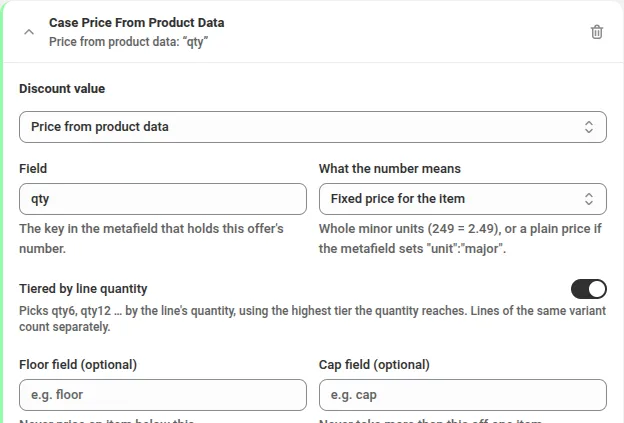
Six mugs cost 8.50 each. Twelve cost 7.50. A SKU with no price data is left alone. One discount covers the whole catalogue, and you change prices in the data, never in the discount.
8. The same, with a floor so nothing sells at a loss
Section titled “8. The same, with a floor so nothing sells at a loss”Goal. A deep tier must never take an item below cost.
{ "v": 1, "unit": "major", "qty6": 8.50, "qty12": 7.50, "floor": 7.00 }Same offer as above, and name floor in the offer’s Floor field.
9. Contract pricing for one customer group
Section titled “9. Contract pricing for one customer group”Goal. Trade accounts pay a different price from everyone else.
{ "v": 1, "unit": "major", "retail": 8.50, "contract": 6.75 }- Cart group
Trade, condition Customer tags · is one of ·contract. - Product offer A: Price from product data, field
retail, applied to All items. - Product offer B: Price from product data, field
contract, applied toTrade. - Set When offers overlap to Apply the discount that saves the most.
Two prices per variant, one discount, and the customer’s tag decides.
10. Case packs only, chosen by a number in your data
Section titled “10. Case packs only, chosen by a number in your data”Goal. 10% off SKUs that ship as a case of 12, without keeping a product list.
{ "v": 1, "pack": 12 }- Cart group
Case packs, condition Price data number, field namepack, is greater than or equal to6. - Product offer: Percentage off
10, applied toCase packs.
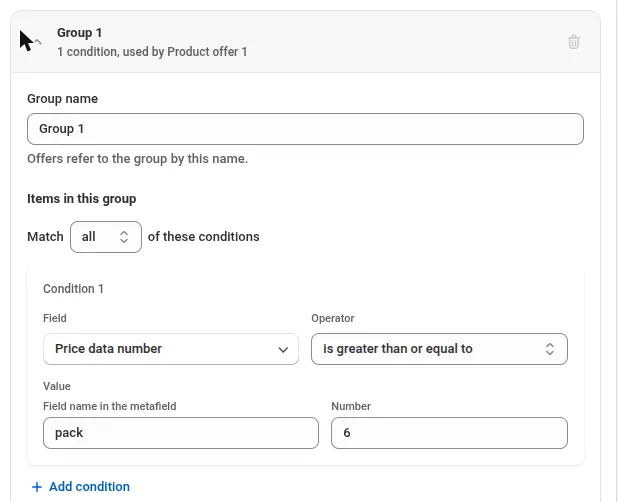
Add a pack number to a new SKU and it joins the discount on its own. Nothing else in the cart is
touched.
11. Everything except the case packs
Section titled “11. Everything except the case packs”Goal. The complement of example 10.
Take the same group and set its Match to none. That selects every item the group does not match, including items with no price data at all. Point a second offer at it.
12. Clearing a season
Section titled “12. Clearing a season”Goal. 25% off last season, and the discount never needs editing again.
{ "v": 1, "season": "ss26" }- Cart group
Last season, condition Price data field, field nameseason, is one ofss26. - Product offer: Percentage off
25, applied toLast season.
When the season turns over you change the data, not the discount.
13. A percentage that differs per product
Section titled “13. A percentage that differs per product”Goal. Each supplier agreed a different discount rate.
{ "v": 1, "rate": 12.5 }- Product offer, value Price from product data, field
rate, meaning Percentage off.
A percentage is read exactly as written, so 12.5 is 12.5%. It is not affected by the unit
setting. A variant with no rate gets nothing.
Weight and repeating deals
Section titled “Weight and repeating deals”14. A deal once the cart holds 1 kg, any mix of bags
Section titled “14. A deal once the cart holds 1 kg, any mix of bags”Goal. 10% off coffee once the cart holds at least 1 kg — four 250 g bags, two 500 g bags or any other mix.
- On each coffee variant, add the weight in grams to its price data:
{"v":1,"g":250}on the 250 g bag,{"v":1,"g":1000}on the 1 kg bag, and so on. - Turn on Read prices from a variant metafield and enter the metafield.
- One cart group
Weighed coffeematching all of: Specific collections is one of Coffee, and Price data numbergis greater than or equal to1. The second condition keeps a mug or a grinder from the same collection out of the deal. - One product offer, Percentage off
10, applied toWeighed coffee, with a requirement:Weighed coffee, Price data total, number nameg, is greater than or equal to1000.
950 g gets nothing; 1000 g or more gets 10% on every bag.
15. Money off for every full kilo
Section titled “15. Money off for every full kilo”Goal. 5 off for every full kilo of coffee, at most three times.
- Set up as in example 14, but use Fixed amount off
5. - Tick Repeat for every full step, choose the requirement in Step, and set Max times to
3.
1 kg gets 5 off, 2,400 g gets 10 off, 5 kg gets 15 off. The amount is shared across the coffee in the cart.
16. Money off for every 500 spent
Section titled “16. Money off for every 500 spent”Goal. 50 off the order for every full 500 spent. No metafield needed.
- One order offer, Fixed amount off
50, with a requirement: All items, Subtotal, is greater than or equal to500. - Tick Repeat for every full step and choose that requirement in Step.
A 1,250 order gets 100 off; a 499 order gets nothing.
Before you launch any of these
Section titled “Before you launch any of these”- Use Check a product on the discount page. It reads a real variant and shows what would happen, or the reason nothing would.
- Use Test mode to put the discount live for one signed-in customer only, check a real cart, then turn it off.
Related
Section titled “Related”- Custom Discount — the full reference.
- Set up the price metafield — creating and filling the metafield.