How to have more than 25 automatic discounts on Shopify
Shopify caps a store at 25 active automatic discounts, apps included. How to run multiple automatic discounts, more than 25 offers, inside one discount.
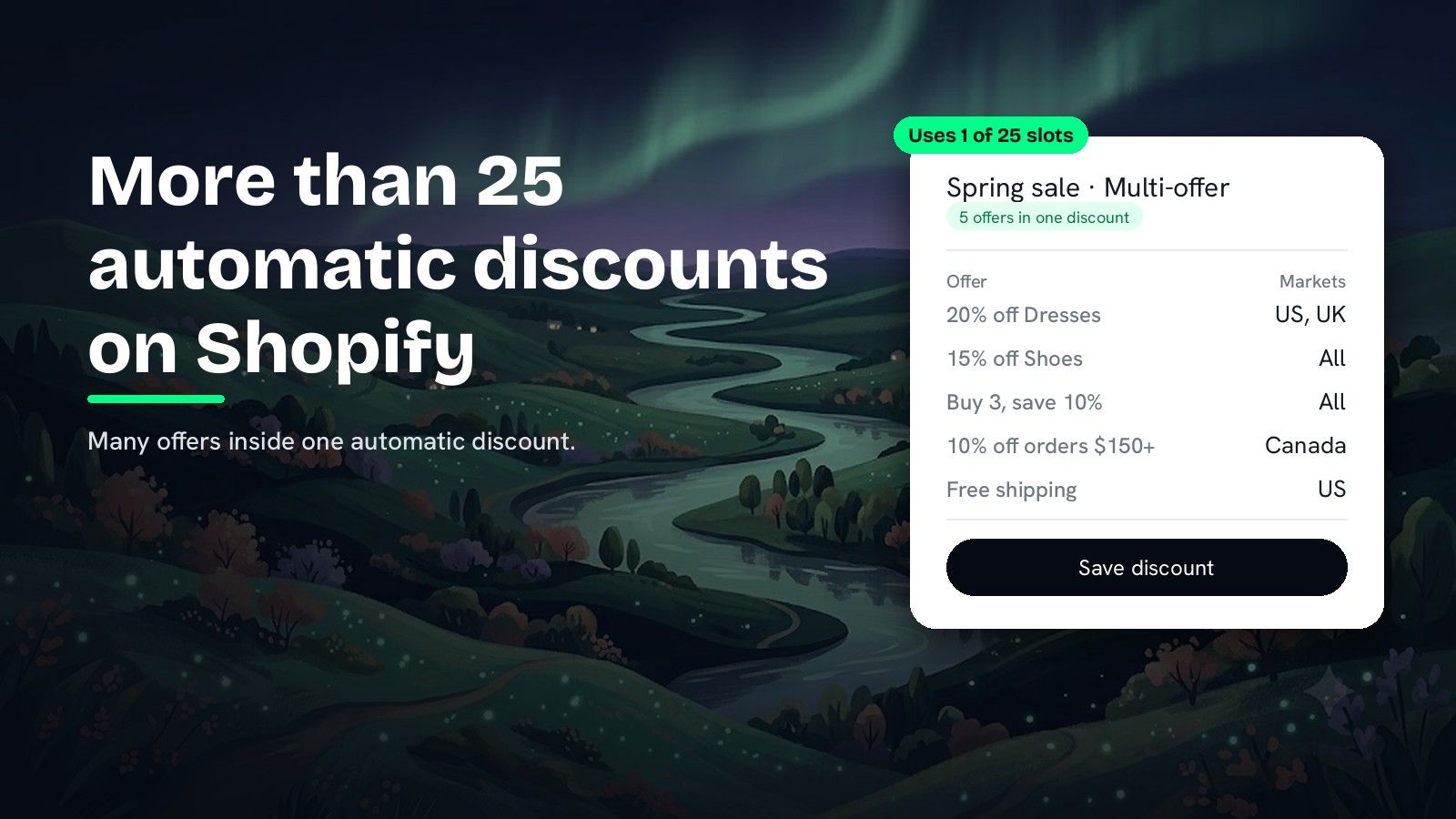
DiscountOS is a Built for Shopify discount app that runs multiple offers inside a single automatic discount, including market-specific and tiered discounts.
What is Shopify’s 25 automatic discount limit?
Shopify’s 25 automatic discount limit is the maximum number of automatic discounts a store can have active at the same time. The Shopify Help Center puts it in two sentences: “You can have a maximum of 25 active automatic discounts. This total includes app-based discounts.” That second sentence matters most. Every automatic discount counts toward the same 25, whether you made it in Shopify admin or an app made it for you, so a bundle app, a volume app and a gift app each spend slots from one shared pool. Shopify’s developer changelog shows app-based automatic discounts were capped at 5 until November 2024, when that cap rose to 25. The limit counts automatic discounts only: a discount code, which the shopper types in, is a separate kind of discount. The way to run more offers without breaking the limit is to make each automatic discount carry more than one offer. DiscountOS does this with product, order and shipping offers that each keep their own products, conditions and markets, while the whole discount uses one of the 25 slots.
Three details decide how fast a store reaches it:
- Active means running now. The Help Center counts active automatic discounts, so what matters is everything live at the same moment.
- Apps share the same 25. “This total includes app-based discounts.”
- Codes are separate. The limit counts automatic discounts, not codes.
A store running a sale per collection, free shipping per country and a loyalty discount reaches 25 quickly. One automatic discount per offer is the pattern that fills the pool.
How do you get around the 25 automatic discount limit?
| Way | What it takes | Offers per slot |
|---|---|---|
| End or schedule unused discounts | Planning every campaign | 1 |
| Move offers to discount codes | Shoppers must type the code | none used |
| Several discounts in one DiscountOS discount (Multi-offer) | One setup page, applied automatically | Many |
| DiscountOS tiers (Quantity Break, Price List, Spend More Save More, Gift with Purchase) | One setup page per ladder of tiers | Many tiers |
The first two ways manage the limit. The last two change the math: each DiscountOS discount carries more than one Shopify discount would.
How many offers fit in one discount slot
The same five offers, set up two ways:
| Offer | One discount each | DiscountOS Multi-offer |
|---|---|---|
| 20% off Dresses, US and UK | 1 slot | in “Spring sale” |
| 15% off Shoes | 1 slot | in “Spring sale” |
| Buy 3, save 10% | 1 slot | in “Spring sale” |
| 10% off orders over $150, Canada | 1 slot | in “Spring sale” |
| Free shipping, US | 1 slot | in “Spring sale” |
| Slots used | 5 of 25 | 1 of 25 |
Tiered offers work the same way. A DiscountOS Spend More Save More discount holds its whole ladder of spend tiers in one discount, and a DiscountOS Price List discount prices a whole collection with quantity tiers in one discount. A store that builds one discount per product or per tier is the store that runs out of slots.
How to apply multiple discounts at once with DiscountOS
- Open DiscountOS, click Create discount, and choose Multi-offer Discount. It sits under Advanced in the create menu.
- Choose Automatic and give the discount a title. Shoppers see this title next to the saving, so name the campaign (“Spring sale”), not one number.
- Turn on the kinds of offer you need. Under What does this discount give?, switch on Product discount, Order discount and Shipping discount in any combination. Add more of each with Add another product discount and its equivalents.
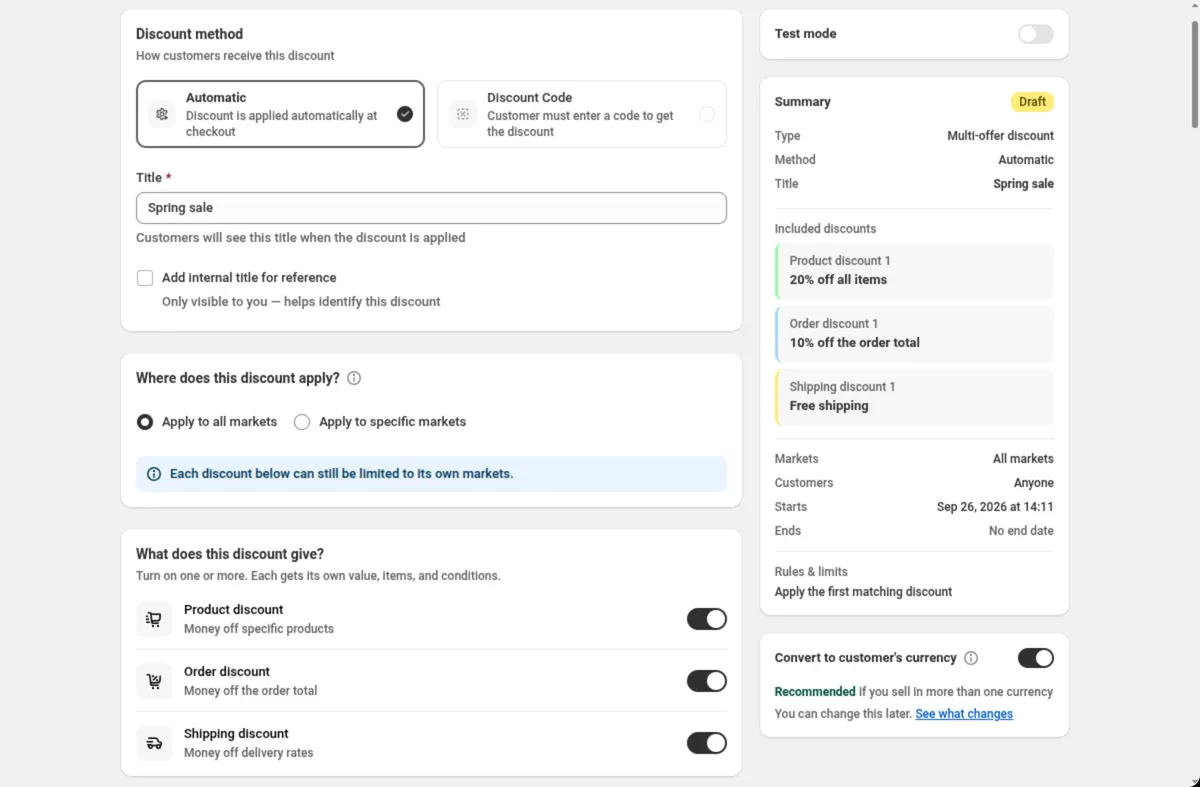
- Fill in each offer. Every offer card has its own Discount type and value, its own Qualifying items (collections, tags, products, line quantity and more), its own Requirements and its own Applies to.
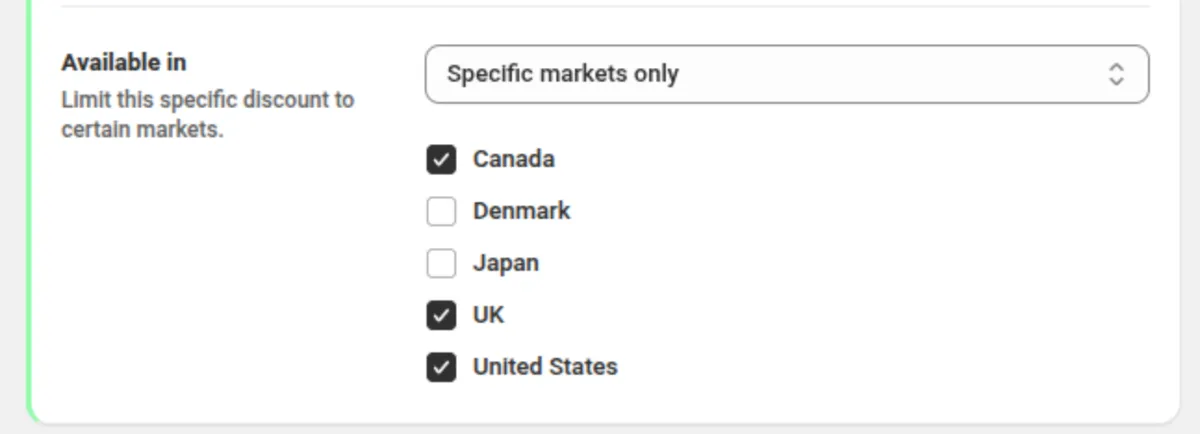
- Limit each offer to its own markets. Available in on each card narrows that one offer to the markets you pick, inside the markets the whole discount runs in. This is how “Dresses in the US and UK, free shipping in the US” lives in one discount.
- Choose what happens when two offers reach the same item. Under When discounts overlap, pick Apply the first matching discount, Apply the discount that saves the most or Apply all matching discounts.
- Set dates and save. The whole discount now uses one of Shopify’s 25 automatic slots.
Every setting on the page is explained in the Multi-offer docs. Market rules are covered in Markets and currency.
Setup tips before you merge discounts
- Name the campaign. Shoppers see the discount’s title next to the saving from every offer inside it, so a campaign name (“Spring sale”) reads well. Give an offer its own discount when it needs its own name on the receipt.
- Shopify’s stacking rule for product discounts. This is Shopify’s rule for every discount and every app. The Shopify Help Center states: “To combine multiple product discounts on the same line item, your store must be on the Shopify Plus plan.” Offers on collections that share no products never meet.
- Combinations still apply. Discount can be combined with controls how this discount sits next to other discounts outside it. Shopify decides what applies to a cart.
Where the offers show for the shopper
- In the cart and at checkout: Shopify applies the matching offers automatically, following the overlap rule you chose, and shows the discount title next to the saving. Nothing to type.
- On product pages: DiscountOS storefront blocks show the offer before the shopper adds anything. Two of them are a sale badge and a cart goal bar.
Planning how deep each offer can go? The break-even guide shows what a percentage does to margin. For a side-by-side of Shopify discount apps, read the best Shopify discount apps in 2026.
Questions merchants ask
How many automatic discounts can a Shopify store have? Shopify allows a maximum of 25 active automatic discounts per store. The Shopify Help Center states that this total includes app-based discounts, so discounts created by apps count toward the same 25.
Can I raise the 25 automatic discount limit? The Shopify Help Center gives 25 as the maximum and describes no way to raise it. What you can change is how much each discount holds: DiscountOS Multi-offer runs several product, order and shipping offers inside one automatic discount, so one slot carries many offers.
Do discount codes count toward the 25 limit? The limit is on active automatic discounts. A discount code is a different kind of discount that the shopper types in, so moving a low-priority offer to a code frees an automatic slot, at the cost of the shopper having to enter it.
Is the 25 automatic discount limit higher on Shopify Plus? The Shopify Help Center page on discount combinations names no higher automatic discount limit for Shopify Plus. Its Plus sentences are about stacking, for example: “To combine multiple product discounts on the same line item, your store must be on the Shopify Plus plan.”
How many offers can one DiscountOS Multi-offer discount hold? You keep adding offers with Add another product discount, Add another order discount and Add another shipping discount. Each offer has its own discount type and value, its own qualifying items, its own requirements and its own markets, and the whole discount still uses one of Shopify’s 25 automatic slots.
Is DiscountOS free? Yes. DiscountOS is free to install and use, and Multi-offer is included. DiscountOS carries the Built for Shopify badge on the Shopify App Store.
Sources
- Shopify Help Center, Discount combinations: “You can have a maximum of 25 active automatic discounts. This total includes app-based discounts.” Read on 26 September 2026.
- Shopify developer changelog, Increased limits for automatic function-based discounts, 21 November 2024: app-based automatic discounts raised from 5 to 25.
- DiscountOS on the Shopify App Store, listed as DiscountOS ‑ Market Discount, read on 26 September 2026: Built for Shopify, free.
- DiscountOS documentation: Multi-offer, Spend More Save More, Price List, Markets and currency.