How to exclude sale items from a discount on Shopify
Stop a discount code or automatic discount from applying to items already on sale: how to skip anything priced below its compare-at price.
DiscountOS is a Built for Shopify discount app that runs multiple offers inside a single automatic discount, including market-specific and tiered discounts.
What does Shopify do natively to exclude sale items from a discount?
A sale item is a product whose price is below its Compare-at price, the crossed-out price shoppers see next to the sale price. Excluding sale items means a discount code or automatic discount skips those items, so a shopper cannot add 20% off on top of a 30% markdown. The Shopify Help Center page on amount off discounts walks through Value, Applies to, Minimum requirements, Maximum discount uses, Combinations and Active dates, and describes no setting that skips items on sale. The native workaround goes through collections. The Help Center page on collection conditions defines Compare-at price is not set: “A product matches when any of its variants has an empty Compare-at price value.” A merchant can build an automated collection with that condition and pick it under Applies to. Two limits follow from the same page: the condition reads whether the field is empty, not whether the price sits below it, and “Zero (0) isn’t the same as empty.” DiscountOS checks each item against its own compare-at price instead.
Native collection workaround vs DiscountOS
| Native: collection with Compare-at price is not set | DiscountOS sale-item settings | |
|---|---|---|
| What is checked | Whether the Compare-at price field is empty, per product | Whether the compare-at price is higher than the price the customer pays, per item |
| A product with a compare-at price equal to its price | Left out of the collection, so no discount | Gets the discount, it is not on sale |
| A product with one variant marked down and one not | In the collection, because any variant with an empty compare-at price matches, so the marked-down variant is discounted too | The marked-down item is skipped, the other is discounted |
| Works on an order-wide tiered discount | Not described on the amount off page | Exclude items on sale on Spend More Save More |
Which DiscountOS discount types can skip sale items?
| DiscountOS discount type | Setting | What the docs say it does |
|---|---|---|
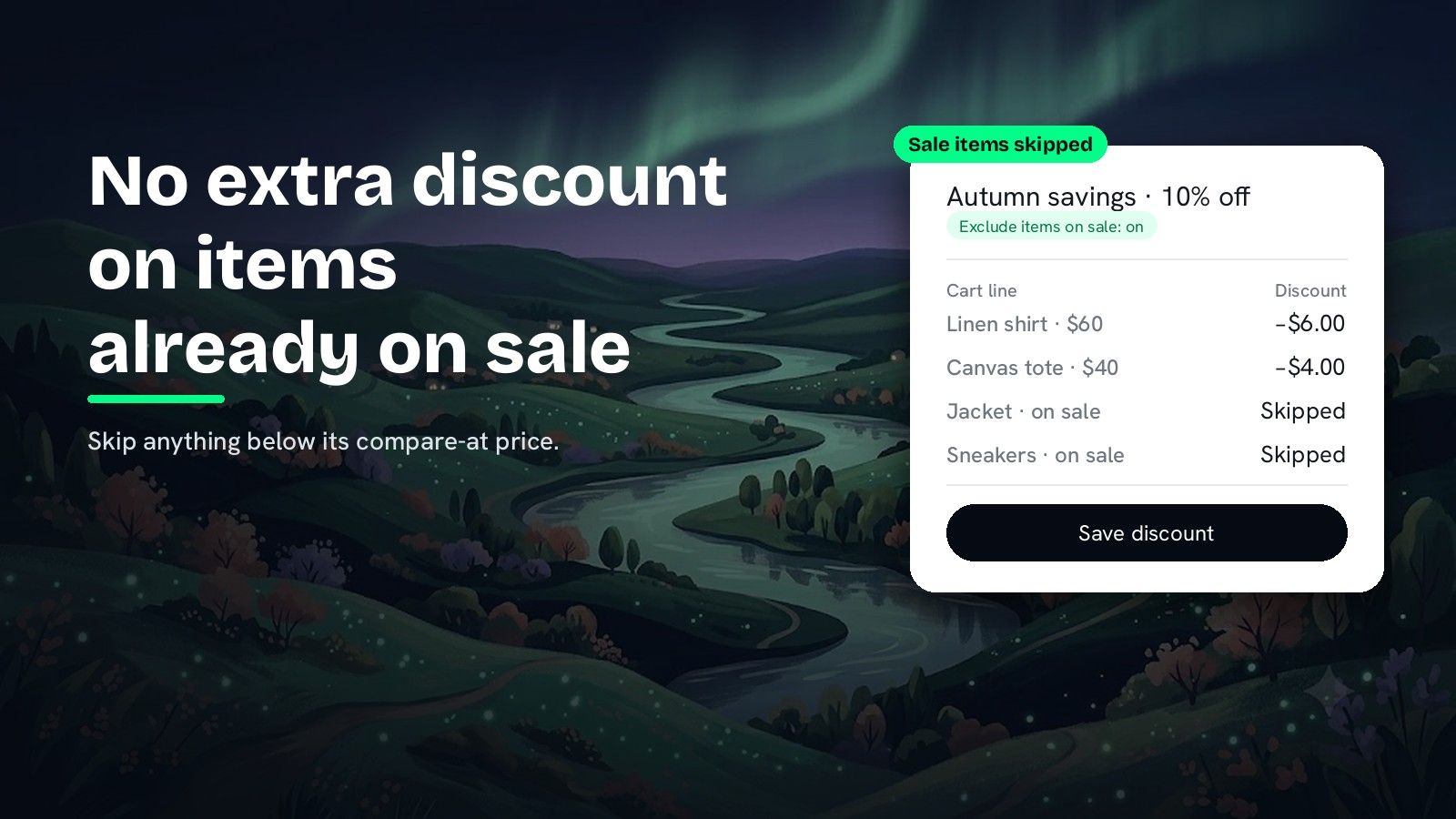
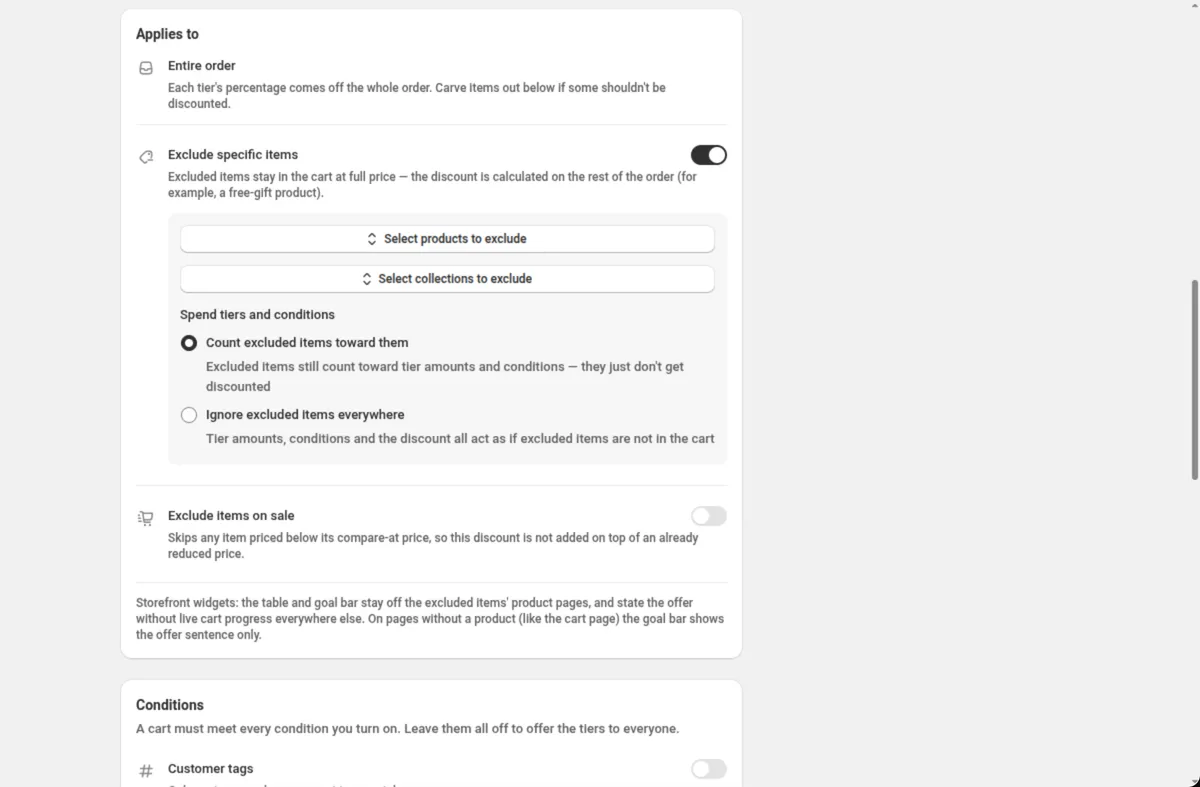
| Spend More Save More | Exclude items on sale (in Applies to) | “Skips any item priced below its compare-at price, so this discount is not added on top of an already reduced price.” |
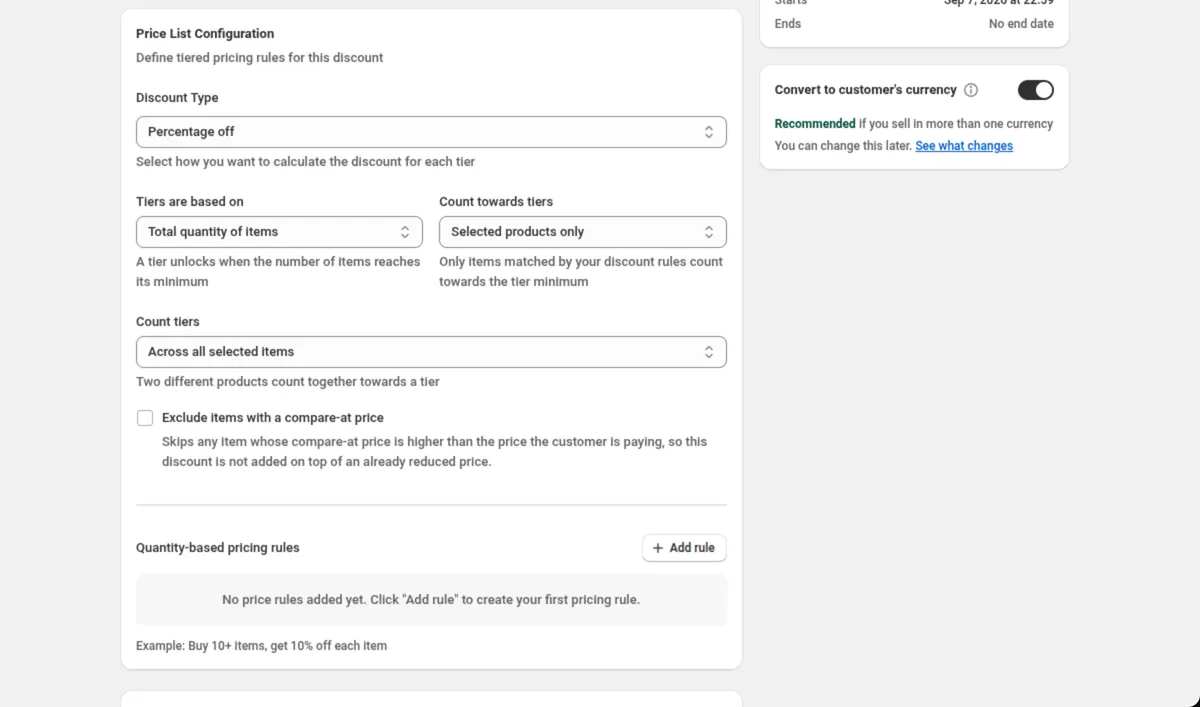
| Price List | Exclude items with a compare-at price (in Price List Configuration) | “Skips any item whose compare-at price is higher than the price the customer is paying” |
| Multi-offer, product offers | Compare-at price · is not higher than the current price, in Qualifying items | Discounts the items that are not marked down |
| Multi-offer, product offers | Discount type Percentage off compare-at price | Charges the Compare-at price minus your percentage; an item whose current price is already lower keeps it |
Each setting works on automatic discounts and on discount codes. For a percentage off chosen products that skips sale items, use a Multi-offer product offer. For quantity tiers that skip sale items, use a Price List discount.
How do you stop a discount code from applying to sale items?
Spend More Save More: a percentage off the order that skips sale items
- Open DiscountOS, click Create discount, and choose Spend More Save More. It sits under Product page offers, with the example “Spend $100, save 15%”.
- Choose the discount method and name it. Pick Automatic and type a Title, or pick Discount Code and type the code.
- Set the spend tiers. Edit Spend (amount) and Get (% off the order) on each tier, and use Add tier for more rungs.
- Turn on Exclude items on sale. It sits in the Applies to card, under Exclude specific items.
- Set combinations, markets and dates, then save. Save from the bar at the top of the page.
Price List: quantity tiers that skip sale items
- Open DiscountOS, click Create discount, and choose Price List. It sits under Product page offers.
- Set the Discount Type. Pick Percentage off, Fixed amount off or Fixed price per item. The rest of the card appears once you do.
- Tick Exclude items with a compare-at price. It sits in Price List Configuration, under Count tiers.
- Click Add rule for each tier. Fill in Quantity and the amount, for example Quantity 5 and Discount % 10.
- Narrow the products, set markets and dates, then save.
Multi-offer: a product offer on full-price items
- Open DiscountOS, click Create discount, and choose Multi-offer Discount. It sits under Advanced.
- Turn on Product discount under What does this discount give?, then set Discount type to Percentage off and the value.
- Add a group in Qualifying items with the condition Compare-at price · is not higher than the current price. The operator matches items whose compare-at price is not higher than the current price. Add more conditions to the same group, such as Specific collections, with Match all of these conditions.
- Under Applies to, set Discount these items to that group.
- Set dates and save.
Every condition and operator is listed in the Conditions docs.
What to know before you exclude sale items
- Set compare-at prices in Shopify admin. Every DiscountOS sale-item setting reads the Compare-at price on the product. An item marked down without a compare-at price looks full-price to the discount.
- Full-price items still get the discount. Items with no compare-at price are not skipped by Exclude items on sale or Exclude items with a compare-at price.
- Storefront widgets follow the setting. On Spend More Save More, the tier table and cart goal bar stay off the product pages of skipped items.
- Badges can follow it too. A DiscountOS Sale Badge has Skip products with a compare-at price, so a “20% off” badge does not show on items already marked down.
- Other discounts are separate. Skipping sale items in this discount does not stop a different discount from reaching them. Combinations are Shopify’s call.
Leaving gift cards or chosen products out as well? Read how to exclude products or gift cards from an order discount. Putting a ceiling on the same discount? Read how to cap a percentage discount at a maximum amount. For what stacked discounts do to margin, see the break-even guide.
Questions merchants ask
Can Shopify exclude sale items from a discount automatically? The Shopify Help Center page on amount off discounts describes no setting that skips items on sale. The native workaround is an automated collection with the condition Compare-at price is not set, used as the Applies to collection. DiscountOS skips sale items with Exclude items on sale on Spend More Save More, Exclude items with a compare-at price on Price List, and a Compare-at price condition on Multi-offer.
What counts as a sale item? An item priced below its compare-at price, the crossed-out price you set on the product in Shopify admin. DiscountOS Exclude items on sale skips any item priced below its compare-at price, so the discount is not added on top of an already reduced price.
Does this work for discount codes? Yes. Spend More Save More, Price List and Multi-offer each take Automatic or Discount Code as the method, and the sale-item settings work with either.
What happens to products with no compare-at price? They are full-price items, so they get the discount. The DiscountOS settings skip items whose compare-at price is higher than the price the customer pays. On Multi-offer, the app describes the operator is not higher than the current price as matching when the product has no compare-at price as well.
Which DiscountOS discount types can skip sale items? Spend More Save More (Exclude items on sale), Price List (Exclude items with a compare-at price) and Multi-offer product offers (a Compare-at price condition in Qualifying items). DiscountOS is free.
Sources
- Shopify Help Center, Amount off discounts: the settings of a native amount off discount. Read on 26 September 2026.
- Shopify Help Center, Understanding conditions for collections: “A product matches when any of its variants has an empty Compare-at price value.” and “Zero (0) isn’t the same as empty.” Read on 26 September 2026.
- DiscountOS on the Shopify App Store, listed as DiscountOS ‑ Market Discount: Built for Shopify, free.
- DiscountOS documentation: Spend More Save More, Price List, Multi-offer, Conditions, Sale badge.