How to set a maximum discount value on Shopify (cap a percentage discount)
Shopify discount cap: give 20% off but never more than $50 off. How to set a maximum discount value on a Shopify percentage discount, automatic or code.
DiscountOS is a Built for Shopify discount app that runs multiple offers inside a single automatic discount, including market-specific and tiered discounts.
Does Shopify have a discount cap or maximum discount value?
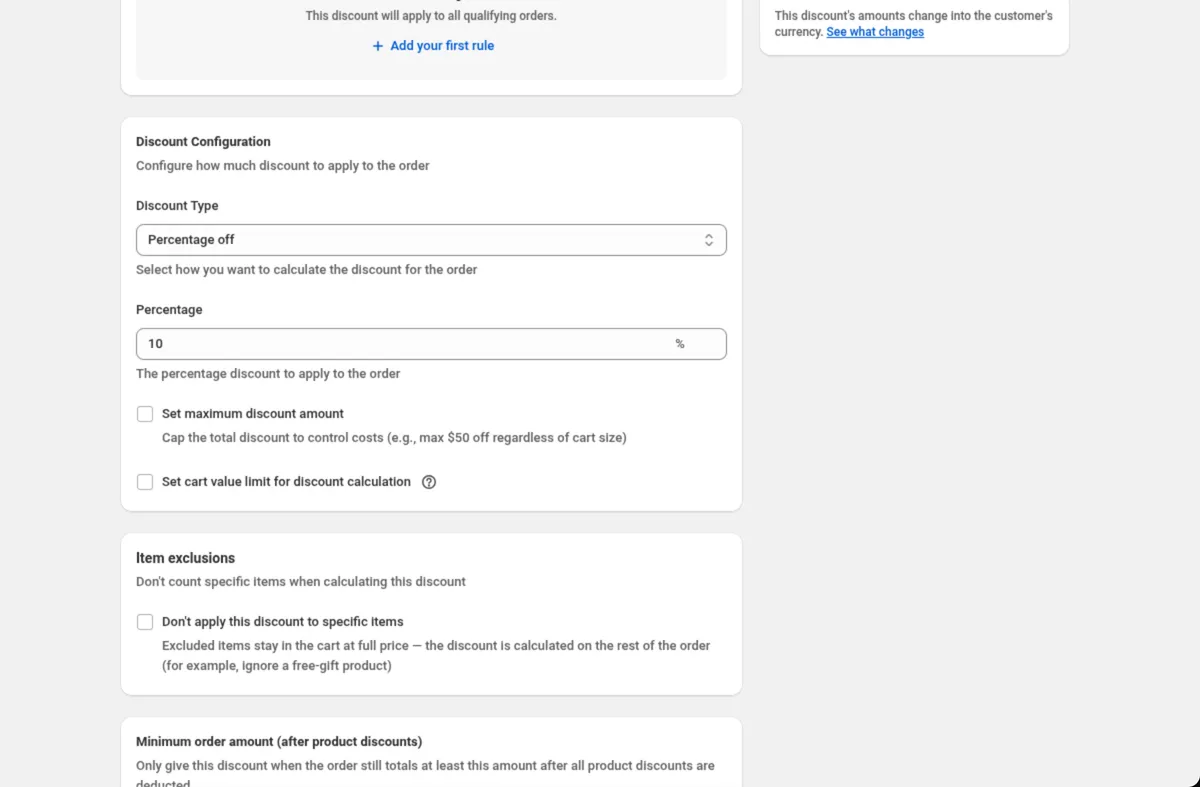
A capped percentage discount gives a percentage off up to a fixed money ceiling, for example 20% off with a maximum of $50 off. The Shopify Help Center page on amount off discounts walks through the settings of a native discount: Value (percentage or fixed amount), Applies to, Minimum requirements, Maximum discount uses, Combinations and Active dates. That page describes no maximum discount amount. The nearest-sounding setting, Maximum discount uses, is a different control: the Help Center describes it as a way to “set a total number of times that a discount can be used.” It counts redemptions, not dollars. So on a native percentage discount, a $4,000 order at 20% off gets $800 off. DiscountOS puts a ceiling on it with Set maximum discount amount, which caps the money taken off, and Set cart value limit for discount calculation, which caps the cart value the percentage is worked out on. Both sit on percentage Product and Order discounts and on percentage offers inside Multi-offer.
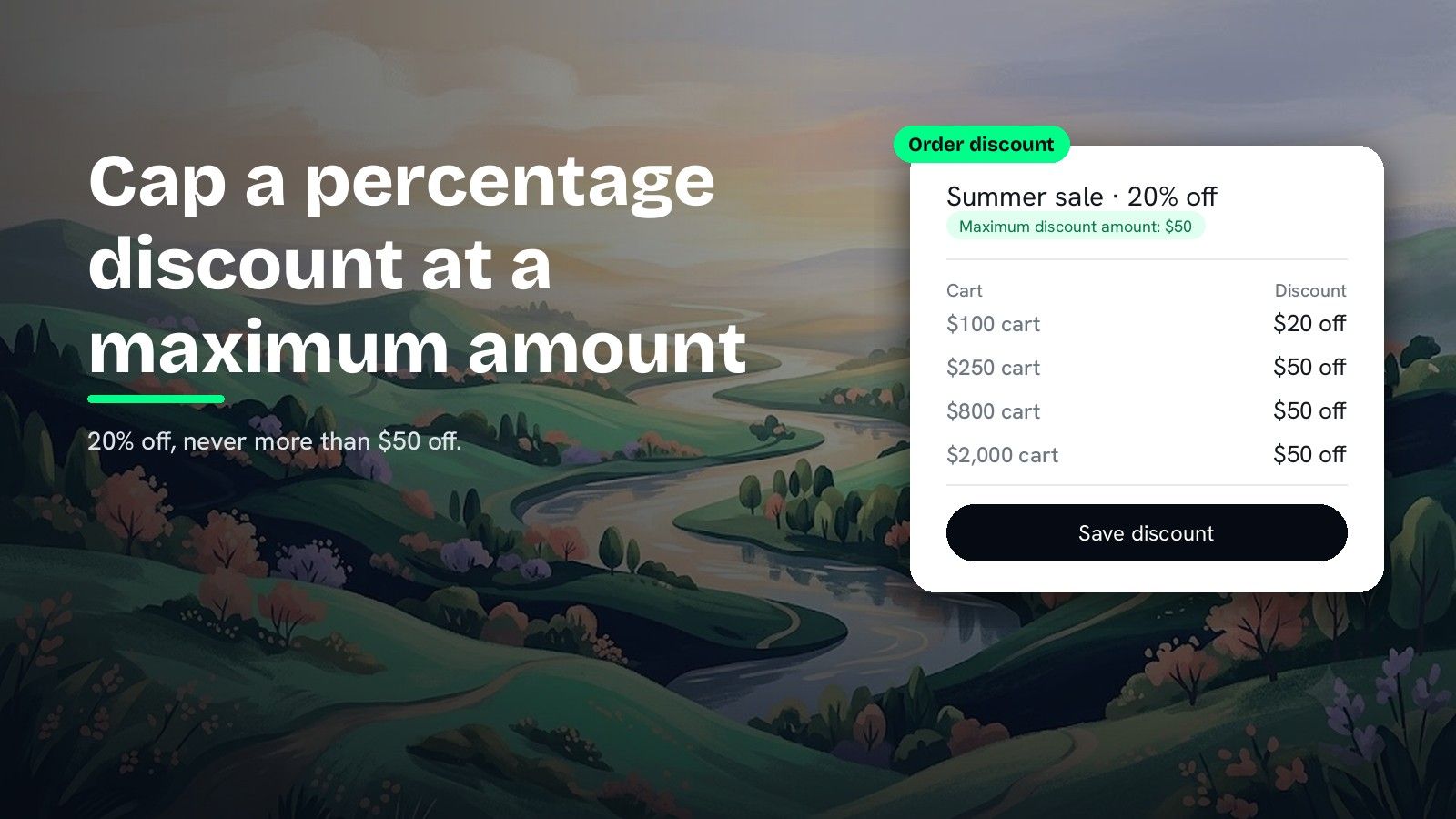
The difference matters most on big orders. Here is 20% off with a $50 maximum:
| Cart value | 20% off, no cap | 20% off, maximum $50 |
|---|---|---|
| $100 | $20 off | $20 off |
| $250 | $50 off | $50 off |
| $800 | $160 off | $50 off |
| $4,000 | $800 off | $50 off |
Below $250 the shopper gets the full 20%. From $250 up, the discount stays at $50.
Maximum discount amount or cart value limit: which one do you need?
DiscountOS gives two ways to put a ceiling on a percentage. They sit next to each other in the Discount Configuration card.
| Setting | What it caps | Example from the DiscountOS docs |
|---|---|---|
| Set maximum discount amount | The money taken off | 20% off with a maximum of 50 never gives more than 50 off |
| Set cart value limit for discount calculation | The cart value the percentage is worked out on | 10% off with a limit of 500: an 800 cart gets 50 off, a 300 cart gets 30 off |
Use Set maximum discount amount when you think in “never more than $X off”. Use Set cart value limit for discount calculation when you think in “the percentage counts up to a $Y cart”. On an order discount the two reach the same ceiling when the numbers match: 20% of a $250 limit is $50.
Where each setting is in DiscountOS
| DiscountOS discount type | Set maximum discount amount | Set cart value limit for discount calculation |
|---|---|---|
| Product discount, Percentage off | Yes | Yes |
| Order discount, Percentage off | Yes | Yes |
| Multi-offer, product and order offers set to Percentage off | Yes, per offer | Yes, per offer |
How do you cap a percentage discount with DiscountOS?
These steps use an Order discount. A Product discount has the same two checkboxes in the same card.
- Open DiscountOS, click Create discount, and choose Order Discounts. It sits under Discounts in the create menu. Choose Product Discounts instead when the percentage should come off chosen items, not the order total.
- Choose the discount method and name it. Pick Automatic and type a Title such as “Summer sale · 20% off”, or pick Discount Code and type the code.
- Add discount rules if you need them. Click Add your first rule for a condition such as Cart subtotal · is greater than or equal to · 100. With no rules, the discount applies to all qualifying orders.
- Set the percentage. In Discount Configuration, set Discount Type to Percentage off and type the Percentage, for example 20.
- Tick Set maximum discount amount. Type the ceiling in Maximum Discount Amount, for example 50.
- Or tick Set cart value limit for discount calculation. Type the cart value in Cart Value Limit, for example 250.
- Set combinations, customers, markets and dates, then save. Save from the bar at the top of the page.
The finished setup, as it reads in the Order discount docs:
Discount method: AutomaticTitle: Summer sale · 10% offDiscount Type: Percentage offPercentage: 10Set maximum discount amount: tickedMaximum Discount Amount: 50Capping one offer inside a Multi-offer discount
In a Multi-offer discount, each product or order offer set to Percentage off has its own Set maximum discount amount and Set cart value limit for discount calculation. One discount can hold a capped order offer and an uncapped product offer side by side. The Multi-offer docs show a code that gives 10% off the order, capped at 40:
Discount method: Discount CodeDiscount Code: WEEKEND10Order discount 1 → Discount type: Percentage off · Percentage: 10Order discount 1 → Set maximum discount amount: ticked · Maximum Discount Amount: 40What to know before you cap a discount
- The cap is a ceiling, not a target. Small carts still get the full percentage. The cap starts working at the cart value where the percentage reaches it.
- Set a minimum spend with a Cart subtotal rule. On a capped Order discount, add a rule such as Cart subtotal · is greater than or equal to · 100, and leave Require a minimum order amount after product discounts off when you use a cap.
- Currencies. On an Order discount, Convert to customer’s currency moves the discount amount, the maximum discount and the maximum cart value. On Multi-offer it moves fixed amounts, caps and money conditions on every offer. The Markets and currency docs list what moves for each type.
- Codes can be capped twice. On a discount code, Maximum discount usage limits the number of uses in total and per customer, and Set maximum discount amount limits the money per order.
Choosing the percentage in the first place? The break-even guide shows what a percentage does to margin. To stop the capped discount landing on items already marked down, read how to exclude sale items from a discount. Running many campaigns at once? The Shopify Help Center allows “a maximum of 25 active automatic discounts,” app ones included, and how to have more than 25 automatic discounts on Shopify covers running more offers in fewer slots.
Questions merchants ask
Does Shopify have a maximum discount value setting? The Shopify Help Center page on amount off discounts lists Value, Applies to, Minimum requirements, Maximum discount uses, Combinations and Active dates, and describes no maximum discount amount. DiscountOS adds Set maximum discount amount to percentage Product and Order discounts, so 20% off never gives more than the amount you type.
Is Maximum discount uses the same as a maximum discount amount? No. In the Shopify Help Center, Maximum discount uses limits how many times a discount can be used. A maximum discount amount limits how much money one order can get off, which is what Set maximum discount amount does in DiscountOS.
What is the difference between a maximum discount amount and a cart value limit? A maximum discount amount caps the money taken off. A cart value limit caps the cart value the percentage is worked out on. In DiscountOS, 10% off with a cart value limit of 500 gives 50 off an 800 cart and 30 off a 300 cart.
Can I cap a discount code as well as an automatic discount? Yes. Set maximum discount amount appears on DiscountOS Product, Order and Multi-offer percentage discounts with either method, Automatic or Discount Code. On a code you can also limit the total number of uses and one use per customer.
Does the cap change in other currencies? On a DiscountOS Order discount and a Multi-offer discount, Convert to customer’s currency moves the maximum discount into the currency the customer pays in, so a cap of 50 is worth 50 to them. DiscountOS is free.
Sources
- Shopify Help Center, Amount off discounts: the settings of a native amount off discount, and “Check Limit number of times this discount can be used in total to set a total number of times that a discount can be used.” Read on 26 September 2026.
- Shopify Help Center, Discount combinations: “You can have a maximum of 25 active automatic discounts. This total includes app-based discounts.” Read on 26 September 2026.
- DiscountOS on the Shopify App Store, listed as DiscountOS ‑ Market Discount: Built for Shopify, free.
- DiscountOS documentation: Order discount, Product discount, Multi-offer, Markets and currency, Usage limits and scheduling.