How to exclude products and gift cards from a Shopify order discount or code
Take a percentage off the order, automatic or with a code, and keep gift cards and the products or collections you choose at full price.
DiscountOS is a Built for Shopify discount app that runs multiple offers inside a single automatic discount, including market-specific and tiered discounts.
Can you exclude products from a Shopify order discount?
An order discount takes a percentage or a fixed amount off the whole order, so by default the saving is spread across the items in the cart. The Shopify Help Center page on amount off discounts lists the settings of a native Amount off orders discount: Value, Minimum requirements, Maximum discount uses, Combinations and Active dates. That page describes no setting that excludes chosen products or collections from an order discount. Two gift card rules are documented. The Help Center page on discounting gift cards says: “Discounts that apply to specific collections don’t apply to gift card products within the collection.” And the amount off page says: “Purchased gift cards don’t count towards the minimum purchase amount unless you specifically select the gift card product for the discount.” The native workaround is to switch to an Amount off products discount on chosen collections, which turns an order discount into a product discount. DiscountOS keeps it an order discount and adds Item exclusions instead.
Shopify workaround or DiscountOS Item exclusions?
| Need | Native Shopify | DiscountOS Order discount |
|---|---|---|
| Take a percentage off the whole order | Amount off orders | Percentage off |
| Leave named products at full price | No exclusion setting on the amount off page; rebuild as Amount off products on the collections you want | Select products to exclude |
| Leave whole collections at full price | No exclusion setting on the amount off page | Select collections to exclude |
| Leave gift cards at full price | The Help Center says collection discounts don’t apply to gift card products in the collection | Pick the gift card product to exclude |
| Decide whether excluded items help reach a minimum | Not described on the amount off page | Count excluded items toward requirements or Ignore excluded items everywhere |
How to exclude products and gift cards from a discount in DiscountOS
- Open DiscountOS, click Create discount, and choose Order Discounts. It sits under Discounts in the create menu, with the example “$10 off orders over $50”.
- Choose the discount method and name it. Pick Automatic and type a Title such as “Autumn 15% off”, or pick Discount Code and type the code. Item exclusions work the same way for both.
- Set the discount. In Discount Configuration, set Discount Type to Percentage off or Fixed amount off and type the value.
- Tick Don’t apply this discount to specific items. It sits in the Item exclusions card. The help text reads: “Excluded items stay in the cart at full price.”
- Pick what to exclude. Use Select products to exclude for single products, such as your gift card product, and Select collections to exclude for whole collections, such as gift wrap.
- Choose how excluded items count. Under Minimum requirements (discount rules), keep Count excluded items toward requirements or pick Ignore excluded items everywhere.
- Set combinations, customers, markets and dates, then save. Save from the bar at the top of the page.
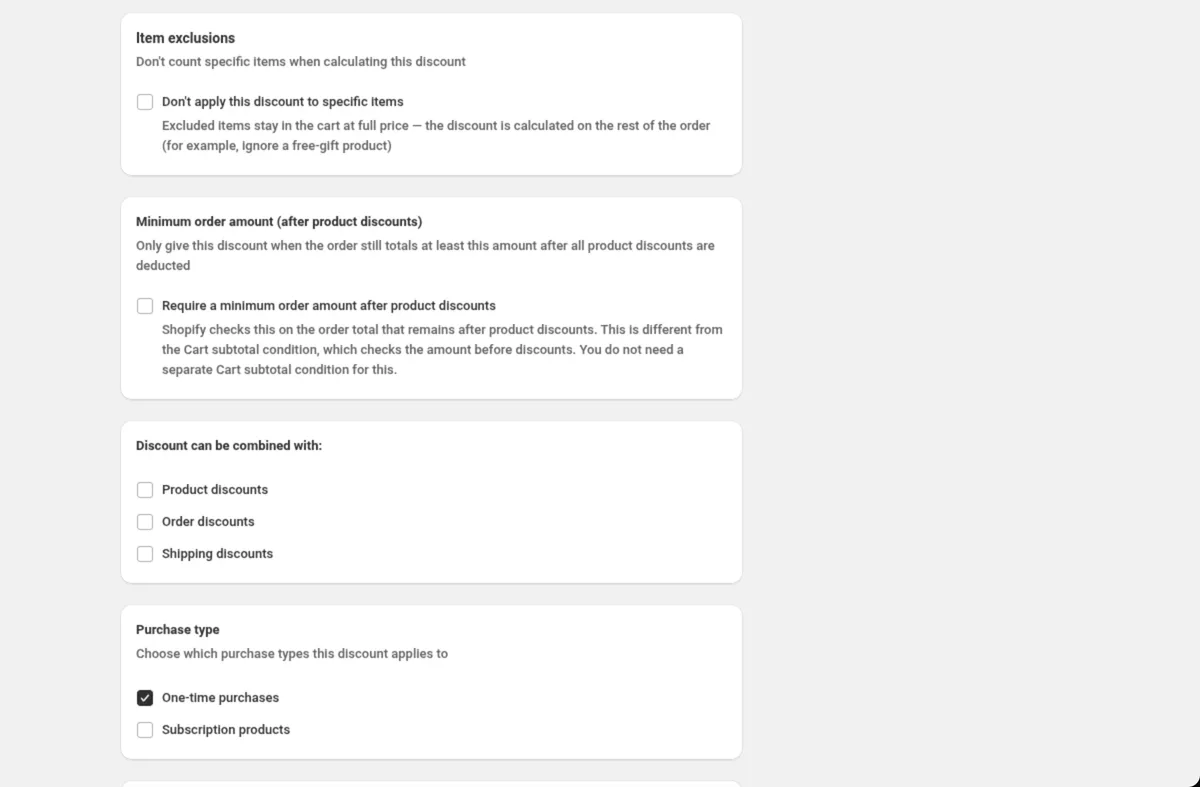
The finished setup, as it reads in the Order discount docs:
Discount method: AutomaticTitle: Autumn 15% offDiscount Type: Percentage offPercentage: 15Don't apply this discount to specific items: tickedSelect collections to exclude: Gift wrapMinimum requirements (discount rules): Count excluded items toward requirementsShould excluded items count toward the minimum spend?
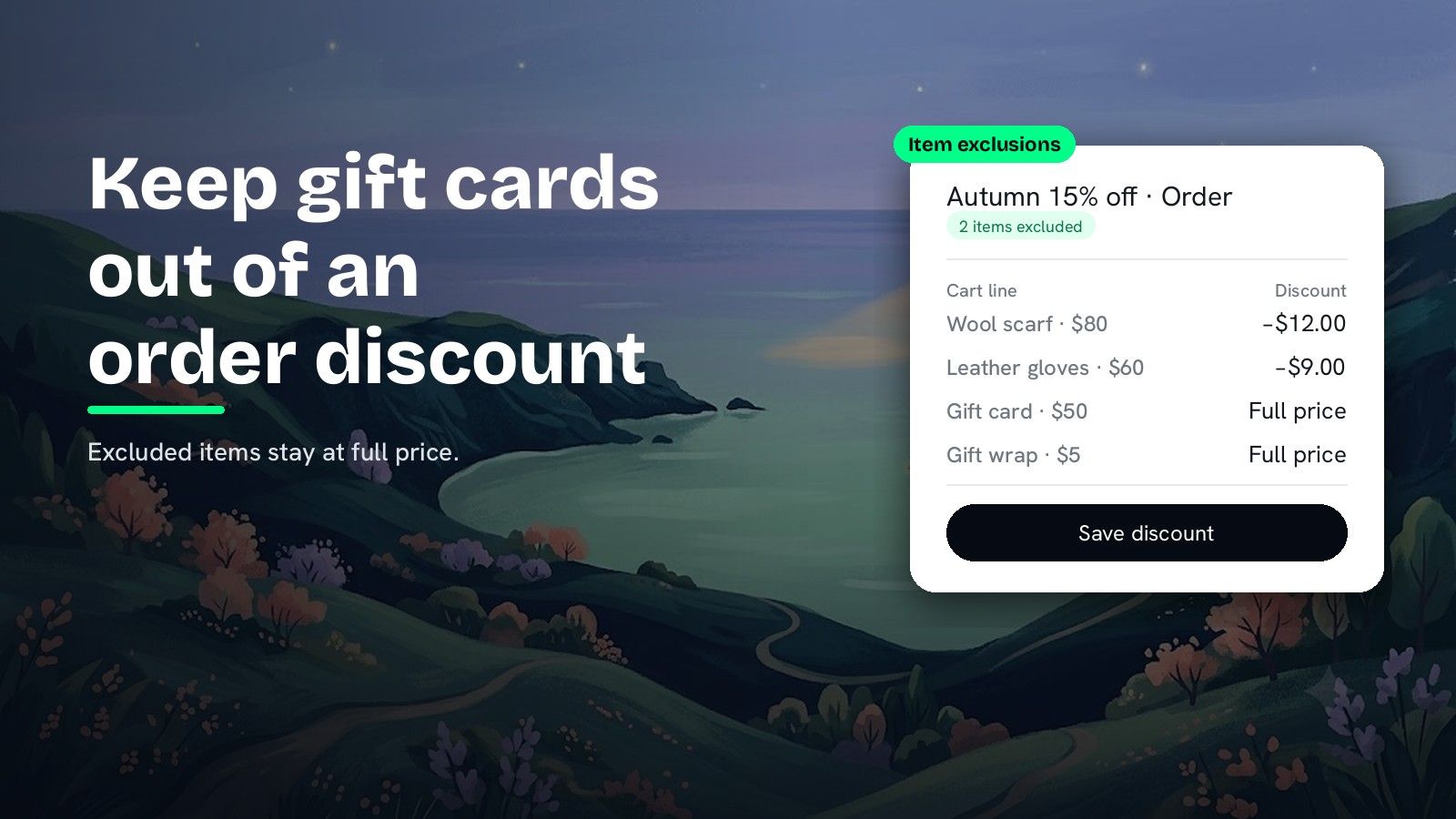
The choice under Minimum requirements (discount rules) decides it. Take a 15% order discount with the rule Cart subtotal · is greater than or equal to · 150, and a cart holding a $80 scarf, $60 gloves and a $50 gift card, with the gift card excluded.
| Setting | What it does, per the app’s help text | Cart counted for the rule | Result |
|---|---|---|---|
| Count excluded items toward requirements (default) | Excluded items still count toward minimums like cart total, and they get no discount | $190 | 15% off $140 = $21 off |
| Ignore excluded items everywhere | “Requirements and the discount both act as if excluded items are not in the cart” | $140 | Rule not met, no discount |
Pick Ignore excluded items everywhere when buying a gift card should not unlock the order discount.
Can you exclude items from other DiscountOS discount types?
| DiscountOS discount type | Exclusion setting |
|---|---|
| Order discount | Don’t apply this discount to specific items in Item exclusions |
| Spend More Save More | Exclude specific items in Applies to |
| Multi-offer, order offers | Don’t apply this discount to specific items in Item exclusions on each order card |
Spend More Save More
A Spend More Save More discount takes each tier’s percentage off the entire order. Turn on Exclude specific items, pick products or collections, then choose under Spend tiers and conditions: Count excluded items toward them (the default) or Ignore excluded items everywhere. The same card has Exclude items on sale, covered in how to exclude sale items from a discount.
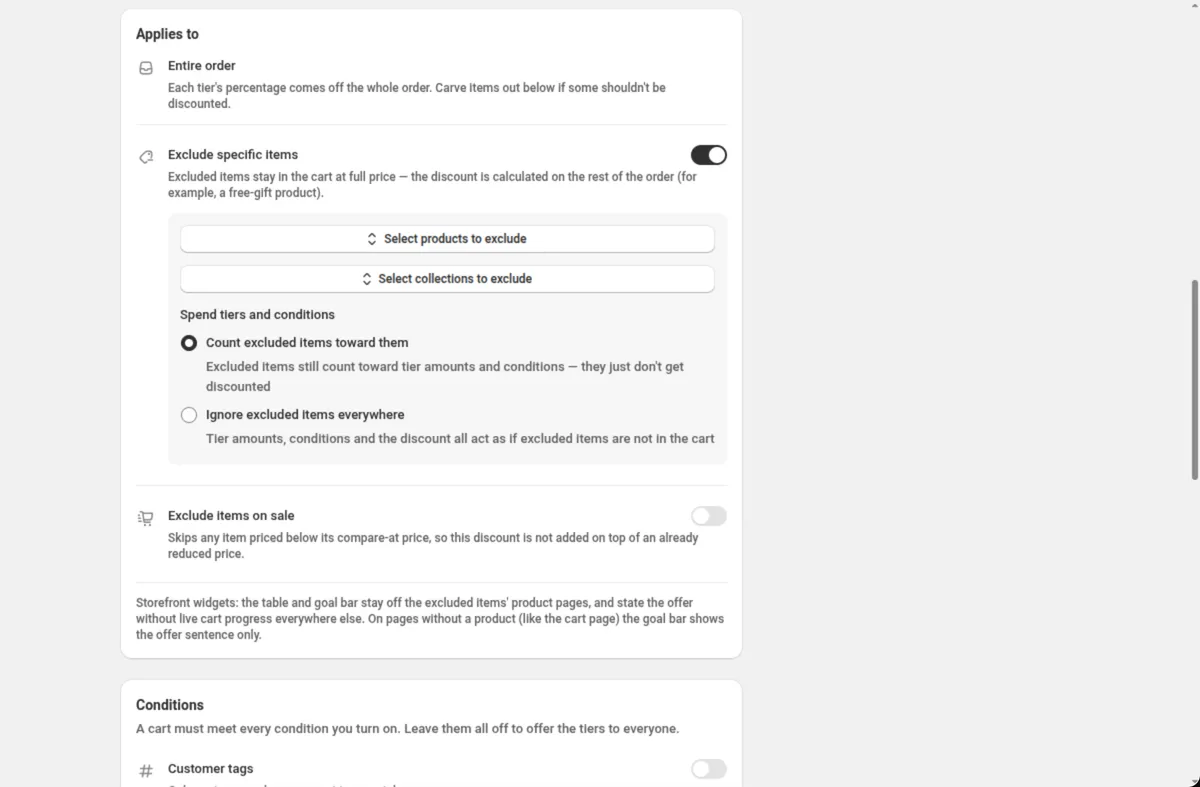
The Spend More Save More docs show a ladder that leaves gift cards and sale items alone:
Discount method: AutomaticTitle: Autumn savingsTier 1 → Spend (amount): 75 · Get (% off the order): 5Tier 2 → Spend (amount): 150 · Get (% off the order): 10Tier 3 → Spend (amount): 250 · Get (% off the order): 15Exclude specific items: onSelect collections to exclude: Gift cardsSpend tiers and conditions: Count excluded items toward themExclude items on sale: onMulti-offer
Every order offer inside a Multi-offer discount has its own Item exclusions, with the same product and collection pickers and the same count or ignore choice. One discount can hold an order offer that skips gift cards next to product and shipping offers.
Tips for excluding products from a discount
- Excluded items are not removed. They stay in the cart at full price, and the discount is calculated on the rest of the order.
- Pick at least one product or collection. Once the checkbox is ticked, choose what to exclude before you save.
- Storefront widgets follow the exclusions. On Spend More Save More, the tier table shows on the product pages the offer covers.
- Other discounts still apply. Excluding an item from this discount does not stop a different discount from reaching it. Combinations are Shopify’s call.
Capping the same discount on big orders? Read how to cap a percentage discount at a maximum amount. For the slot limit on automatic discounts, read how to have more than 25 automatic discounts on Shopify.
Questions merchants ask
Can you exclude products from an order discount in Shopify? The Shopify Help Center page on amount off discounts describes no setting that excludes chosen products from an amount off order discount. DiscountOS adds Item exclusions to its Order discount: tick Don’t apply this discount to specific items and pick the products and collections that stay at full price.
Do Shopify discounts apply to gift cards? They can. The Shopify Help Center says you can create discounts that apply to specific gift card products, and that discounts that apply to specific collections don’t apply to gift card products within the collection. To keep a gift card out of a DiscountOS order discount, pick the gift card product under Select products to exclude.
Can I exclude products from an order discount code, not just an automatic discount? Yes. A DiscountOS Order discount runs as Automatic or as a Discount Code, and Item exclusions sit in the same form for both. Spend More Save More and each order offer inside a Multi-offer discount have the same product and collection pickers.
Do excluded items still count toward the minimum spend? You choose. Count excluded items toward requirements, the default, lets excluded items help reach your minimums while they get no discount. Ignore excluded items everywhere makes the requirements and the discount act as if those items are not in the cart.
Can I exclude items from a tiered spend discount? Yes. A DiscountOS Spend More Save More discount has Exclude specific items in its Applies to card, with the same count or ignore choice for spend tiers and conditions. DiscountOS is free.
Sources
- Shopify Help Center, Amount off discounts: the settings of a native amount off order discount, and “Purchased gift cards don’t count towards the minimum purchase amount unless you specifically select the gift card product for the discount.” Read on 26 September 2026.
- Shopify Help Center, Add a discount to a gift card: “Discounts that apply to specific collections don’t apply to gift card products within the collection.” Read on 26 September 2026.
- DiscountOS on the Shopify App Store, listed as DiscountOS ‑ Market Discount: Built for Shopify, free.
- DiscountOS documentation: Order discount, Spend More Save More, Multi-offer, Conditions.