
Which discounts are published
Este conteúdo não está disponível em sua língua ainda.
The rule
Section titled “The rule”Only discounts that are live right now are in the data. Then:
| Discount | In the data? |
|---|---|
| A DiscountOS automatic discount | Yes, unless you tag it dos:unpublish |
| A DiscountOS discount code | Only when you tag it dos:publish |
| Shopify’s own discount, automatic or code | Only when you tag it dos:publish |
| A discount made by another app | Only when you tag it dos:publish |
| A DiscountOS discount that works only in your physical stores | Never, it cannot apply to an online order |
| A DiscountOS discount in test mode | Yes, marked test. Your theme should hide it from shoppers. See Filtering. |
A scheduled discount is not in the data before its start time. An ended, expired or turned-off discount is removed.
Where to add the tags
Section titled “Where to add the tags”For Shopify’s own discounts and other apps’ discounts: open the discount in Shopify
(Discounts in your admin) and use the Tags card on the right. Add dos:publish and save.
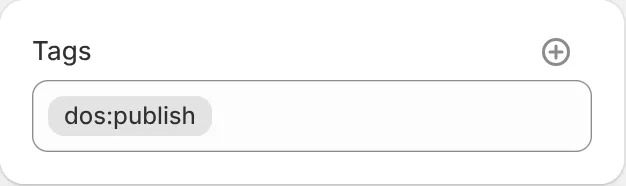
For DiscountOS discounts: use the Tags field in the discount’s form in the app.
See what is published from Shopify and other apps
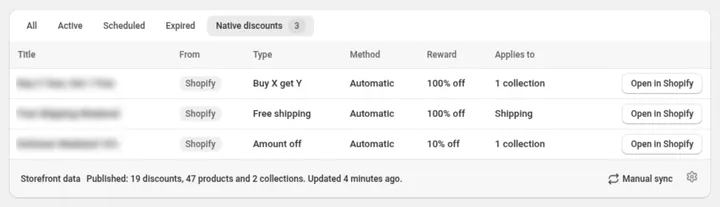
Section titled “See what is published from Shopify and other apps”The Native discounts tab on Manage discounts lists every published discount that DiscountOS did not make, with a button to open it in Shopify.
Which discounts can be the best value
Section titled “Which discounts can be the best value”The best-value keys (max_reward_percent, max_reward_cents, max_reward_discount) are picked
from your DiscountOS discounts and Shopify’s own together; discounts made by other apps never
count. The highest value among the ones that count wins.
| Discount | Counts towards the best value |
|---|---|
| Automatic, amount off (a percent or money), for every customer, on one-time purchases | Yes, when DiscountOS or Shopify made it |
| A discount made by another app | No |
| Buy X get Y | No |
| A discount code | No |
| A discount limited to some customers, markets or conditions | No |
| Free shipping or a free gift | No |
| Test mode | No |
Your theme can still show every discount from the discounts list in its own way. The rule above
only decides which one fills the ready-made best-value keys.
Limits
Section titled “Limits”| Limit | Value | What happens past it |
|---|---|---|
| Automatic discounts in the data | 30 | Nothing is written and the previous data is kept. The Storefront data line tells you how many to remove. |
Tagged discounts (dos:publish) | 30 | Same as above. |
| Products written through Publish to collection products | 8,000 | Discounts and collections still sync; the products do not. The line says so. |
Active discounts carrying any dos: tag (including dos:unpublish) | 2,500 | Nothing is written and the previous data is kept. The line asks you to remove the tag from discounts that don’t need it. |