Free gift with purchase on Shopify: how to add one to the cart automatically
Three ways to run a free gift with purchase on Shopify, what each costs, and a setup that adds the gift to the cart automatically, with no order cap.
What a free gift with purchase is, and how it compares to a percentage off
A free gift with purchase (GWP) gives the shopper a specific item at $0 once the cart passes a threshold: spend $100, get the tote; buy three candles, get the fourth. It is the offer beauty brands have run at counters for decades, and it works online for the same reasons.
- It moves the order up, not the price down. A 15% code lowers every order. A gift at $75 pulls the $60 cart to $75 and leaves full-price orders alone.
- It costs you cost price, not retail. The shopper values the gift at its shelf price. You pay what it cost you. A $12 sample kit that costs $3 reads as a 12% reward and costs 3%.
- It moves inventory you choose. Samples, last-season colours, the accessory nobody finds on its own.
If you have not read it yet, our break-even guide shows why a 20% discount at 40% margin needs double the units to break even. A gift rarely gets anywhere near that.
The three ways to run it on Shopify
| Method | Adds the gift to the cart by itself | Threshold types | Cost |
|---|---|---|---|
| DiscountOS | Yes, with the app embed | Spend or quantity, optional gift tiers, same-item mode | $14.90 every 30 days, 7-day free trial, no order cap |
| Shopify’s native Buy X get Y | No. The customer adds the gift manually | Quantity or amount of specific items | Included in Shopify |
| A gift app (Monk, Fokkio, BOGOS) | Yes, with the app’s embed | Spend, quantity, product rules | Free plans capped at 10 orders/month (Fokkio) or 30 orders total (BOGOS); paid from $6.99 to $49.99/month; Monk from $1 for the first month then a paid plan |
Method 1: DiscountOS, with no order cap
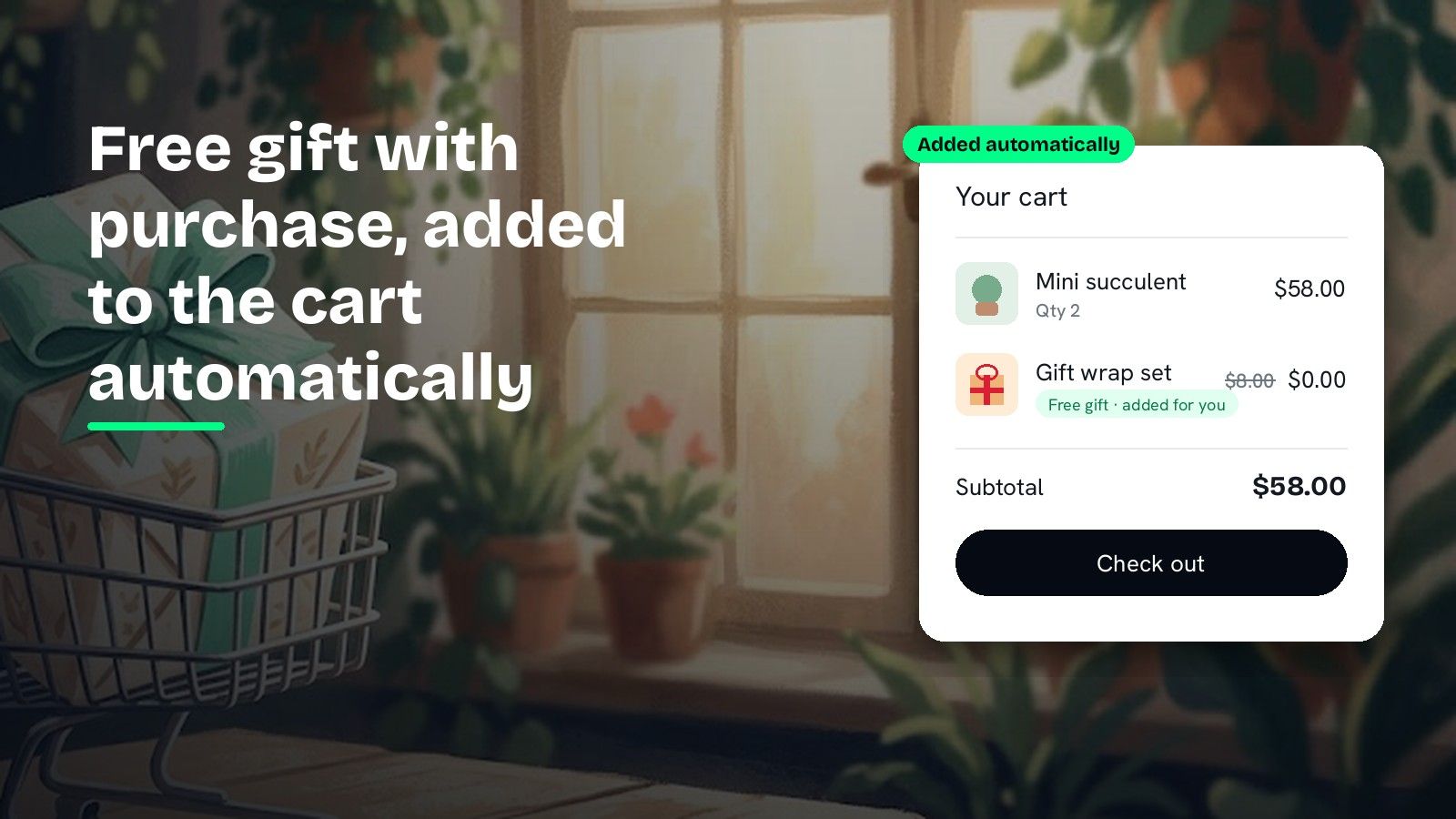
DiscountOS runs gift with purchase as a real Shopify discount on Shopify Functions, so the gift is priced at $0 by Shopify itself. Once a cart qualifies, the app embed adds the gift line; if the cart later falls under the threshold, the gift comes back out. There is no order cap and one plan for every feature, $14.90 every 30 days with a 7-day free trial, on Basic, Shopify, Advanced and Plus. You can build the gift and test it before choosing a plan. The setup is below, screen by screen.
Method 2: Shopify’s built-in Buy X get Y
Shopify ships a Buy X get Y discount type. You choose what the customer buys, what they get, and set the “get” discount to free. It is quick and it costs nothing. The catch is the one line from Shopify’s Buy X get Y help page:
Customers must add all items to their cart manually. The free or discounted “get” item is never automatically added to the cart.
So the shopper has to know the gift exists, find it, and add it. Most will not. Merchants on the Shopify Community forum end up adding custom theme code to push the item in, which breaks on the next theme update. Use the native discount if the gift is something the shopper already wants to add, and you are happy telling them to.
Method 3: a paid gift app
The gift-app category is crowded and the good ones are polished. Reading the listings on 8 September 2026:
- Monk Free Gift, BOGO and Upsell, 4.9 stars from 587 reviews. $1 for the first month, then a paid plan; free only for development stores.
- Fokkio Free Gift With Purchase, 4.8 stars from 78 reviews. A free plan up to 10 orders a month, then $6.99 a month for 50 orders and $12.99 above that.
- BOGOS: Free Gift Bundle Upsell, 5.0 stars from 4,558 reviews. A free plan with 30 free orders in total, then $29.99 a month for 300 orders and $0.05 per extra order, or $49.99 a month.
They all add the gift to the cart automatically. What you pay for is the order volume, and a busy store crosses the free tier in a weekend.
Gifts are one job among many. Our 2026 roundup of discount apps compares eight of them on everything else they cover.
How to add a free gift with purchase automatically
You need DiscountOS installed, which takes one click from the App Store listing, and the gift product published in your store.
1. Open Gift with Purchase from the create menu
In the app, choose Create discount. Gift with Purchase sits under Advanced, next to Multi-offer and Block Codes.

2. Name it and set the trigger
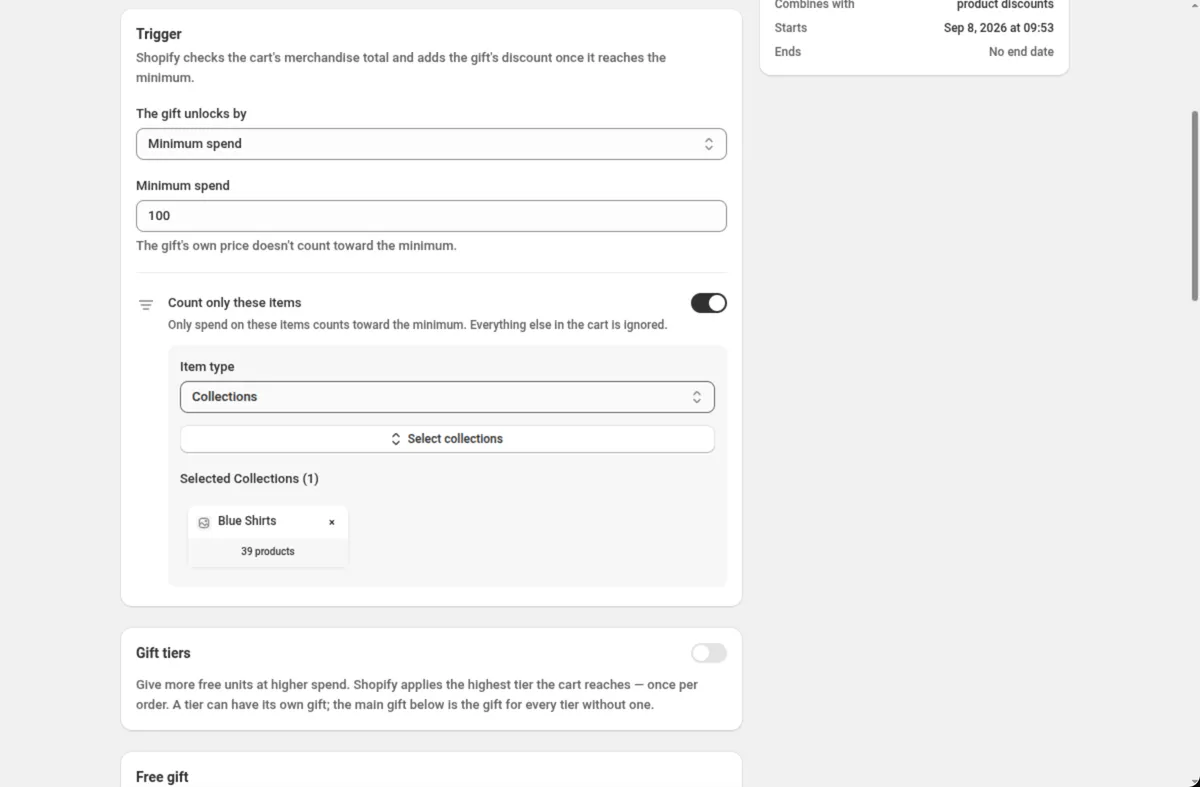
Type a Title. Shoppers see it on the discount line, so write it the way you would say it: “Free tote over $100”. Then choose how The gift unlocks by: Minimum spend for a money threshold or Minimum quantity for a unit count.
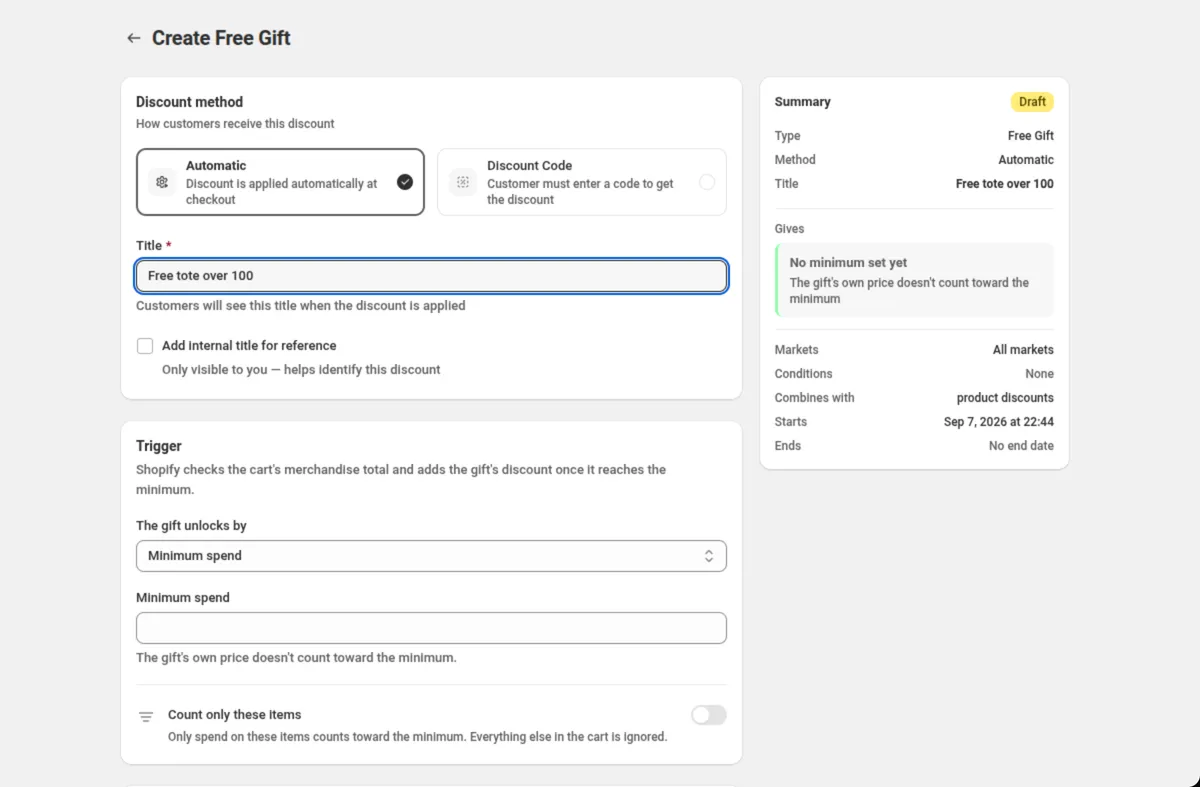
Turn on Count only these items if only some products, collections or tags should count toward the threshold. That is how you make a gift that only the skincare collection unlocks, or that ignores gift cards.
3. Pick the gift
In Free gift, pick one to five product variants. With more than one, the shopper can choose which they want. Set Free quantity, the units given free per order, and if you want a ceiling, Maximum gifts per order.
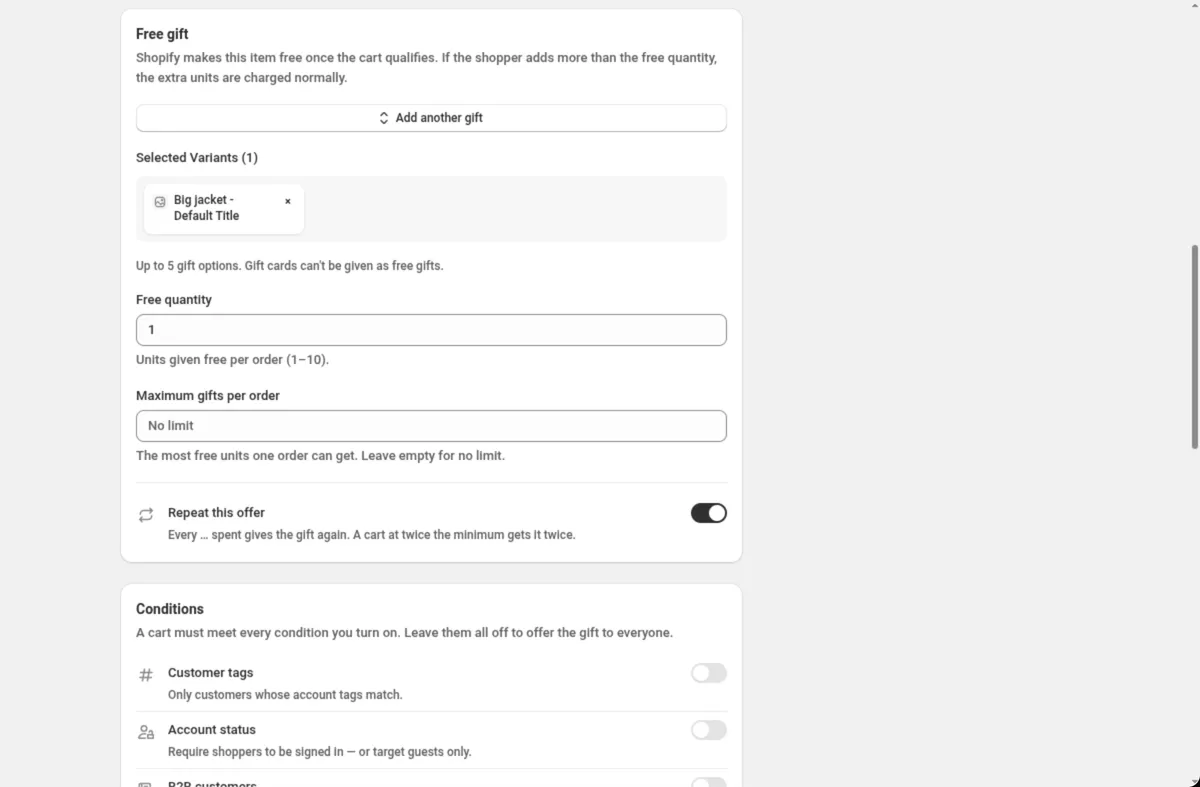
Three switches change the shape of the offer:
- Gift tiers turns one threshold into a ladder of steps: spend $50 for one sample, $100 for two, $200 for the full-size. Each order gets one tier’s worth, so tiers do not stack.
- Same item as the gift appears for a quantity trigger and turns the offer into “buy 2, get the 3rd free” on the same product. The third unit is the gift.
- Repeat this offer hands out the gift again for every full set, so buy 4 gets 2 free.
4. Turn on the app embed once
The Storefront card in the discount shows whether the DiscountOS app embed is on in your theme. With it on, the gift is added to the cart by itself the moment the cart qualifies, and taken out if the shopper drops below the threshold. Turn it on from the card’s button, which opens your theme editor on the App embeds panel; it stays on for every future gift.

5. Set the rest and save
- Conditions limit who gets the gift: customer tags, logged-in only, B2B, order count, a cart attribute.
- Discount can be combined with has product discounts ticked for a new gift on purpose, so a running sale does not block the gift. Untick it if the gift should be the only discount.
- Markets limit the gift to the countries you choose, and Active Dates schedule it in your store’s timezone.
Save. The gift is a live Shopify discount from that moment (on a store without a plan it is saved in test mode, so only customers tagged dos-test get it). Add a qualifying cart in your own storefront and watch the line appear at $0.
Seven gift with purchase ideas
Each one is a few minutes in the setup above.
- Threshold just above average order value. If your average order is $62, unlock the gift at $75. The shopper adds one more item to get there.
- Sample as the gift. A travel size that costs you $2 introduces a full-size product you sell for $30.
- Buy 2, get the 3rd free with Same item as the gift, on consumables that shoppers restock anyway.
- Gift tiers for a launch. $50 gets the sticker pack, $100 gets the tote, $200 gets the hoodie. Show the ladder in the cart goal bar so shoppers see the next step.
- VIP gift. Add a customer tag condition so only tagged customers see the offer.
- Market-specific gift. A gift for one country during a local holiday, scoped with Markets.
- Clearance as the gift. Last season’s colour moves out at cost, attached to full-price orders.
Run the numbers first. Gift cost divided by the threshold is your effective discount rate; keep it where your margin can carry it.
Where it shows for the shopper
- In the cart and at checkout: the gift appears as a line at $0.00 with your title on the discount line. Automatic discounts apply in the cart, not only on the last step.
- On the product page: pair the gift with a cart goal bar or a sale badge so the offer is visible before the shopper adds anything.
- On Shopify POS: the gift is not added by itself, because there is no theme to run the embed. Staff add the gift and it rings up free.
Questions merchants ask
Can Shopify add a free gift to the cart automatically? Not on its own. Shopify’s native Buy X get Y discount makes the gift free, but the Help Center states the customer must add every item to the cart manually and the gift is never added automatically. An app that runs on Shopify Functions with a theme app embed can add and remove the gift for the shopper.
What is the best free gift with purchase app for Shopify? DiscountOS runs gift with purchase on every Shopify plan, with spend or quantity triggers, gift tiers, a choice of gifts, automatic adding and removing, and no order limits. It is one plan at $14.90 every 30 days with a 7-day free trial. Fokkio and BOGOS have free plans capped at 10 orders a month and 30 orders in total respectively; Monk is paid.
How much should the free gift cost me? Treat the gift like a discount: its cost to you divided by the spend it unlocks is the effective discount rate. A $4 gift that unlocks a $100 order is a 4% discount, which most margins can absorb. Set the threshold a little above your current average order value so the gift lifts orders rather than rewarding what shoppers already spend.
Does the free gift work with discount codes or on Shopify POS? In DiscountOS the gift runs as an automatic discount and combines with product discounts by default, so a code the shopper enters can still apply. On Shopify POS the gift is not added by itself because there is no theme; staff add it and it rings up free.
Can I do buy 2, get the 3rd free of the same product? Yes. Set the trigger to a minimum quantity of 2 and turn on Same item as the gift. The third unit of the qualifying product becomes the gift. Repeat this offer is hidden while Same item as the gift is on.
Sources
- Shopify Help Center, Buy X get Y discounts: “Customers must add all items to their cart manually. The free or discounted ‘get’ item is never automatically added to the cart.”
- Shopify App Store listings read on 8 September 2026 (BOGOS re-read on 28 October 2026): DiscountOS, Monk Free Gift BOGO & Upsell, Fokkio Free Gift With Purchase, BOGOS: Free Gift Bundle Upsell.
- DiscountOS, 20 October 2026: one Pro plan at $14.90 every 30 days with a 7-day free trial; billing goes through the Shopify invoice, with every feature and no order cap.
- DiscountOS documentation: Gift with Purchase, App embed, Conditions, Plans and billing.