
使用限制与排期
折扣页面靠下位置的三张卡片,决定了一个折扣可以被使用多少次、它适用于哪一类购买, 以及它什么时候运行。
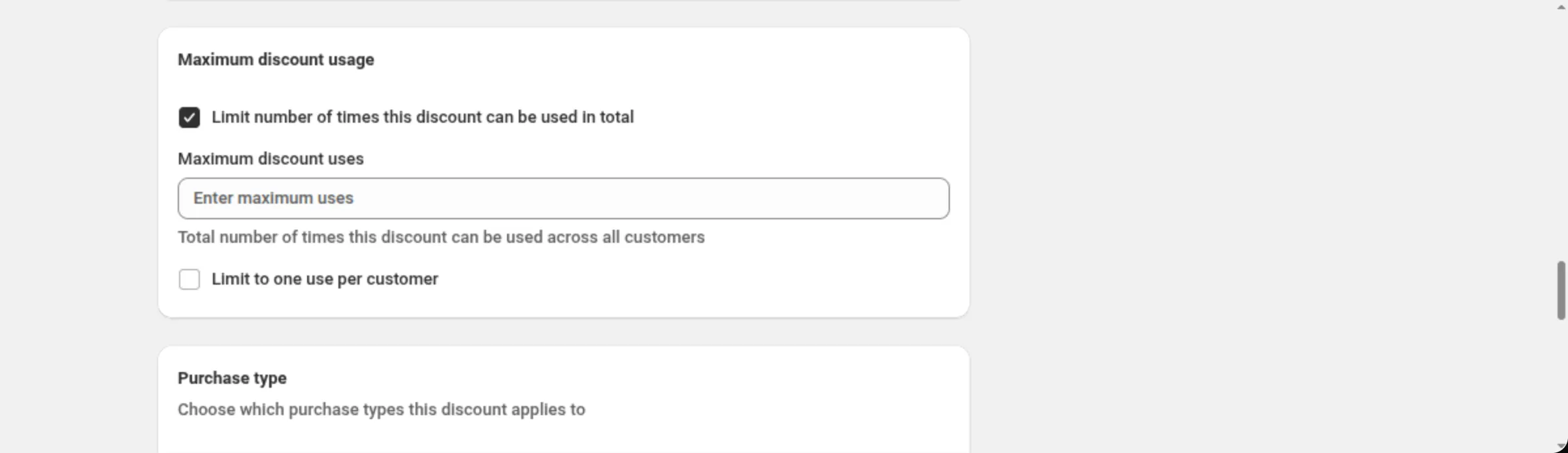
Maximum discount usage 用来限制折扣码 — 可以限制总次数、每位客户的次数,或者两者。 它只对折扣码折扣显示。
Purchase type 决定这个折扣是面向一次性购买、订阅商品,还是两者兼有, 对于订阅还要决定它适用于多少次付款。
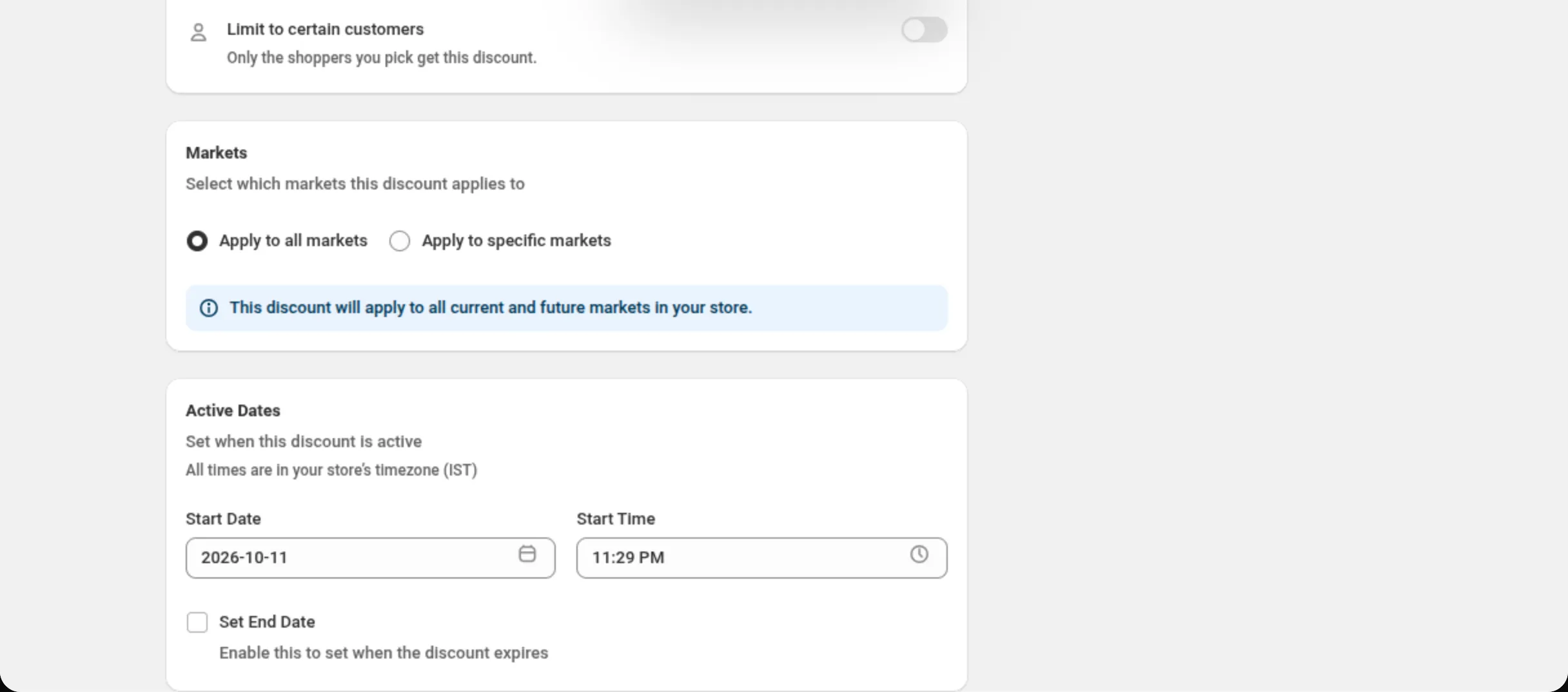
Active Dates 设置开始时间,以及可选的结束时间。卡片上的每一个时间都采用您的店铺时区, 卡片会在屏幕上写明该时区。
Shopify 会根据这些日期得出一个状态 — Active、Scheduled 或 Expired — 应用显示的就是这个状态标签。
它出现在哪里
Section titled “它出现在哪里”Active Dates 出现在每一个折扣页面上。Purchase type 出现在产品、订单、配送、 价格表、买 X 得 Y、多重优惠、Custom Discount 和购物赠礼上 — 捆绑组合、数量折扣和多买多省 没有这张卡片。Maximum discount usage 出现在除购物赠礼以外每种类型的折扣码折扣上, 在有 Purchase type 卡片的页面上位于它的上方。
Limit number of times this discount can be used in total
Section titled “Limit number of times this discount can be used in total”会添加一个 Maximum discount uses 字段:“Total number of times this discount can be used across all customers.”。必须是一个大于 0 的整数 — 其他任何内容都会在该字段上被拒绝,并提示 “Enter a whole number greater than 0”。
Limit to one use per customer
Section titled “Limit to one use per customer”把折扣码限制为每人一次。它与总次数上限相互独立;您可以只用其中一个,也可以两个都用。
One-time purchases
Section titled “One-time purchases”把折扣应用到普通购买上。页面打开时它就是勾选状态。
Subscription products
Section titled “Subscription products”把折扣应用到订阅商品上。至少必须选择一种购买类型 — 两个都取消勾选时, 卡片会显示 “At least one purchase type must be selected”。
Apply to recurring payments
Section titled “Apply to recurring payments”在勾选 Subscription products 之后显示。有三个选项:
- First payment only — 初始选项。
- Limited number of payments — 会显示一个 Number of payments 字段, 取值为 1 到 100 的整数。“Discount will apply to the first specified number of recurring payments.”。
- All recurring payments。
Start Date / Start Time
Section titled “Start Date / Start Time”折扣开始的时间。两者都是必填。日历不允许您点击店铺时区中今天之前的日期, 不过折扣上已有的日期会被保留。
Set End Date
Section titled “Set End Date”默认关闭:“Enable this to set when the discount expires.”。打开它后, 会自动填入开始日期与今天之中较晚者的次日 23:59 作为结束时间, 并显示 End Date 和 End Time。结束必须晚于开始 — 否则卡片会显示 “End date must be after start date” 或 “End time must be after start time”。
折扣上的状态标签来自 Shopify,而不是应用自己的时钟:
- Active — 正在运行。
- Scheduled — 开始日期还没到。
- Expired — 结束日期已经过去。
停用一个折扣同样会让它离开 Active;此时标签会显示 Shopify 为它报告的任何状态。
当一个折扣仅仅因为时间流逝而改变状态时,Shopify 不会发出任何信号。因此当您打开应用时, 它会针对那些可能已经跨过时间边界的折扣,从 Shopify 重新读取真实状态并写回去。 已经打开的列表会静默更新,不会重新加载,也不会跳动。
一个可用 100 次、每人一次的折扣码
Discount method: Discount CodeDiscount Code: WELCOME10Limit number of times this discount can be used in total: tickedMaximum discount uses: 100Limit to one use per customer: ticked一场周末促销
Start Date: 2026-09-12Start Time: 00:00Set End Date: tickedEnd Date: 2026-09-14End Time: 23:59一个适用于前三次付款的订阅折扣
One-time purchases: untickedSubscription products: tickedApply to recurring payments: Limited number of paymentsNumber of payments: 3- **Maximum discount uses:**一个大于 0 的整数。仅折扣码可用。
- **周期性付款:**选择有限次数时最多 100 次。
- **Purchase type:**在有这张卡片的页面上,两者中至少要选一个。
- 所有时间都采用您的店铺时区,绝不是浏览器的时区。卡片会写明该时区。
- 一旦启用结束日期,开始和结束都是必填,并且结束必须晚于开始。
- 允许使用已过去的开始日期,只要它是手动输入的或已经保存过的;只是日历不会提供这样的日期。
- **状态是 Shopify 给出的答案,不是猜测。**应用只是复制它,从不自行计算。
- 列表页面上的 Used 列显示一个折扣被使用了多少次,数据由 Shopify 报告。 它会在每笔订单后的几分钟内更新,统计的是该折扣的整个生命周期,涵盖它的所有折扣码。