
购物车目标进度条
购物车目标进度条把一个多买多省优惠变成一行文字和一条进度条:还要再花多少钱、 那能解锁什么,以及沿途每一个档位的刻度。它会随着买家购物车金额的增长而填充。
-
在多买多省折扣中打开 Show on storefront。
打开多买多省折扣,并打开 Show on storefront。新建的折扣默认就是打开的。
-
点击 Cart Goal Bar 旁边的 Add。
在该卡片的 Add to your theme 面板中,Cart Goal Bar 那一行写着 “Shows progress toward the next tier in the cart”。它的 Add 按钮会打开您的主题编辑器, 并把该区块准备好供您放置。
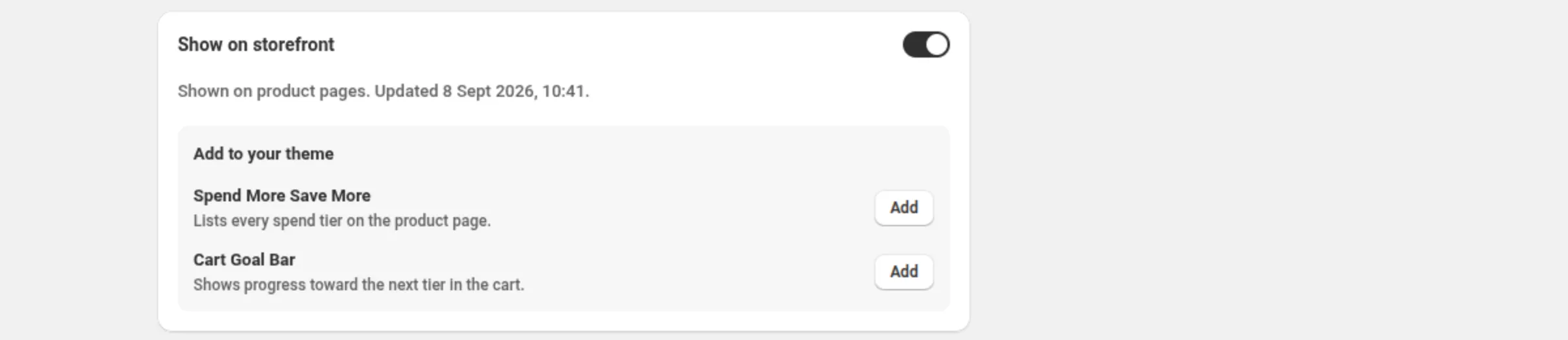
-
在主题编辑器中放置该区块并保存。
把这个区块放到买家应该看到自己进度的位置,然后点击 Save。
-
设置这条进度条的颜色和文案。
下面的所有内容都是该区块在主题编辑器中的设置。
- Track color — 进度条未填充的部分。默认
#e5e5e5。 - Fill color — 已填充的部分。默认
#1a1a1a。 - Unlocked color — 在达到最高档位后使用。默认
#2e7d32。 - Text color — 进度条上方那一行文字。
- Bar height — 4–32 px。默认 10。
- Roundness — 0–24 px。默认 8。
- Show amounts under the bar — 默认关闭。会显示已花金额和下一个门槛。
Wording
Section titled “Wording”- Goal text — 默认
Spend {amount} more to get {percent} off。{amount}和{percent}会被自动替换。 - Unlocked text — 默认
You’ve unlocked {percent} off! - Tier mark colour — 默认
#ffffff。用于尚未达到的刻度;已达到的刻度使用 unlocked 颜色。 - Tier mark shape — Circle(默认)或 Square。
- Tier mark size — 6–28 px。默认 14。
- Show tier amounts under the bar — 默认关闭,因为在窄屏上标签可能会重叠。
- Tier reached text — 默认
You've got {current} off. Spend {amount} more to get {percent} off。在达到某个档位且后面还有档位时显示;{current}、{amount}和{percent}会被自动替换。 - Code hint prefix — 默认 “Use code”。只对折扣码折扣显示。
- Static text — 默认
Spend {amount} to get {percent} off。在无法测量进度时使用。 - Static text with excluded items — 默认
Spend {amount} to get {percent} off eligible items。当折扣排除了部分商品时,用它来取代 static text。
一条使用您品牌色的低调进度条
Fill color: #1a1a1aUnlocked color: #2e7d32Bar height: 10Roundness: 8Show amounts under the bar: off一条标出每个档位的醒目进度条
Bar height: 16Tier mark shape: SquareTier mark size: 18Show tier amounts under the bar: onGoal text: Only {amount} more for {percent} off买家看到的效果
Section titled “买家看到的效果”在应用能够测量购物车的情况下,这行文字会倒数 — “Spend $20 more to get 15% off” — 进度条会朝着下一个刻度填充。当达到某个档位且后面还有档位时,这行文字会切换成 Tier reached text;到了最高档位则切换成 Unlocked text,进度条也会变成 unlocked 颜色。刻度最多为 6 个档位绘制。
当无法测量进度时,这个区块会改用 Static text 来陈述这个优惠 — 绝不会给出一个它无法保证的进度说法。无论哪种情况折扣本身都不受影响: Shopify 会检查购物车,并在购物车符合条件时应用它。
对于折扣码折扣,会显示 Code hint prefix,好让买家知道需要一个折扣码。
- **刻度最多为 6 个档位绘制。**超过之后,进度条仍会填充,文案仍会倒数; 只是不再绘制刻度。
- Bar height 4–32 px · Roundness 0–24 px · Tier mark size 6–28 px。
- **有条件时不显示进度条。**在线商店无法针对每位购物者检查折扣的条件,因此带条件的折扣完全不显示 进度条。折扣仍会对符合条件的购物车生效。
- **排除项会关闭实时进度。**当折扣排除了部分商品时,区块无法测量购物车中符合条件的部分,因此会显示 Static text with excluded items 文案,而不是倒数。 折扣的 Show on storefront 卡片会说明属于哪一种情况。
- 暂停这个优惠会隐藏进度条,卡片上会这样说明,而不是留下一个看起来还在运行的开关。
- **不需要 App embed。**这个区块自行渲染。