
条件
条件用来说明折扣在什么时候生效。您在每个折扣页面上的同一张卡片中构建它们: 选择一个字段、选择一个运算符,然后输入或选择一个数值。
一个条件由从左到右读的三部分组成 — 字段 · 运算符 · 数值。例如 Cart subtotal · is greater than or equal to · 50。
条件位于一个规则组内。一个规则组可以容纳您需要的任意多个条件。
- Between conditions: 控件 — 一旦某个规则组包含两个或更多条件,它就会出现在每一对条件之间, 以标签的形式显示当前的连接方式(AND 或 OR),并带有 Switch to OR / Switch to AND 按钮。这个选择属于整个规则组,而不是某一对条件。 初始值是 AND。
- 规则组之间 — 一旦存在第二个规则组,卡片标题中就会出现一个 Rule Group Logic 下拉框, 提供 Match All Rule Groups 和 Match Any Rule Group。画在两个规则组之间的 标记会显示当前生效的是哪一个。
如果完全没有规则,卡片会显示 No rules configured 以及这样一行文字:“This discount will apply to all qualifying orders.”。
它出现在哪里
Section titled “它出现在哪里”在产品、订单、配送和价格表折扣上,规则构建器就是 Discount Rules 卡片。 同一个构建器在其他地方以不同的标题出现:
- 捆绑组合 — 位于 Customer Eligibility (Discount Rules) 内,只有客户类条件, 并且最多只有一个规则组。
- 买 X 得 Y — 出现两次,一次在 Customer buys 下,一次在 Customer gets 下。 这两处各自都至少需要一条规则。
下面的条件行 — 字段 · 运算符 · 数值 — 在整个应用中是共用的,但规则组和 Rule Group Logic 只属于这六种类型:产品、订单、配送、价格表、捆绑组合和买 X 得 Y。 其他类型以不同的方式组织它们的条件:
- 多重优惠 — 没有规则构建器。每个优惠在 Qualifying items 分组中命名它所认识的 购物车商品,每个分组的标题都是 “Match [all] of these conditions”, 并带有一份单独的 Requirements 清单。这种折扣还有一张 Who can use this discount 卡片作为客户层面的限制。
- Custom Discount — 没有规则构建器。商品条件放在 Cart groups 卡片中带名称的分组里, 每个优惠在 When it applies 下设置自己的要求,客户层面的限制则是 Who can use this discount 卡片。它增加了两个自己的字段 Retail location 和 Company,并且不提供 Product tags 和 Customer orders count。
- 屏蔽折扣码 — 一张扁平的 Conditions 卡片。条件一条接一条地列出, 并带有 all/any 的匹配选择,没有规则组。
- 多买多省 — 没有构建器。它提供的是一份固定的六个开关的清单:Customer tags、Account status、B2B customers、Past orders、Cart quantity、Cart contents。
- 购物赠礼 — 同样没有构建器。它的 Conditions 卡片是一份固定的五个开关的清单: Customer tags、Account status、B2B customers、Past orders、Cart attribute。
- 数量折扣 — 完全没有条件卡片。
Add your first rule / Add rule group
Section titled “Add your first rule / Add rule group”Add your first rule 会创建 RULE GROUP #1,其中包含一个空条件。Add rule group 会在下方添加另一个规则组。每个规则组的右上角都有一个 ✕ 用于移除它。在只允许一个 规则组的捆绑组合上,不提供 Add rule group。
Add condition
Section titled “Add condition”在同一个规则组内添加另一个条件。当规则组包含不止一个条件时,条件上才会出现移除控件。
Rule Group Logic
Section titled “Rule Group Logic”只有存在两个或更多规则组时才会显示,因此它在捆绑组合上永远不会出现。可选 Match All Rule Groups(AND)或 Match Any Rule Group(OR)。
Between conditions:
Section titled “Between conditions:”规则组内部的 AND/OR 标签,并带有一个用于切换它的按钮。当规则组包含两个或更多条件时才会出现, 并且它作用于该规则组中的每一个条件。
购物车类条件
Section titled “购物车类条件”可用于产品、订单、配送、多重优惠和屏蔽折扣码的规则。
Cart attribute
Section titled “Cart attribute”设置在购物车上的自定义属性。运算符:is one of、is not one of。数值:一到两组 键值对,两部分都必填。
一个折扣能读取多少个键取决于它的类型:
- **Block codes:**每个条件一组键和值,所有启用的规则合起来只用一个购物车属性键。添加第二个键的保存会被拒绝。
- **Custom 和 Multi-offer:**产品优惠和订单优惠每个折扣读取一个购物车属性键;配送优惠可以读取两个。 使用其他键的条件在保存时会被拒绝,原因显示在该条件上。
Cart quantity
Section titled “Cart quantity”购物车中的商品总件数。运算符:equals、is greater than or equal to、is less than or equal to。数值:一个 1 或更大的整数。
Cart subtotal
Section titled “Cart subtotal”购物车中商品在折扣之前的小计金额。运算符:equals、is greater than or equal to、is less than or equal to。数值:至少 0.01 的金额。
可用于产品、订单、配送、捆绑组合、多重优惠和屏蔽折扣码的规则。价格表 只提供 Customer tags。捆绑组合不提供 Customer is B2B。
Customer is B2B
Section titled “Customer is B2B”客户是否为企业客户。运算符:equals。数值:True 或 False。
Customer logged in
Section titled “Customer logged in”客户是否已登录自己的账户。运算符:equals。数值:True 或 False。
Customer tags
Section titled “Customer tags”客户记录上的标签。运算符:is one of、is not one of。数值:最多 20 个标签, 一次输入一个。
Customer orders count
Section titled “Customer orders count”客户已下过多少个订单。运算符:equals、is greater than or equal to、 is less than or equal to。数值:一个 0 或更大的整数 — 因此 equals 0 就是一个首单折扣。
商品行类条件
Section titled “商品行类条件”可用于产品、订单、买 X 得 Y 和多重优惠。价格表只提供 Specific products 和 Specific collections;屏蔽折扣码提供 Specific collections、Product tags 和 Has selling plan。配送折扣完全没有这些条件。
Line attribute
Section titled “Line attribute”商品行上的自定义属性。运算符:is one of、is not one of。数值:一到两组键值对。
Line quantity
Section titled “Line quantity”单个商品行的数量。运算符:equals、is greater than or equal to、is less than or equal to、is in range。数值:一个 1 或更大的整数;is in range 需要填写 最小值和最大值。
Line subtotal
Section titled “Line subtotal”该商品行自身的小计。运算符:equals、is greater than or equal to、is less than or equal to。数值:至少 0.01 的金额。
Specific collections
Section titled “Specific collections”运算符:is one of、is not one of。数值:最多 10 个产品系列,从 Shopify 的产品系列浏览面板中选择。
Specific products
Section titled “Specific products”运算符:is one of、is not one of。数值:最多 20 个产品,从 Shopify 的产品浏览面板中选择。
Product tags
Section titled “Product tags”运算符:is one of、is not one of。数值:最多 20 个标签。
Specific variants
Section titled “Specific variants”运算符:is one of、is not one of。数值:最多 20 个变体。
Compare-at price
Section titled “Compare-at price”来自您 Shopify 后台的产品 Compare-at 价格;没有该价格的产品会被跳过。 可用于多重优惠中的产品优惠和订单优惠。运算符:is higher than the current price 和 is not higher than the current price(两者都不需要数值), 以及 is greater than or equal to、is less than or equal to 和 equals, 这三个需要一个至少 0.01 的金额。
Has selling plan
Section titled “Has selling plan”该商品行是否为订阅。运算符:equals。数值:True 或 False。
仅用于配送折扣,以及多重优惠中的配送优惠。
Shipping type
Section titled “Shipping type”Shopify 为该配送选项报告的配送种类,而不是运费方案的名称。运算符:contains、does not contain。
数值:SHIPPING(发货)、LOCAL(本地配送)、PICKUP_POINT(自提点)、PICK_UP(到店自提)或
RETAIL(零售)— 例如 Shipping type contains “LOCAL”。请按所示用大写输入:Shipping 折扣不区分大小写,
而 Multi-offer 的配送优惠区分。要按名称(例如 Express)匹配运费方案,请使用 Shipping method。
Shipping method
Section titled “Shipping method”承运商或配送方式。运算符:equals、contains、does not contain。数值:自由 文本。 Shipping 折扣不区分大小写;在 Multi-offer 的配送优惠中,运费方案名称或承运商代码必须连大小写都完全一致 — “Express” 不匹配 “express”。
Country code
Section titled “Country code”目的地国家/地区,以两位字母代码表示(US、CA、GB)。运算符:is one of、is not one of。数值:最多 20 个代码。
Shipping city
Section titled “Shipping city”目的地城市名称。运算符:is one of、is not one of。数值:最多 20 个名称。
Province / State code
Section titled “Province / State code”运算符:is one of、is not one of。数值:最多 20 个代码。
Postal code
Section titled “Postal code”运算符:is one of、is not one of。数值:最多 20 个代码。
字段混用警告
Section titled “字段混用警告”如果一个规则组中同时包含一个产品选择(Specific Products、Specific Variants、 Collections、Product Tags)和一个产品要求(Line Quantity、Line Subtotal、Line Attribute、Subscription),卡片会显示一条同时点出这两类字段的警告:
Rule Group #1: These fields should be in separate rule groups. … Move product requirements to a different rule group for the discount to work correctly.
在买 X 得 Y 上,这个建议是特意反过来的,因为这种折扣是按规则组匹配商品,然后把各规则组 加在一起。在那里,一个单独的要求会作用于每一个产品,因此应用会警告某个规则组 “may discount too many items”,并要求您把这个要求放进它所对应的选择所在的同一个规则组, 并把该规则组设为 AND。它还会把一个用 AND 重复了同一个选择字段的规则组标记为 “may match no products” — 因为那要求一件商品同时属于两个产品系列,或者同时是两个产品。
这两条警告都不会阻止保存。
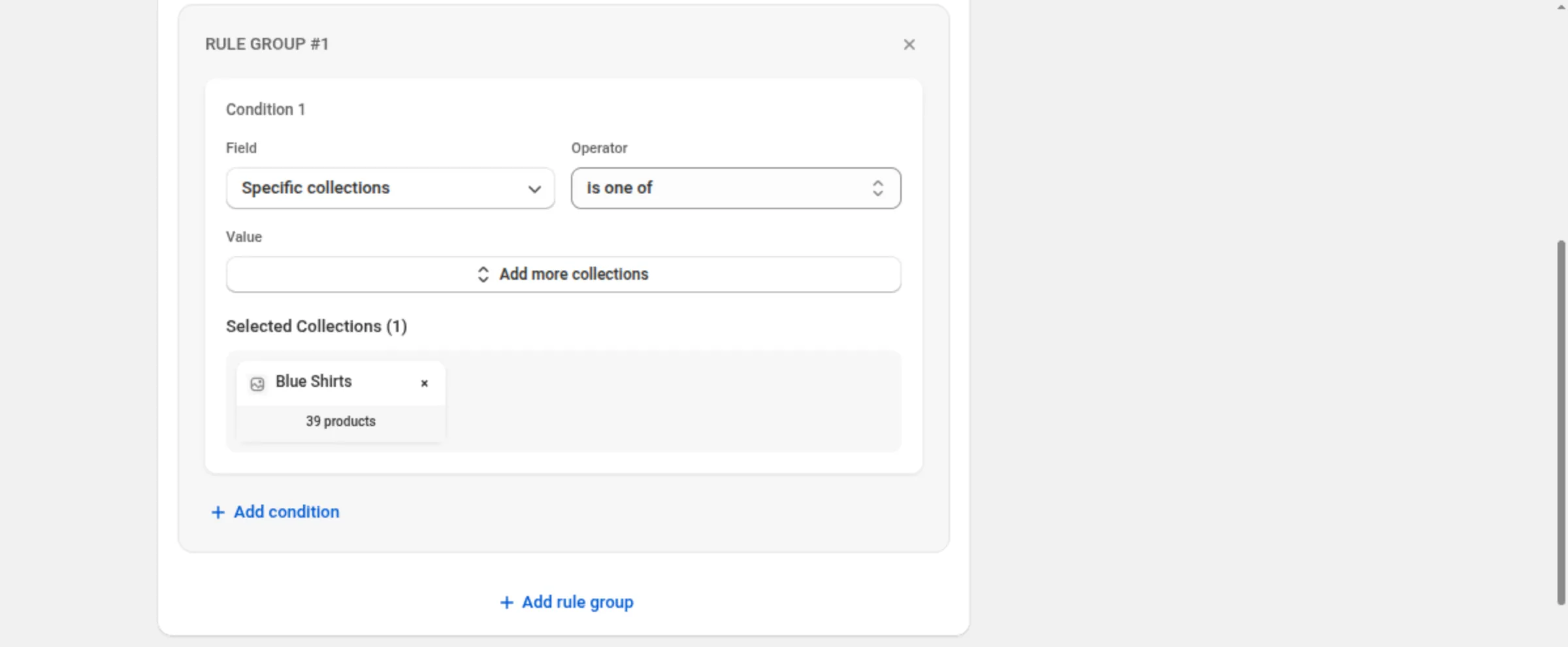
只针对 Blue Shirts
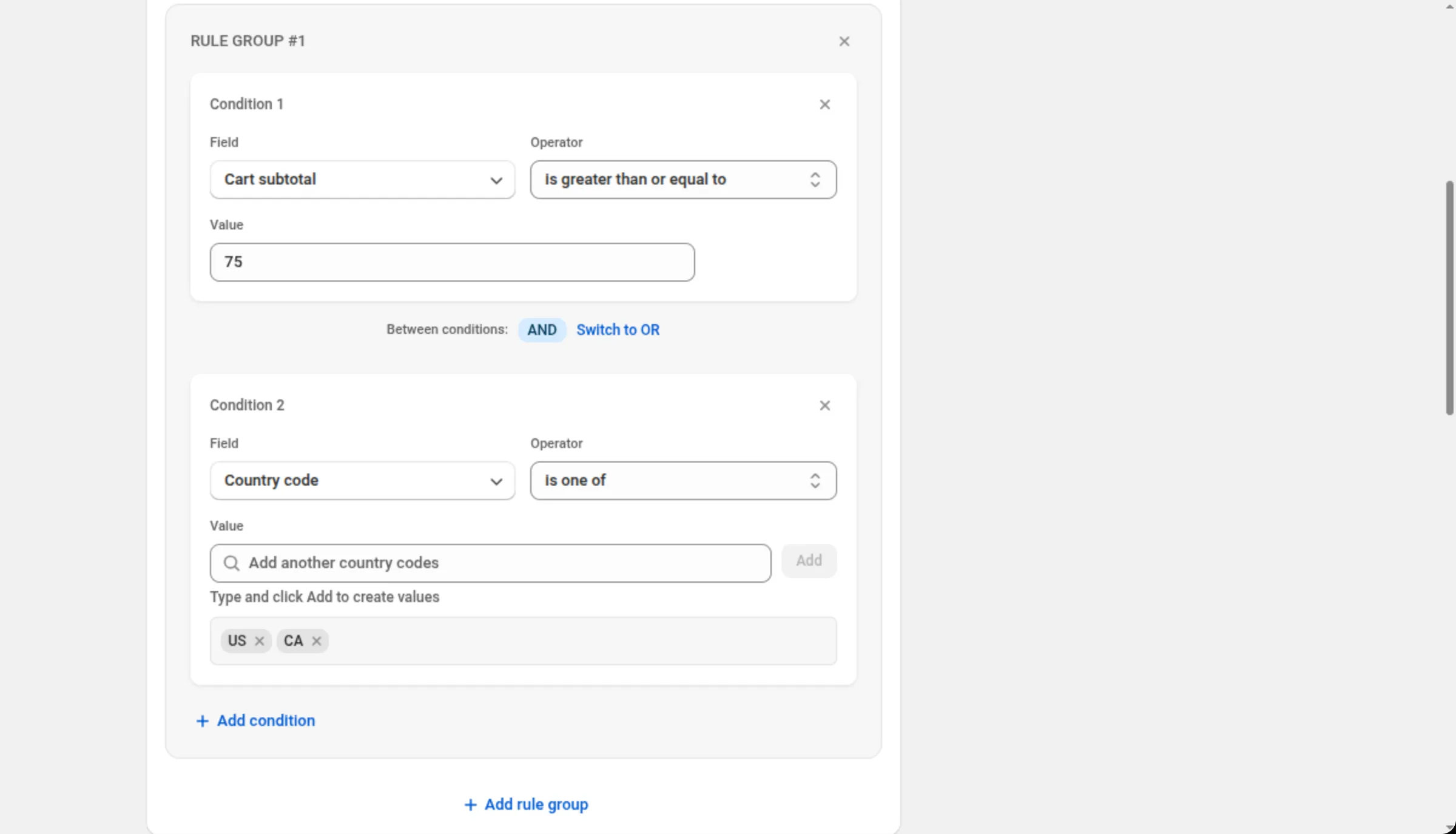
Discount Rules → RULE GROUP #1Condition 1: Specific collections · is one of · Blue Shirts寄往美国或加拿大且金额超过 75 的购物车(配送折扣)
Discount Rules → RULE GROUP #1Condition 1: Cart subtotal · is greater than or equal to · 75Between conditions: ANDCondition 2: Country code · is one of · US, CA仅限首次购买的客户
Discount Rules → RULE GROUP #1Condition 1: Customer orders count · equals · 0带标签的产品或数量较大的商品行,二者取其一(两个规则组)
RULE GROUP #1 → Product tags · is one of · clearanceRULE GROUP #2 → Line quantity · is greater than or equal to · 5Rule Group Logic: Match Any Rule Group- **产品:**每个条件最多 20 个。**变体:**最多 20 个。**产品系列:**最多 10 个。
- 标签和代码(客户标签、产品标签、国家/地区、城市、州省、邮政编码):每个条件最多 20 个条目。
- 属性(购物车或商品行):每个条件一到两组键值对;每一组的两部分都必填。
- 计数都是整数:购物车件数和商品行数量从 1 开始,客户订单数从 0 开始。
- 金额必须至少为 0.01 — 包括购物车小计、商品行小计和 compare-at 价格。
- 在大多数类型上,不设置任何规则也是有效的折扣。这时它会应用到所有符合条件的订单上。 例外是买 X 得 Y:它的两个构建器都至少需要一条规则,留空会被拒绝并提示 “At least one rule is required”。
- **Shopify 会用这些条件检查购物车。**在买家购物期间,这里的任何内容都不会调用应用。
- **规则组不能为空:**不提供移除规则组中最后一个条件的操作;请改为移除整个规则组。