
产品折扣
产品折扣减免的是购物车中商品的金额,而不是订单总额:可以是一个百分比、 一个按比例分摊到各件商品上的固定金额、从每一件商品上减去的固定金额,或者一定件数的成交总价。 您可以选择哪些商品符合条件、哪些商品优先享受折扣,以及享受折扣的商品件数。
-
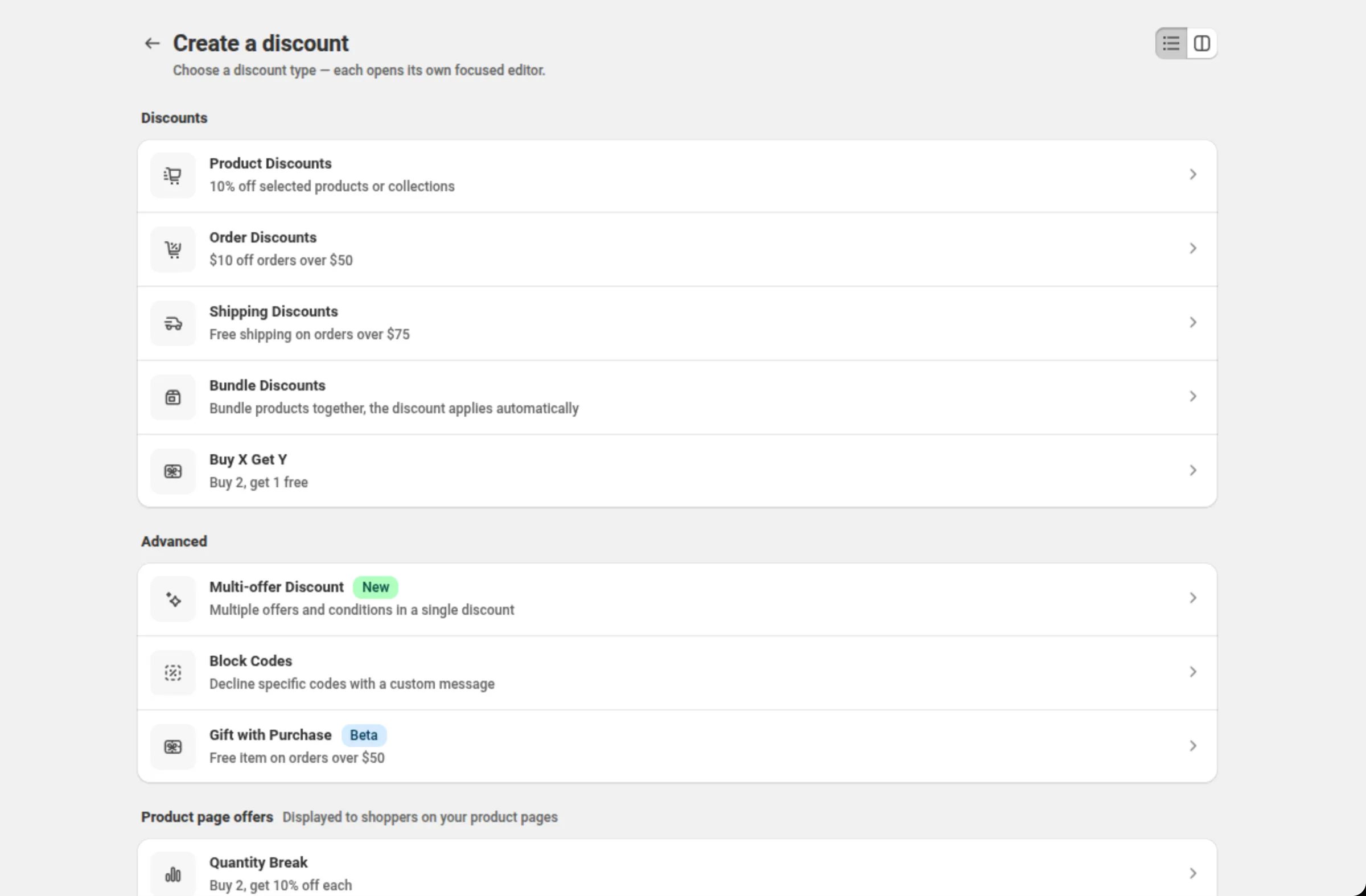
打开 Discounts 并点击 Create discount,然后选择 Product Discounts。
创建菜单会把 Product Discounts 列在 Discounts 下面,并带有示例 “10% off selected products or collections”。
-
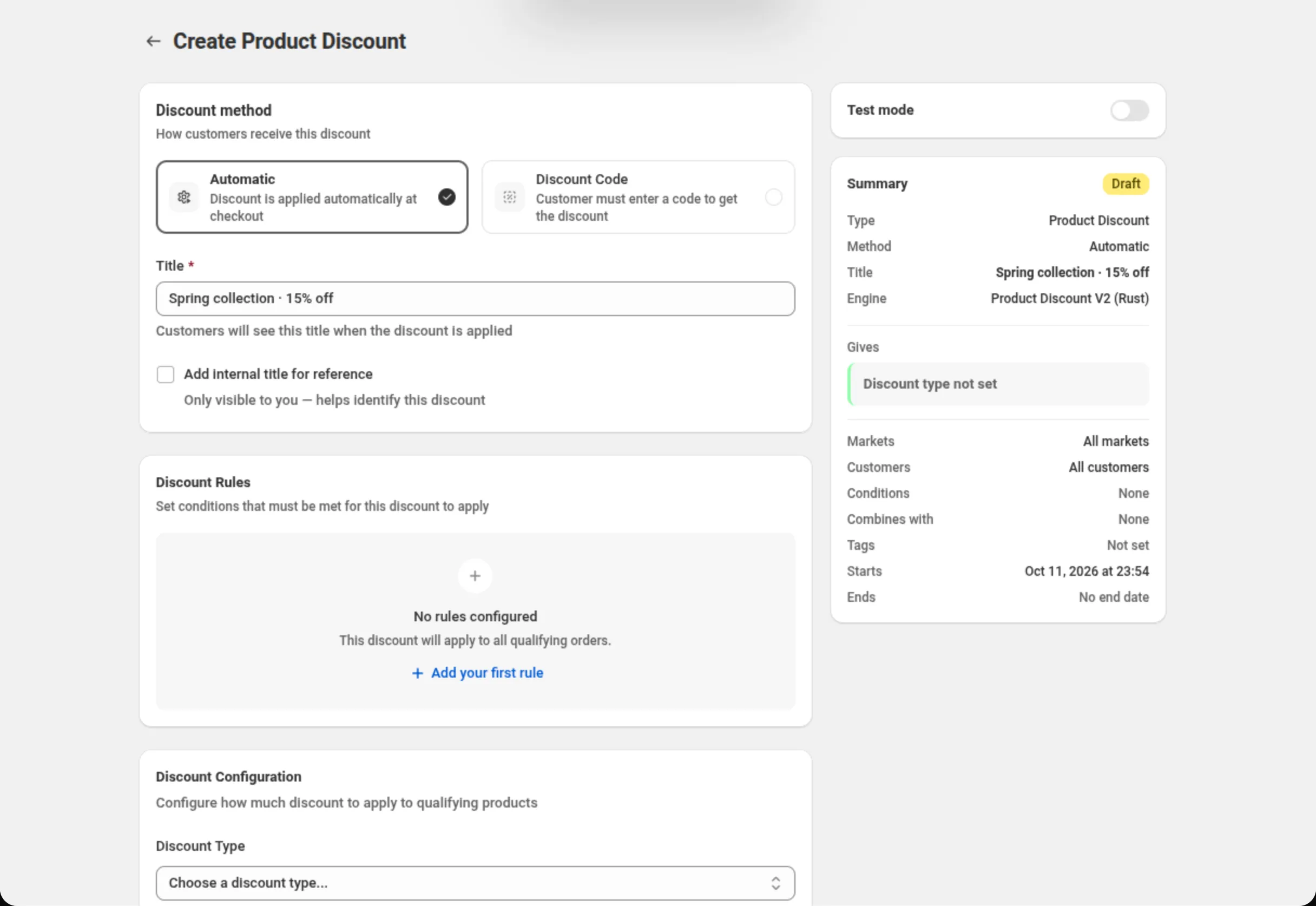
选择折扣方式并为折扣命名。
选择 Automatic(自动折扣)或 Discount Code(折扣码),然后填写 Title(自动折扣) 或 Discount Code(折扣码)。右侧的 Summary 卡片会随着您的创建过程概括这个折扣。
-
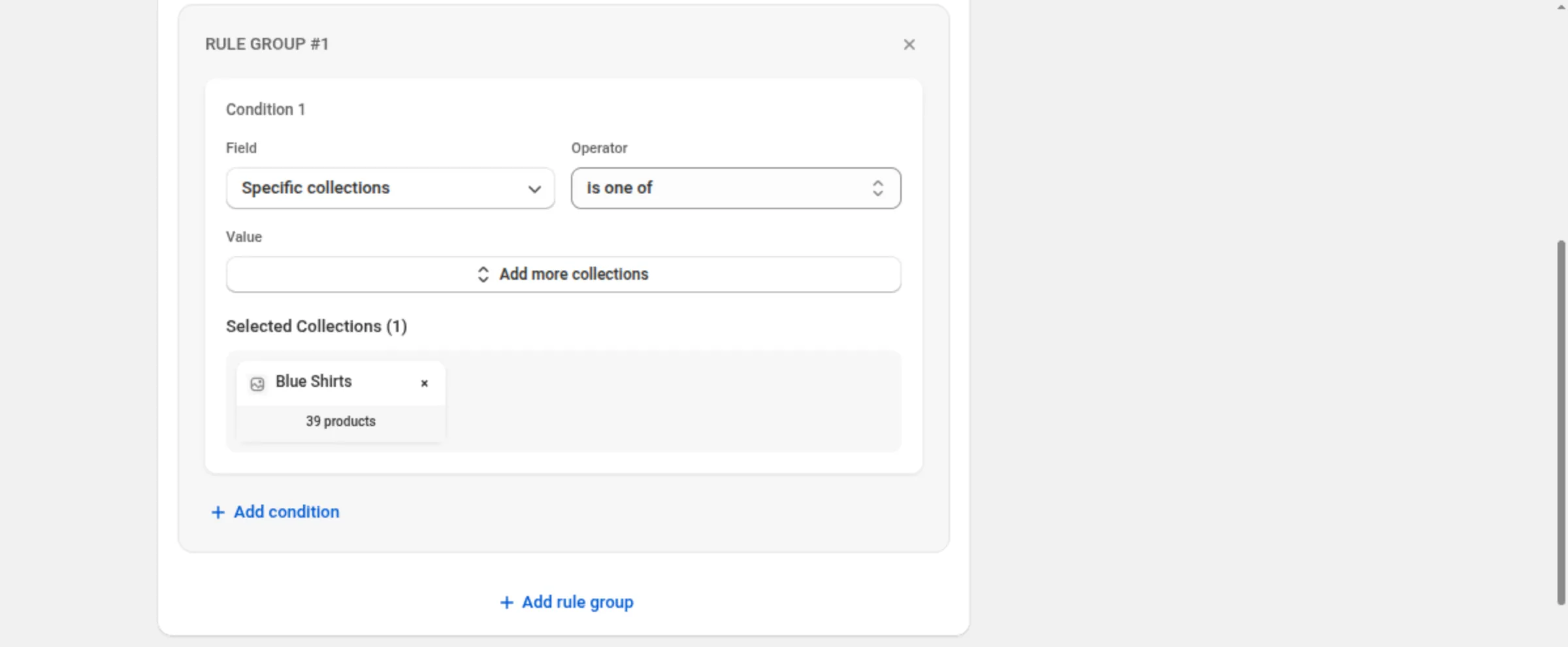
添加折扣规则,指定哪些产品符合条件。
点击 Add your first rule,然后选择一个条件,例如 Specific collections 或 Product tags,再选择运算符和具体产品。如果没有任何规则, 每一个符合条件的订单都会获得该折扣。
-
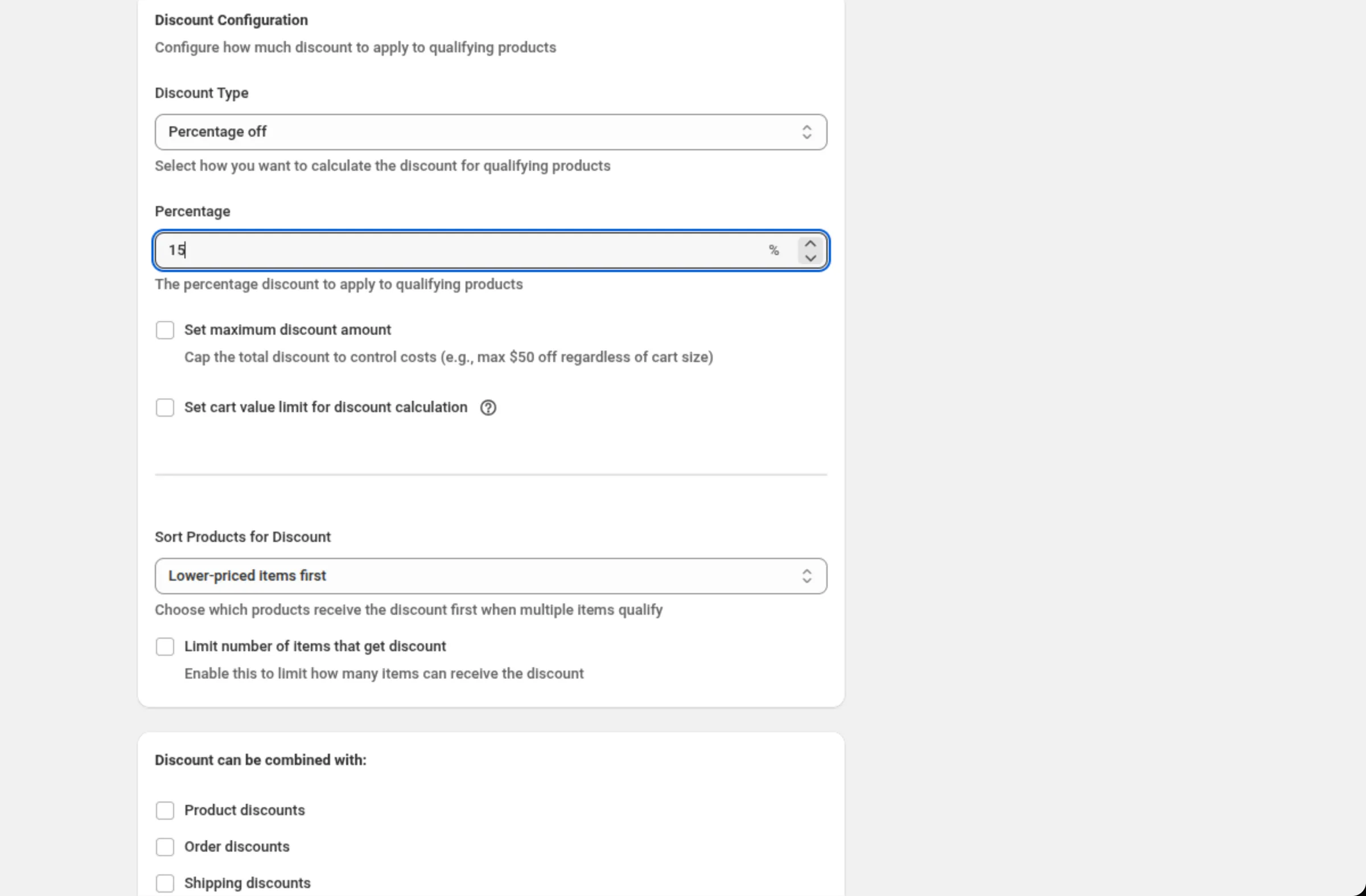
选择折扣类型并输入数值。
把 Discount Type 设为 Percentage off、Fixed amount off、Fixed amount off per item 或 Specific price,然后输入数值。百分比还可以通过 Set maximum discount amount 和 Set cart value limit for discount calculation 设置上限。
-
设置排序方式和商品件数上限。
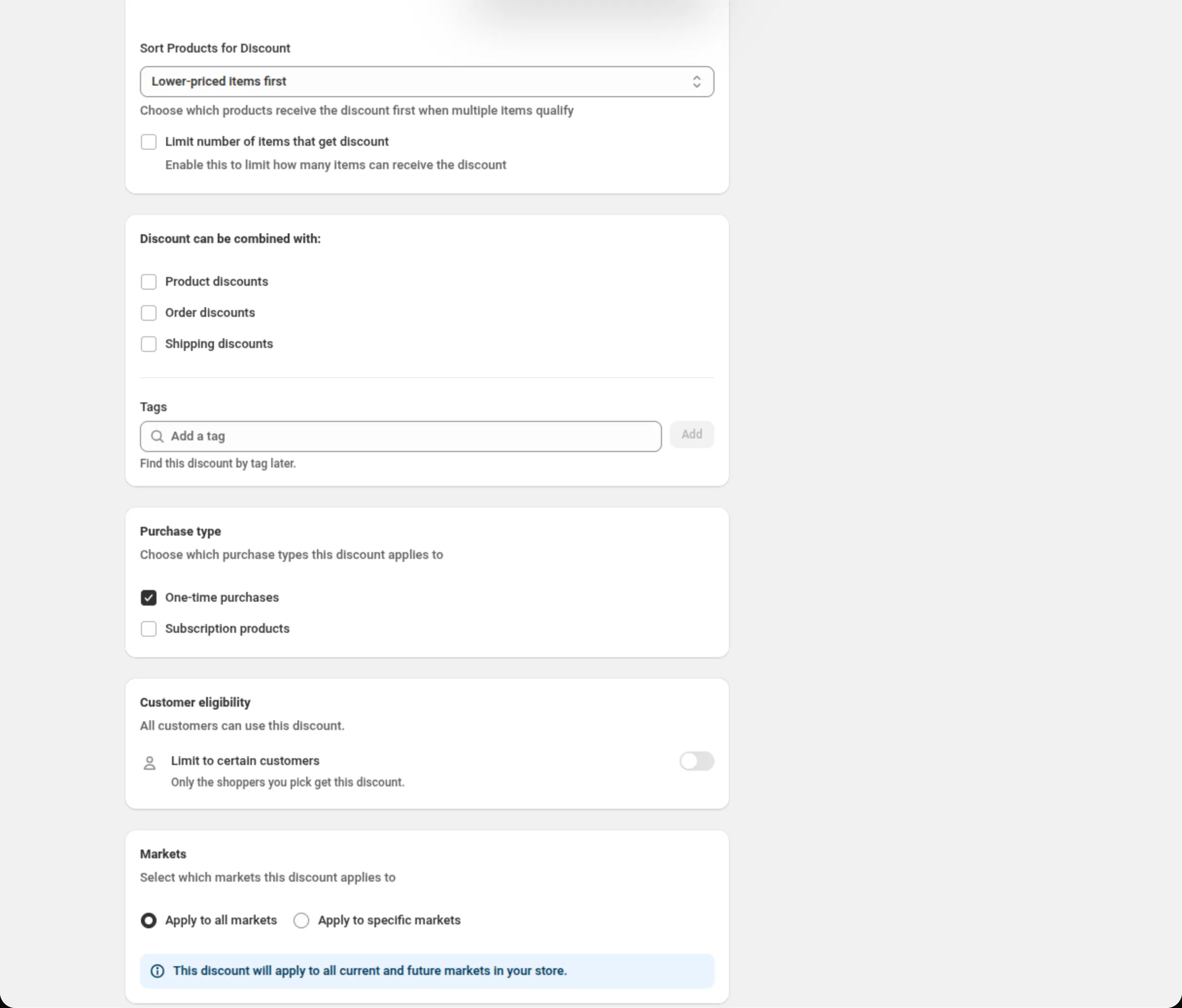
Sort Products for Discount 决定哪些符合条件的商品优先享受折扣, Limit number of items that get discount 会添加一个 Maximum items 字段, 使得只有这么多件商品享受折扣。
-
设置组合、客户、市场和日期,然后保存。
选择这个折扣可以与哪些其他折扣组合、是否限定给特定客户、在哪些市场运行, 以及什么时候开始和结束。从页面顶部的保存栏保存。
Discount method
Section titled “Discount method”Automatic 不需要折扣码 — 只要订单符合条件,Shopify 就会应用该折扣。 Discount Code 表示买家要输入您设置的折扣码。方式在创建时选定,之后选择器会被禁用。
Title / Discount Code
Section titled “Title / Discount Code”在自动折扣上,Title 是折扣生效时买家看到的名称。在折扣码折扣上,该字段会变成 Discount Code,并且只接受字母、数字、下划线和连字符。
Add internal title for reference
Section titled “Add internal title for reference”第二个只有您自己可见的名称。当面向客户的标题在您自己的列表里不够具体时,可以使用它。
Discount Rules
Section titled “Discount Rules”决定哪些商品和订单符合条件的条件。产品折扣可以使用 Cart subtotal、Cart quantity、Cart attribute、Customer tags、Customer logged in、 Customer is B2B、Customer orders count、Specific products、Specific variants、 Specific collections、Product tags、Line quantity、Line subtotal、Line attribute 和 Has selling plan。同一个规则组中的条件通过 Between conditions 的 AND/OR 开关连接;规则组之间通过 Match All Rule Groups 或 Match Any Rule Group 连接。
Discount Type
Section titled “Discount Type”Percentage off 从每一件符合条件的商品上按比例减免。Fixed amount off 把一个金额按比例 分摊到这些商品上。Fixed amount off per item 从每一件符合条件的商品上都减去该金额。 Specific price 为一定件数的商品设定一个总价。切换类型会清除您为上一种类型输入的数值。
Percentage
Section titled “Percentage”从符合条件的产品上减免的比例。必须大于 0 且不超过 100 — 字段和服务器都会拒绝超出该范围的数值。
Set maximum discount amount
Section titled “Set maximum discount amount”无论购物车金额多少,都为折扣总额设置一个金额上限,因此一个上限为 50 的 20% 折扣, 减免金额永远不会超过 50。
Set cart value limit for discount calculation
Section titled “Set cart value limit for discount calculation”只对您输入的购物车金额以内的部分应用该百分比。上限为 500 且折扣为 10% 时, 800 的购物车减免 50,300 的购物车减免 30。
Discount Amount
Section titled “Discount Amount”用于 Fixed amount off,即按比例分摊到符合条件商品上的那一个金额。必须大于 0。
Discount Amount Per Item
Section titled “Discount Amount Per Item”用于 Fixed amount off per item,即从每一件符合条件的商品上减去的金额 — 该字段的帮助文字为 “Amount deducted from each qualifying item in the cart”。必须大于 0。
Quantity and Total Price
Section titled “Quantity and Total Price”用于 Specific price:买家必须购买多少件,以及买这么多件所支付的固定总价。 适用于 “3 for 100” 这类定价。
Repeat this pricing
Section titled “Repeat this pricing”同样用于 Specific price:Unlimited 让这个优惠在购物车允许的范围内反复适用, Limit to 则限制它在一个订单中重复的次数。
Add Tiers To This Discount
Section titled “Add Tiers To This Discount”把 Specific price 一次变成多行数量/价格组合 — 3 件 100、5 件 150 — 最多 15 个档位, 每个档位都有自己的数量。两个档位不能使用相同的数量。
Sort Products for Discount
Section titled “Sort Products for Discount”Lower-priced items first 优先对价格最低的符合条件商品打折; Higher-priced items first 优先对价格最高的商品打折。只有当符合条件的商品多于折扣所能覆盖的 数量时,它才会起作用。
Limit number of items that get discount
Section titled “Limit number of items that get discount”限制享受折扣的商品件数,其中 Maximum items 是一个大于 0 的整数。 Specific price 不提供该选项,因为它自己就设定了数量。
Discount can be combined with:
Section titled “Discount can be combined with:”Product discounts、Order discounts 和 Shipping discounts 的复选框。不勾选它们, 这个折扣就单独运行;勾选某一项,Shopify 就可能把那一类折扣与它一起应用。
同一张卡片中的 Tags 用于给折扣加标签 — 最多 20 个。它们保存在 Shopify 中的折扣上。 在 Shopify Plus 上,勾选 Product discounts 后还会显示 Stack with product discounts tagged。详见折扣组合。
Maximum discount usage
Section titled “Maximum discount usage”只对折扣码折扣显示。Limit number of times this discount can be used in total 会添加一个 Maximum discount uses 字段(一个大于 0 的整数),而 Limit to one use per customer 会按买家限制使用次数。
Purchase type
Section titled “Purchase type”One-time purchases、Subscription products,或两者都选 — 至少需要选择一项。 勾选订阅后会增加 First payment only、Limited number of payments(最多 100 次)或 All recurring payments。
Customer eligibility
Section titled “Customer eligibility”Limit to certain customers 会把折扣限定给您选中的买家。打开后,Match by 可选择 Customer segments(自动折扣最多 5 个,折扣码最多 20 个) 或 Specific customers(最多 100 个)。Shopify 会在折扣生效之前检查买家,在购物车中同样如此。 请参阅客户资格。
Markets
Section titled “Markets”Apply to all markets 覆盖当前和将来的所有市场。Apply to specific markets 让您最多选择 20 个市场;一旦切换到该选项,就至少需要选择一个。
Active Dates
Section titled “Active Dates”Start Date 和 Start Time 指定折扣何时开始,Set End Date 可以添加一个结束时间。 所有时间都采用您的店铺时区,卡片上会在屏幕上写明该时区。
Test mode
Section titled “Test mode”位于 Summary 上方、单独一张卡片上的开关。打开时,这个折扣只对已登录、且其账户带有标签
dos-test 的客户生效;其他所有人购物时就像这个折扣不存在一样。在新折扣上,这个开关随折扣一起
保存。在已保存的折扣上,它立即生效,无需 Save。详见测试模式。
某个产品系列 15% 折扣
Discount method: AutomaticTitle: Spring collection · 15% offDiscount Rules → RULE GROUP #1 → Specific collections · is one of · Spring collectionDiscount Type: Percentage offPercentage: 15Sort Products for Discount: Lower-priced items first每件减 5,仅限带标签的产品,每单限一件
Discount method: AutomaticTitle: Clearance · 5 off eachDiscount Rules → RULE GROUP #1 → Product tags · is one of · clearanceDiscount Type: Fixed amount off per itemDiscount Amount Per Item: 5Limit number of items that get discount: tickedMaximum items: 1某个产品系列 3 件 100
Discount method: AutomaticTitle: 3 for 100Discount Rules → RULE GROUP #1 → Specific collections · is one of · T-shirtsDiscount Type: Specific priceQuantity: 3Total Price: 100Repeat this pricing: Unlimited已登录客户 20% 折扣,以折扣码形式,上限 40
Discount method: Discount CodeDiscount Code: MEMBER20Discount Rules → RULE GROUP #1 → Customer logged in · equals · trueDiscount Type: Percentage offPercentage: 20Set maximum discount amount: tickedMaximum Discount Amount: 40Limit to one use per customer: ticked买家看到的效果
Section titled “买家看到的效果”自动产品折扣不需要买家做任何事:只要购物车符合条件,Shopify 就会应用它, 而您输入的 Title 就是显示在优惠金额旁边的名称。折扣码折扣则在买家输入折扣码后生效。
优惠落在符合条件的商品本身上,因此买家会在那些商品行上看到降价,而不是在订单总额上。 当折扣只覆盖某一行中的一部分时 — 因为打开了 Limit number of items that get discount — Shopify 会把已享受折扣和未享受折扣的件数 分成不同的行显示。
- **Percentage:**大于 0,最多 100。
- **Maximum items:**一个大于 0 的整数。
- **Specific price 档位:**最多 15 个,且任意两个档位不能使用相同的数量。
- **客户:**自动折扣最多 5 个客户细分,折扣码最多 20 个, 或最多 100 个指定客户。
- **市场:**选择特定市场时最多 20 个。
- **订阅:**选择有限次数时最多 100 次周期性付款。
- **部分件数上限会按设计拆分购物车行。**在一行 5 件的商品中覆盖 3 件,会让 Shopify 把已覆盖和未覆盖的件数分开呈现。仅靠舍入永远不会产生这种情况。
- **组合由 Shopify 决定。**在 Discount can be combined with 中勾选一个复选框, 是在告诉 Shopify 这个折扣可以与那一类折扣一起运行;至于实际应用了什么,由 Shopify 决定。
- **客户细分存放在 Shopify 中。**如果某个客户细分在那里被删除,Shopify 就会停止执行该限制, 在 Shopify 一侧该折扣会变成对所有客户可用。应用会显示缺失的客户细分, 并在您移除它或改选另一个之前拒绝保存。
- **方式在创建之后固定。**如果您需要另一种方式,请复制该折扣。
折扣生效后,为什么购物车中的一行商品变成了两行? 因为 Limit number of items that get discount 只覆盖了这一行中的一部分。Shopify 会把 已享受折扣和未享受折扣的件数分成不同的行显示 — 在一行 5 件的商品上设置上限 3,就会变成两行。 这是部分数量折扣的呈现方式,不是舍入误差。
当符合条件的商品多于上限允许的数量时,由什么决定哪些商品享受折扣? 由 Sort Products for Discount 决定。Lower-priced items first 会把折扣给到价格最低的 符合条件商品,Higher-priced items first 则给到价格最高的商品。
Fixed amount off 和 Fixed amount off per item 有什么区别? Fixed amount off 会把一个金额按比例分摊到符合条件的各件商品上。Fixed amount off per item 则从每一件符合条件的商品上都减去该金额,因此总减免金额会随件数增加。
如果我完全不添加规则会怎样? 折扣会应用到每一个符合条件的订单上 — Discount Rules 卡片会在屏幕上这样写明。请添加一个条件, 例如 Specific collections,把范围缩小到特定产品。